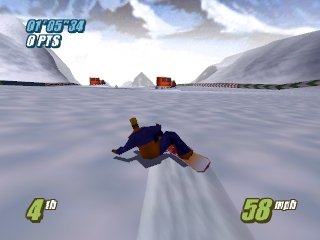
Twisted Edge – Extreme Snowboarding (USA)
0 1 4
Twisted Edge – Extreme Snowboarding (USA) is a classic Nintendo 64 game that captures the excitement of snowboarding competitions with a simple, arcade-style approach. If you enjoy fast-paced, skill-based sports games and have a fondness for retro gaming, this title provides an engaging experience you can play right in your browser. Its roots in the Nintendo 64 era add a nostalgic touch, combined with gameplay that’s easy to pick up but tough to master.
Getting Into Twisted Edge – Extreme Snowboarding
The game revolves around racing down snowy slopes, focusing on timed runs and skillful navigation. Your main aim is to finish courses quickly while performing tricks and dodging obstacles. There are different modes, like time trials and competitions, giving you options to prioritize speed or style. Usually, you select a course, pick your snowboarder, and then race against the clock or AI opponents.
The controls are straightforward yet responsive, making it easy for newcomers to get started while still offering depth for experienced players. As you play, you’ll unlock new courses and challenges, keeping things fresh. The game’s rhythm encourages quick thinking and precise movements, rewarding players who find the right balance between speed and control. Runs typically last a few minutes, making it perfect for quick sessions or longer matches.
Standout Features
The visuals in Twisted Edge – Extreme Snowboarding capture the late 90s Nintendo 64 style, with blocky but colorful environments and character models. The game highlights clear course layouts, so you can easily see your lines and plan your route. As you progress, you’ll encounter new slopes with features like jumps and banked turns that add variety and challenge. Unlocking new courses and customizing your snowboarder give a sense of progress and motivation.
Replay value comes from competing against your best times and scores. The mechanics are simple to learn, but mastering courses and executing tricks consistently takes practice. Its variety of courses and modes encourage multiple playthroughs, whether you’re trying to beat your fastest time or perfect a stylish run. Playing in your browser means instant access—you can jump into the action whenever you feel like it, no hassle involved.
Strategy and Tips
Getting comfortable with the game means understanding each course and timing your tricks for the most points. Here are some tips:
- Focus on staying in control during your descent rather than rushing blindly; this helps prevent crashes.
- Practice jumping and tricks to earn more points and add style to your runs.
- Learn each course’s features to plan your fastest route, spotting shortcuts or risky jumps.
- Use your boosts wisely; saving them for tricky sections can really make a difference.
- Adjust your stance and speed before entering difficult turns or obstacles to keep better control.
- Play through courses multiple times to learn the best lines and timing for jumps and speed.
Quick Questions
How do I get started if I’ve never played before?
Select a course and start racing—controls are intuitive and easy to grasp.
What is a common mistake for beginners?
Many try to go too fast early on, which often leads to crashes. Focusing on control helps improve your times.
Can I play Twisted Edge – Extreme Snowboarding on mobile or touch devices?
This version runs in your browser, optimized mostly for desktop and laptop browsers. Touch support depends on your device, but it’s mainly designed for mouse and keyboard use.
Twisted Edge – Extreme Snowboarding provides a straightforward, fun way to experience snowboarding from the Nintendo 64 era. Its instant browser play means you can jump into the action whenever you want, keeping that nostalgic vibe alive without any downloads.
Related games: you can also try Getter Love!! Cho Renai Party Game (Japan) and Decor Galore Slide, or browse all other games in the Nintendo 64 category.
How to Play Twisted Edge – Extreme Snowboarding (USA)?
Race down snowy slopes, perform tricks, and avoid obstacles to finish courses quickly or stylishly. Use precise timing to improve your times and unlock new challenges.
Game Controls
Arrow keys for movement; action buttons mapped to keyboard keys for tricks and jumps.
You may be interested in:
-
 Nintendo 64
♥ 3
Zool – Majuu Tsukai Densetsu (Japan)
Nintendo 64
♥ 3
Zool – Majuu Tsukai Densetsu (Japan) -
 Nintendo 64
♥ 3
Zero The Jackal 64
Nintendo 64
♥ 3
Zero The Jackal 64 -
 Nintendo 64
♥ 5
Zelda’s Birthday
Nintendo 64
♥ 5
Zelda’s Birthday -
 Nintendo 64
♥ 5
Zelda: The Sealed Palace 1.3
Nintendo 64
♥ 5
Zelda: The Sealed Palace 1.3 -
 Nintendo 64
♥ 6
Zelda Revival
Nintendo 64
♥ 6
Zelda Revival -
 Nintendo 64
♥ 3
Zelda Ocarina Of Time Indigo v0.1.10
Nintendo 64
♥ 3
Zelda Ocarina Of Time Indigo v0.1.10 -
 Nintendo 64
♥ 17
Zelda Ocarina Of Time Indigo v0.1.0
Nintendo 64
♥ 17
Zelda Ocarina Of Time Indigo v0.1.0 -
 Nintendo 64
♥ 10
Zelda Ocarina Of Time Indigo Chapter 2
Nintendo 64
♥ 10
Zelda Ocarina Of Time Indigo Chapter 2
Comments (0)
No comments yet. Be the first to comment!