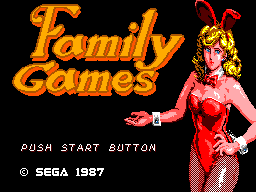
Family Games (Japan)
0 1 0
Family Games (Japan) is a classic Master System title featuring a collection of simple, quick-play activities suitable for players of all ages. As a nostalgic relic from the Sega days, it offers a straightforward experience that focuses on fun and accessibility rather than complexity. It’s easy to play directly in your browser, with no downloads or setup required — perfect for casual gaming or revisiting some of the early home console titles.
Getting Into Family Games
Family Games gathers a variety of mini-games that usually involve short, repeatable challenges. The gameplay typically involves selecting a game mode, playing for a few minutes, and then returning to the menu to pick another activity. Each game is designed to be easy to learn, with simple controls that test timing, accuracy, or quick reflexes. It’s ideal for quick bursts of fun or for players who prefer a relaxed pace.
Most sessions involve choosing from a handful of mini-games, each lasting only a few minutes. The structure encourages trying different activities in one sitting, which adds variety and encourages replay. Its casual design makes it suitable for players looking for light-hearted entertainment or a way to enjoy some friendly competition with friends or family. The straightforward nature makes it accessible for children and adults alike, especially those looking for a nostalgic or laid-back gaming experience.
Standout Features
The visuals are reminiscent of the 8-bit style typical of the Master System, with colorful pixel art that captures the era’s charm. Despite its simplicity, the game creates a playful atmosphere, with each mini-game featuring clear visuals that help players understand the goals quickly. The sound design is modest but effective, with cheerful music and sound effects that add to the light-hearted vibe.
The progression is simple: players aim for high scores or fast times within each activity, encouraging repeated tries. Its replay value comes from the variety of mini-games and the desire to beat personal bests or challenge friends. Since it’s quick and easy to access, it’s perfect for spontaneous fun and short sessions. The variety of modes also lets players find favorites or test their skills across different activities.
Strategy and Tips
Since Family Games is straightforward, focus on mastering the mechanics of each mini-game instead of overthinking. Pay attention to timing and precision, and try not to rush your attempts.
- Start with any tutorial or easy mode if available to learn the basics.
- Look for patterns or cues that can help improve your reaction times.
- Practice each mini-game to beat your best scores or times.
- Take short breaks between games to stay focused and avoid frustration.
- Playing with friends or family can add a fun competitive element.
- If you’re stuck, revisit the game and refine your technique rather than guessing randomly.
Quick Questions
Is Family Games easy for beginners?
Absolutely. Its simple mechanics and short mini-games make it accessible to players of all ages and skill levels.
How long does a typical session last?
Most mini-games only take a few minutes each, so a session can range from about 10 to 30 minutes, depending on how many activities you try.
Can I play Family Games on mobile or touch devices?
The browser version works smoothly on touch screens, making it easy to enjoy on tablets or smartphones without any extra setup.
Family Games provides a straightforward collection of family-friendly activities rooted in the Master System’s gaming era. Its quick, accessible gameplay makes it great for casual fun, whether alone or with others. The simple design and variety help keep it interesting enough to revisit, especially for those craving a nostalgic taste of early console gaming.
Related games: you can also try American Baseball (Europe) and Enduro Racer (Japan), or browse all other games in the Master System category.
How to Play Family Games (Japan)?
Choose a mini-game, follow the on-screen instructions, and try to beat your high score or complete the challenge as quickly as possible.
Game Controls
Arrow keys for movement, and action buttons mapped to keyboard keys for gameplay.
You may be interested in:
-
 Master System
♥ 6
Zool – Ninja of the ‘Nth’ Dimension (Europe)
Master System
♥ 6
Zool – Ninja of the ‘Nth’ Dimension (Europe) -
 Master System
♥ 2
Zillion II – The Tri Formation (World)
Master System
♥ 2
Zillion II – The Tri Formation (World) -
 Master System
♥ 3
Zillion (USA) (v1.1)
Master System
♥ 3
Zillion (USA) (v1.1) -
 Master System
♥ 1
Zillion (Japan, Europe) (En,Ja)
Master System
♥ 1
Zillion (Japan, Europe) (En,Ja) -
 Master System
♥ 1
Zillion (Europe) (v1.2)
Master System
♥ 1
Zillion (Europe) (v1.2) -
 Master System
♥ 1
Zaxxon 3-D (World) (Beta)
Master System
♥ 1
Zaxxon 3-D (World) (Beta) -
 Master System
♥ 1
Zaxxon 3-D (World)
Master System
♥ 1
Zaxxon 3-D (World) -
 Master System
♥ 1
Xenon 2 – Megablast (Europe) (Virgin)
Master System
♥ 1
Xenon 2 – Megablast (Europe) (Virgin)
Comments (0)
No comments yet. Be the first to comment!