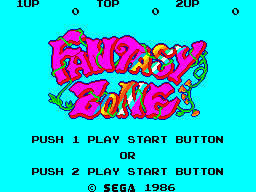
Fantasy Zone (World) (v1.1) (Beta)
0 2 0
Fantasy Zone (World) (v1.1) (Beta) is a classic Master System shoot ’em up that offers a vibrant, arcade-style experience right in your browser. The game captures the spirit of its genre with colorful visuals, straightforward gameplay, and a nostalgic feel from the Master System era. It’s designed for players who want quick, accessible action, providing a compact yet engaging challenge that fits well into short gaming sessions or casual play. Since it runs in your browser, there’s no need to download anything—just jump right in whenever you’re in the mood for some retro fun.
Why Fantasy Zone (World) Is Worth Playing
What sets Fantasy Zone (World) apart is its unique visual style. Bright, cartoonish sprites and lively backgrounds create an energetic atmosphere that’s instantly recognizable. The game has a playful, almost whimsical tone that stands out from more serious shooters. You control a small spaceship, dodging enemies and shooting colorful foes, which keeps the gameplay simple but challenging enough to stay interesting. The pacing encourages quick reflexes and strategic movement, making each attempt feel lively and rewarding.
Beyond its looks, this classic does well in providing a straightforward shoot ’em up experience. It’s easy to get into but difficult to master, with enemies and obstacles designed to test your timing and positioning. The levels are compact, and the gameplay isn’t overly complex, making it perfect for a few minutes of action or longer sessions if you want to beat your high score. The nostalgic sound effects and chiptune music add to the arcade vibe, making the overall experience lively and engaging. Its charm lies in its simplicity, so you can keep coming back without feeling overwhelmed.
Tips to Get Ahead
To get the most out of Fantasy Zone (World), a few simple strategies can help improve your gameplay:
- Focus on dodging enemy projectiles; staying alive is key to high scores.
- Use your shots wisely; save firepower for bigger enemies or bosses instead of wasting it on smaller foes.
- Learn enemy patterns; recognizing how enemies move helps you anticipate attacks and stay safe.
- Keep moving around; staying mobile makes it harder for enemies to trap you and eases dodging.
- Grab power-ups when you see them; they can boost your firepower and help you survive longer during tough moments.
- Be patient; rushing into enemies can lead to unnecessary hits, so take your time to plan your attacks.
Things to Know Before You Start
Question?
How difficult is Fantasy Zone (World) for newcomers?
The difficulty level is manageable, typical of Master System shooters, with quick respawns and simple mechanics. This makes it accessible for beginners but still fun for players who want to improve their skills.
Question?
How long does a typical game session last?
A run through the levels usually takes just a few minutes, making it great for quick breaks or casual play. You can also try to beat your high score or sharpen your skills over multiple tries.
Question?
Is Fantasy Zone (World) good for casual players?
Definitely. Its easy-to-understand gameplay, bright visuals, and instant browser access make it perfect for anyone looking for a quick, fun challenge without a steep learning curve or long commitments.
Jump into Fantasy Zone (World) and enjoy a lively, colorful shoot ’em up experience. Its simple gameplay and charming presentation make it a great pick for anyone wanting a quick retro fix, whether for a short break or a friendly high-score competition.
Related games: you can also try Desert Speedtrap Starring Road Runner and Wile E. Coyote (Europe) (En,Fr,De,Es,It) and Championship Hockey (Europe), or browse all other games in the Master System category.
How to Play Fantasy Zone (World) (v1.1) (Beta)?
Control your spaceship to shoot enemies and dodge projectiles across colorful levels, aiming for high scores by surviving longer and defeating tougher foes. Move constantly, collect power-ups, and learn enemy patterns.
Game Controls
Arrow keys act as the D-pad; fire and other actions are handled by on-screen keys or mapped keyboard buttons.
You may be interested in:
-
 Master System
♥ 6
Zool – Ninja of the ‘Nth’ Dimension (Europe)
Master System
♥ 6
Zool – Ninja of the ‘Nth’ Dimension (Europe) -
 Master System
♥ 2
Zillion II – The Tri Formation (World)
Master System
♥ 2
Zillion II – The Tri Formation (World) -
 Master System
♥ 3
Zillion (USA) (v1.1)
Master System
♥ 3
Zillion (USA) (v1.1) -
 Master System
♥ 1
Zillion (Japan, Europe) (En,Ja)
Master System
♥ 1
Zillion (Japan, Europe) (En,Ja) -
 Master System
♥ 1
Zillion (Europe) (v1.2)
Master System
♥ 1
Zillion (Europe) (v1.2) -
 Master System
♥ 1
Zaxxon 3-D (World) (Beta)
Master System
♥ 1
Zaxxon 3-D (World) (Beta) -
 Master System
♥ 1
Zaxxon 3-D (World)
Master System
♥ 1
Zaxxon 3-D (World) -
 Master System
♥ 1
Xenon 2 – Megablast (Europe) (Virgin)
Master System
♥ 1
Xenon 2 – Megablast (Europe) (Virgin)
Comments (0)
No comments yet. Be the first to comment!