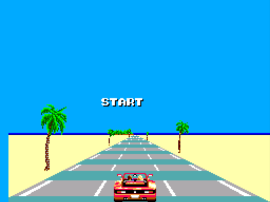
Out Run (World)
0 6 0
Out Run (World) is a beloved Master System game that captures the thrill of arcade-style driving and racing. Originally released in the 1980s, it offers a straightforward yet addictive experience that appeals to fans of action and racing. Playing it on this browser-based emulator gives a nostalgic feel for those who want to enjoy a vintage racing game without any complicated setup.
Getting Into Out Run
The main gameplay involves steering a sports car along scenic roads, aiming to reach checkpoints before time runs out. The game features a branching route system, meaning your choices at intersections influence the next part of the track. This adds some variation to each run. You can pick different routes, which encourages trying out various paths to see which feels best or fastest.
During a session, you control the car, dodging obstacles and other vehicles while keeping your speed steady. The game is designed for quick, arcade-style play — there are no complicated mechanics or long menus. You might find yourself trying to beat your high scores or simply enjoying the rush of weaving through curves and overtaking opponents. Its simple design makes it accessible for newcomers, but learning the best timing and routes can add challenge for experienced players.
Standout Features
Out Run’s visuals are simple but effective, capturing the spirit of 1980s arcade racing. The backgrounds show beaches, mountains, and cityscapes that change as you take different routes. These scenic touches give the game a lively, energetic feel, even with the Master System’s limited hardware. The smooth scrolling and bright, distinct sprites make each run visually appealing.
Replay value comes from the branching paths and time-based challenges. Since you can choose different routes each time, it encourages multiple attempts to improve your route choices and overall time. Each run is quick, lasting just a few minutes, making it great for short gaming sessions. The focus on high scores and route exploration keeps players coming back to improve or try new paths.
Strategy and Tips
To get the most out of Out Run, try timing your acceleration and braking carefully. Keeping a steady speed helps you navigate curves better. Keep an eye on the road ahead to spot obstacles early and decide the best route at intersections.
- Pick routes that seem less crowded or have gentler turns for a safer, faster run.
- Use the accelerator cautiously on corners to avoid losing control or crashing.
- Focus on maintaining your speed rather than braking unnecessarily — staying fast helps improve your time.
- Experiment with different routes to find what suits your driving style best.
- Watch the timer closely and plan your route to reach checkpoints on time.
Quick Questions
How do I start a game on this browser emulator?
Just press start or the key assigned to begin once the game loads — no extra setup needed.
What’s a common mistake for beginners?
Many new players brake too much on turns, slowing down and losing seconds. Try to keep your speed steady through curves.
Does it work well on mobile or touch devices?
Since the game runs right in your browser, it responds to touch controls, but steering might be a bit trickier than with a controller or keyboard.
Playing Out Run here makes it easy to enjoy a classic racing game that’s simple to pick up but fun to master. Its focus on route choices and timing keeps each run fresh, perfect for quick sessions or nostalgic afternoons.
Related games: you can also try Aleste (Japan) and Martlet's Fun Adventure! Demo, or browse all other games in the Master System category.
How to Play Out Run (World)?
Drive along scenic roads, choose routes at intersections, and avoid obstacles while trying to reach checkpoints before time runs out. Focus on steady acceleration and quick decisions to improve your score.
Game Controls
Arrow keys control steering; other keys handle acceleration and braking.
You may be interested in:
-
 Master System
♥ 6
Zool – Ninja of the ‘Nth’ Dimension (Europe)
Master System
♥ 6
Zool – Ninja of the ‘Nth’ Dimension (Europe) -
 Master System
♥ 2
Zillion II – The Tri Formation (World)
Master System
♥ 2
Zillion II – The Tri Formation (World) -
 Master System
♥ 3
Zillion (USA) (v1.1)
Master System
♥ 3
Zillion (USA) (v1.1) -
 Master System
♥ 1
Zillion (Japan, Europe) (En,Ja)
Master System
♥ 1
Zillion (Japan, Europe) (En,Ja) -
 Master System
♥ 1
Zillion (Europe) (v1.2)
Master System
♥ 1
Zillion (Europe) (v1.2) -
 Master System
♥ 1
Zaxxon 3-D (World) (Beta)
Master System
♥ 1
Zaxxon 3-D (World) (Beta) -
 Master System
♥ 1
Zaxxon 3-D (World)
Master System
♥ 1
Zaxxon 3-D (World) -
 Master System
♥ 1
Xenon 2 – Megablast (Europe) (Virgin)
Master System
♥ 1
Xenon 2 – Megablast (Europe) (Virgin)
Comments (0)
No comments yet. Be the first to comment!