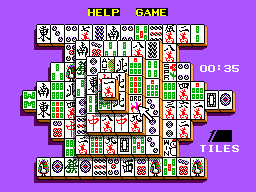
Shanghai (USA, Europe)
0 1 0
Shanghai (USA, Europe) is a classic Master System puzzle and strategy game that tasks players with matching pairs of tiles across different levels. Originating from the era of 8-bit home consoles, it features simple mechanics that focus on pattern recognition and planning. Its straightforward design has helped it stay popular among fans of puzzle games, and many players enjoy it through browser-based emulation here.
Shanghai: Gameplay Overview
The main idea is to remove pairs of identical tiles from a layered layout. Each stage offers a different setup, with tiles stacked and overlapping in ways that require careful observation. To match tiles, they need to be free on at least one side and not blocked by other tiles. Some modes add a timer or move limit, which pushes for quick decisions, but there’s also an option to play at a relaxed pace for casual solving.
As you remove tiles, new options often appear, making it a game of planning ahead. The interface displays the layout clearly, with clickable tiles easily visible. Its visual style is minimal, featuring colorful tiles that are easy to distinguish. The main gameplay involves selecting pairs, clearing them, and tackling more complex layouts that test memory and spatial skills.
Modes, Levels and Progression
Instead of a traditional level system, Shanghai presents a series of puzzles with different arrangements. As you progress, puzzles become more intricate, requiring better planning. There are no storylines or character choices—just a focus on completing each puzzle efficiently. The game encourages replay, with each new puzzle offering a fresh challenge to sharpen your speed and accuracy.
The variety in tile patterns and layering guarantees that each session feels different. Some versions include timed or limited-move challenges to add extra difficulty for seasoned players. Its simplicity makes it accessible for players of all ages, while the increasing complexity keeps things interesting over time.
Winning Strategies
Focus on finding pairs that unlock the most options. Clearing tiles from the middle can often open up more matches, and paying attention to layers—like removing top or edge tiles—can reveal new possibilities. Working systematically from one side to the other helps avoid missing accessible pairs. If you’re playing with a move limit, planning several steps ahead can make a big difference. Taking your time in casual play allows for better analysis and less chance of dead ends.
- Try to clear central tiles early, as they tend to block more options.
- Keep an eye on layers—removing top or edge tiles can open up new matches.
- Work methodically across the layout to avoid missing available pairs.
- If moves are limited, strategize to conserve them by thinking ahead.
- In casual mode, take your time to analyze before making matches.
Common Questions About Shanghai
How does the difficulty change as I go?
Later puzzles tend to be more layered and overlapped, requiring better planning and memory, especially if you’re playing with a timer or move restrictions.
Are there different modes or just puzzles?
The main focus is on completing puzzles, though some versions include timed or limited-move challenges. The core gameplay stays consistent regardless of the mode.
How long does a typical game take?
Each puzzle can take anywhere from less than a minute to several minutes, depending on difficulty and your experience. Replaying puzzles or trying to beat your best times adds a layer of replayability, whether you want quick sessions or longer ones.
Playing Shanghai here gives quick access to a timeless puzzle experience. Its simple mechanics and gradually increasing difficulty keep players engaged, whether you’re just starting out or a seasoned puzzle fan.
Related games: you can also try Castelo Ra-Tim-Bum (Brazil) and American Pro Football (Europe), or browse all other games in the Master System category.
How to Play Shanghai (USA, Europe)?
Match and remove pairs of identical tiles that are free on at least one side, clearing the layout layer by layer. Plan your moves to avoid dead ends and complete each puzzle efficiently.
Game Controls
Arrow keys move the cursor; Enter selects tiles; spacebar confirms matches.
You may be interested in:
-
 Master System
♥ 6
Zool – Ninja of the ‘Nth’ Dimension (Europe)
Master System
♥ 6
Zool – Ninja of the ‘Nth’ Dimension (Europe) -
 Master System
♥ 2
Zillion II – The Tri Formation (World)
Master System
♥ 2
Zillion II – The Tri Formation (World) -
 Master System
♥ 3
Zillion (USA) (v1.1)
Master System
♥ 3
Zillion (USA) (v1.1) -
 Master System
♥ 1
Zillion (Japan, Europe) (En,Ja)
Master System
♥ 1
Zillion (Japan, Europe) (En,Ja) -
 Master System
♥ 1
Zillion (Europe) (v1.2)
Master System
♥ 1
Zillion (Europe) (v1.2) -
 Master System
♥ 1
Zaxxon 3-D (World) (Beta)
Master System
♥ 1
Zaxxon 3-D (World) (Beta) -
 Master System
♥ 1
Zaxxon 3-D (World)
Master System
♥ 1
Zaxxon 3-D (World) -
 Master System
♥ 1
Xenon 2 – Megablast (Europe) (Virgin)
Master System
♥ 1
Xenon 2 – Megablast (Europe) (Virgin)
Comments (0)
No comments yet. Be the first to comment!