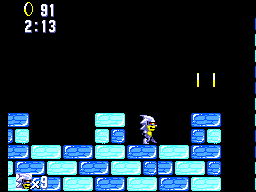
Silver Sonic The Crystal Islands Easy Mode
0 4 0
Silver Sonic The Crystal Islands Easy Mode is a classic Master System game that runs right in your browser, so you can try it out without downloading anything. It’s designed to be accessible for players of all skill levels, especially those just starting with retro games or looking for a relaxed experience. The controls are simple, and the objectives are clear, making it a good entry into the platform genre from the early 80s.
What Is Silver Sonic The Crystal Islands Easy Mode?
This game is a platformer from the Master System era, where you navigate through levels set on the mysterious Crystal Islands. The focus is on exploring, avoiding hazards, and reaching the end of each stage. Its gameplay is rooted in straightforward, arcade-style mechanics of that time. The design makes it easy for players of all ages to enjoy.
It features a classic side-scrolling setup, with a character moving through colorful environments, jumping over obstacles, and dodging enemies. The goal is to finish levels efficiently, sometimes collecting items or avoiding dangers based on the level’s layout. The pacing is steady, and the difficulty is balanced to be gentle, especially in easy mode, to keep frustration low and encourage exploration.
What Keeps You Coming Back
Part of the appeal is how forgiving the difficulty is, letting players enjoy the platforming without too many setbacks. The level design emphasizes clear paths and simple mechanics, so it’s easy to pick up and play again and again. The visuals and sounds reflect the Master System style, giving a nostalgic feel while remaining charming and approachable.
Replayability comes from mastering levels, beating your personal bests, and trying different routes. The structure encourages players to improve timing and movement, making each session engaging without feeling overwhelming. Its straightforward gameplay makes it suitable for quick play sessions or longer ones, offering a relaxing yet satisfying experience.
Handy Tips
If you want to get the most out of Silver Sonic The Crystal Islands Easy Mode, keep these tips in mind:
- Try to time your jumps carefully to avoid falling or hitting hazards.
- Explore each level at a steady pace—rushing can cause mistakes.
- Look for hidden paths or shortcuts to finish levels faster.
- Practice your movements to react more quickly to enemies.
- Use easy mode to get familiar with level layouts before trying more difficult modes.
- Replay levels to improve your score or complete objectives more efficiently.
Player FAQ
Is Silver Sonic The Crystal Islands Easy Mode good for young children?
Yes, the simple controls and gentle difficulty make it suitable for younger players and beginners. The easy mode helps reduce frustration, making it a good starting point for kids learning the basics of platforming.
Can I play Silver Sonic The Crystal Islands Easy Mode offline or on different devices?
This version runs right on the website, so once it loads, you can play without an internet connection. It’s easy to access on both desktop and mobile browsers, with no downloads needed.
Is it easy to learn and complete Silver Sonic The Crystal Islands Easy Mode?
Absolutely. The design focuses on accessibility, so players with little or no experience can enjoy finishing levels without too much difficulty or complex mechanics.
Silver Sonic The Crystal Islands Easy Mode offers a simple platforming experience that captures the style of the Master System. Its approachable gameplay makes it a good pick for casual players, newcomers, or anyone looking for a nostalgic trip with minimal challenge.
Related games: you can also try Ferias Frustradas do Pica Pau (Brazil) and F-16 Fighting Falcon (Japan), or browse all other games in the Master System category.
How to Play Silver Sonic The Crystal Islands Easy Mode?
Move your character across the levels, jump over obstacles, and avoid enemies to reach the end of each stage. Explore, collect items, and practice timing to improve your progress.
Game Controls
Arrow keys control movement; a dedicated button is used for jumping and actions.
You may be interested in:
-
 Master System
♥ 6
Zool – Ninja of the ‘Nth’ Dimension (Europe)
Master System
♥ 6
Zool – Ninja of the ‘Nth’ Dimension (Europe) -
 Master System
♥ 2
Zillion II – The Tri Formation (World)
Master System
♥ 2
Zillion II – The Tri Formation (World) -
 Master System
♥ 3
Zillion (USA) (v1.1)
Master System
♥ 3
Zillion (USA) (v1.1) -
 Master System
♥ 1
Zillion (Japan, Europe) (En,Ja)
Master System
♥ 1
Zillion (Japan, Europe) (En,Ja) -
 Master System
♥ 1
Zillion (Europe) (v1.2)
Master System
♥ 1
Zillion (Europe) (v1.2) -
 Master System
♥ 1
Zaxxon 3-D (World) (Beta)
Master System
♥ 1
Zaxxon 3-D (World) (Beta) -
 Master System
♥ 1
Zaxxon 3-D (World)
Master System
♥ 1
Zaxxon 3-D (World) -
 Master System
♥ 1
Xenon 2 – Megablast (Europe) (Virgin)
Master System
♥ 1
Xenon 2 – Megablast (Europe) (Virgin)
Comments (0)
No comments yet. Be the first to comment!