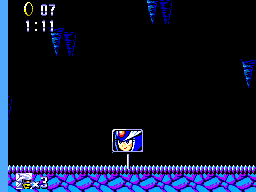
Silver Sonic The Crystal Islands Refreshed
0 2 1
Silver Sonic The Crystal Islands Refreshed is a classic Master System game that runs right in your browser, giving you a simple and fun action experience from the 8-bit days. If you enjoy vintage platformers, this game offers a nostalgic look at the straightforward design and challenge typical of early console titles. It feels familiar but fresh, making it accessible for newcomers and satisfying for longtime fans of the Master System’s library.
Getting Into Silver Sonic The Crystal Islands Refreshed
The game involves moving through a series of levels on the Crystal Islands, dodging obstacles and enemies along the way. The main gameplay focuses on running, jumping, and avoiding hazards as you move from one platform to the next. It’s built for single players, with each run consisting of completing levels or sections while trying to beat your best time or score.
The game runs smoothly in your browser, with controls similar to the original Master System setup. Play sessions are short and focused, testing your reflexes and timing. Progress is simple: clear each level to move forward, with increasing difficulty as layouts become more complex and enemies faster. There aren’t elaborate storylines or modes, just tight, responsive gameplay that’s easy to pick up but tough to master.
Standout Features
The visuals stay true to the original Master System style, with pixel-perfect graphics, bright colors, simple sprites, and clear level design. It’s easy to see hazards and objectives at a glance. The game encourages learning enemy patterns and improving your timing through its progression and scoring system. Many players come back to beat their best scores or find more efficient routes on each run. Its quick, bite-sized levels make for good short sessions, and mastering each one can take some practice. The mechanics are straightforward, without complex stories, making it suitable for all ages and casual play.
Strategy and Tips
Getting the best out of Silver Sonic The Crystal Islands Refreshed involves paying attention to timing and recognizing patterns. Here are some helpful tips:
- Watch enemy movements and avoid them rather than trying to fight or outrun them.
- Make quick, precise jumps to navigate difficult sections smoothly.
- Take your time on unfamiliar areas to observe hazards before rushing through.
- Use small, controlled movements to prevent overreacting and mistakes.
- Practice levels repeatedly to memorize layouts and improve your reaction time.
Quick Questions
How do I start playing Silver Sonic The Crystal Islands Refreshed?
The game loads instantly in your browser. Once the level begins, use your keyboard or connected controls to navigate. Just click to start.
What’s a common mistake new players make?
Many rush through levels without paying attention to enemy patterns, leading to unnecessary hits. Taking a moment to observe can really help improve your success rate.
Can I play this comfortably on a mobile device or touchscreen?
Yes, since it runs directly in the browser, you can play on mobile browsers. Touch controls might work, but using a keyboard or external controller usually gives a better experience.
Silver Sonic The Crystal Islands Refreshed offers a straightforward, nostalgic challenge that’s easy to get into but hard to master. Its pixel art, simple mechanics, and focus on timing make it a good choice for quick play or practicing platforming skills. Playing this Master System classic in your browser keeps things simple and immediate, making it a fun throwback for both retro gamers and newcomers alike.
Related games: you can also try Great Tennis (Japan) and Lucky Dime Caper Starring Donald Duck, The (Europe) (Beta), or browse all other games in the Master System category.
How to Play Silver Sonic The Crystal Islands Refreshed?
Move through levels by running and jumping to avoid enemies and obstacles, completing each stage as quickly as possible. Focus on timing and pattern recognition to improve your score.
Game Controls
Arrow keys act as the D-pad; Start and action buttons are mapped to on-screen keys.
You may be interested in:
-
 Master System
♥ 6
Zool – Ninja of the ‘Nth’ Dimension (Europe)
Master System
♥ 6
Zool – Ninja of the ‘Nth’ Dimension (Europe) -
 Master System
♥ 2
Zillion II – The Tri Formation (World)
Master System
♥ 2
Zillion II – The Tri Formation (World) -
 Master System
♥ 3
Zillion (USA) (v1.1)
Master System
♥ 3
Zillion (USA) (v1.1) -
 Master System
♥ 1
Zillion (Japan, Europe) (En,Ja)
Master System
♥ 1
Zillion (Japan, Europe) (En,Ja) -
 Master System
♥ 1
Zillion (Europe) (v1.2)
Master System
♥ 1
Zillion (Europe) (v1.2) -
 Master System
♥ 1
Zaxxon 3-D (World) (Beta)
Master System
♥ 1
Zaxxon 3-D (World) (Beta) -
 Master System
♥ 1
Zaxxon 3-D (World)
Master System
♥ 1
Zaxxon 3-D (World) -
 Master System
♥ 1
Xenon 2 – Megablast (Europe) (Virgin)
Master System
♥ 1
Xenon 2 – Megablast (Europe) (Virgin)
Comments (0)
No comments yet. Be the first to comment!