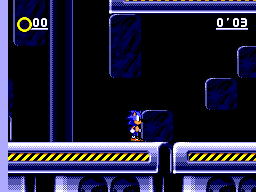
Sonic Eclipse Demo
0 6 1
Sonic Eclipse Demo is a classic Master System game that runs directly in your browser, offering a nostalgic look back at the console’s era. Designed to be simple to pick up and play, it appeals to both newcomers and seasoned players who want a quick, straightforward gaming session. This demo captures the spirit of the original Master System titles, making it a good choice for fans of retro gaming or those curious about early console titles.
What Is Sonic Eclipse Demo?
This game is a platformer, focusing on running, jumping, and navigating through straightforward levels. Its main goal is to move through stages by avoiding obstacles and completing basic challenges, providing an easy-to-understand experience. The gameplay emphasizes timing and reflexes, making it accessible for players of all ages.
Sonic Eclipse Demo features a side-scrolling format where you control a character moving along a linear path. Its design echoes early 8-bit platformers, with pixel art visuals and a chiptune soundtrack that bring back the sounds of the Master System. As a demo, it offers a quick taste of what a full game might be, with short sessions and controls that are easy to pick up without any prior experience.
What Keeps You Coming Back
One reason to revisit Sonic Eclipse Demo is its tight gameplay loop. The simple mechanics encourage players to improve their timing and reflexes with each run, making it satisfying to beat your previous scores or finish levels faster. The pixel art and soundtrack also offer a nostalgic charm that appeals to fans of early 80s and 90s games.
Replayability comes from the game’s straightforward challenge and short length. It’s great for quick sessions, whether you want to test your skills or just enjoy some retro action. The demo doesn’t overwhelm with complexity, so you can focus on mastering the mechanics or simply having fun exploring the levels again and again. Its browser-based setup means you can jump into a game instantly, making it perfect for quick gaming breaks.
Handy Tips
To get the most out of Sonic Eclipse Demo, try timing your jumps carefully to avoid obstacles. Patience and rhythm can help you go further in each run.
- Practice your timing to jump over or around hazards more smoothly.
- Memorize level patterns to improve your reaction time.
- Take your time: rushing can lead to mistakes in tricky spots.
- Restart often to beat your high score or finish levels quicker.
- Adjust your browser window size for better visibility of the gameplay area.
- Listen to the soundtrack for hints that can help you anticipate upcoming challenges.
Player FAQ
Is Sonic Eclipse Demo suitable for younger players?
Yes, its simple controls and straightforward gameplay make it accessible for children and beginners interested in retro platformers. There are no complicated mechanics or mature themes.
Can I play Sonic Eclipse Demo offline or on any device?
This demo runs directly in your browser, so you only need an internet connection initially. It works on most devices with a modern browser, including PCs, tablets, and smartphones, with no downloads necessary.
Is Sonic Eclipse Demo easy to pick up for new players?
Absolutely. Its simple controls, short levels, and clear goals make it great for newcomers to retro games or those new to platformers. It’s designed for quick, intuitive fun without a steep learning curve.
Playing Sonic Eclipse Demo offers a quick taste of Master System-style platforming, perfect for short gaming sessions. Its browser-based nature makes it easy to access and enjoy anytime, offering a fun way to revisit vintage gaming.
Related games: you can also try Ninja Gaiden (Europe) (Beta) and Phantasy Star (Korea), or browse all other games in the Master System category.
How to Play Sonic Eclipse Demo?
Run, jump, and avoid obstacles to progress through levels. Improve your timing and reflexes with each attempt to beat your high score or complete stages quickly.
Game Controls
Arrow keys control movement; action buttons are mapped to keyboard keys for jumping and other actions.
You may be interested in:
-
 Master System
♥ 6
Zool – Ninja of the ‘Nth’ Dimension (Europe)
Master System
♥ 6
Zool – Ninja of the ‘Nth’ Dimension (Europe) -
 Master System
♥ 2
Zillion II – The Tri Formation (World)
Master System
♥ 2
Zillion II – The Tri Formation (World) -
 Master System
♥ 3
Zillion (USA) (v1.1)
Master System
♥ 3
Zillion (USA) (v1.1) -
 Master System
♥ 1
Zillion (Japan, Europe) (En,Ja)
Master System
♥ 1
Zillion (Japan, Europe) (En,Ja) -
 Master System
♥ 1
Zillion (Europe) (v1.2)
Master System
♥ 1
Zillion (Europe) (v1.2) -
 Master System
♥ 1
Zaxxon 3-D (World) (Beta)
Master System
♥ 1
Zaxxon 3-D (World) (Beta) -
 Master System
♥ 1
Zaxxon 3-D (World)
Master System
♥ 1
Zaxxon 3-D (World) -
 Master System
♥ 1
Xenon 2 – Megablast (Europe) (Virgin)
Master System
♥ 1
Xenon 2 – Megablast (Europe) (Virgin)
Comments (0)
No comments yet. Be the first to comment!