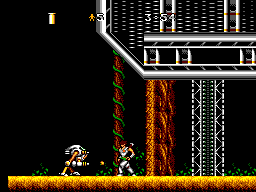
Strider II (Europe)
0 1 0
Strider II (Europe) is a well-loved Master System game that captures the essence of platformers on this 8-bit console. Known for its quick-paced action and tight controls, it provides a challenge rooted in arcade-style gameplay. As a side-scrolling platformer, it requires fast reactions and strategic movement, standing out for its fluid gameplay and simple mechanics.
Strider II: Gameplay Overview
The game involves moving through levels filled with enemies, obstacles, and platforming puzzles. The main actions include running, jumping, and attacking to defeat enemies and advance. The controls are responsive, letting players perform swift maneuvers needed to dodge hazards and enemy attacks. While it doesn’t have complex weapons or power-ups, its focus on timing and accuracy makes each level a test of skill.
Levels tend to be straightforward but offer enough variation to keep things interesting. Players need to master jumping gaps, avoiding enemy fire, and timing their attacks. The difficulty gradually increases, introducing more enemies and tricky platform sections as you progress. Its emphasis on fluid movement and quick reflexes fits the classic platformer style of its time, providing a fair but challenging experience.
Levels, Modes, and Progression
This game from the Master System era features a series of levels that grow more complex and tough as you go. Each stage offers a new setting and layout, with enemies and hazards that require different strategies. While there aren’t multiple modes or branching paths, the game’s flow encourages players to improve with each try.
The design centers on a single-player experience, moving straight from start to finish. Different backgrounds and obstacle setups keep things fresh. Beating each stage often involves overcoming difficult sections through precise timing and pattern recognition. Playing again helps you learn enemy placements and improve your skills, making repeated attempts rewarding.
Winning Strategies
To do well, focus on quick reactions and memorizing enemy behavior. Position yourself carefully to avoid unnecessary damage, and time your attacks for maximum effect.
- Watch enemy movement patterns to predict attacks and counter them.
- Jump at the right moments to dodge ground hazards and reach higher platforms.
- Keep up your momentum; stopping often can leave you open to enemy fire.
- Practice your timing for jumps and attacks, especially in tricky sections.
- Monitor your health and avoid taking risks in tough spots.
- Replay levels to memorize enemy placements and refine your approach.
Common Questions About Strider II
How does the difficulty change as I go forward?
It gets tougher gradually, with more enemies and more complex platforming sections, requiring quicker reflexes and better timing as you advance.
Are there different modes or difficulty settings?
This version mainly offers a single experience — progressing through levels in order without multiple modes or adjustable difficulties.
How much replay value does the game offer?
Since levels are linear and focus on challenge, replaying helps sharpen your skills, score higher, and memorize enemy patterns, making it fun for players who enjoy improving with each try.
Playing Strider II here gives quick access to an authentic Master System game, without needing extra setups. Its straightforward design and tough gameplay make it a memorable piece of the console’s library. Fans of classic platformers can enjoy a solid dose of nostalgic action right in their browser.
Related games: you can also try Global Defense (USA, Europe) and Fantasy Zone II – Opa-Opa no Namida (Japan), or browse all other games in the Master System category.
How to Play Strider II (Europe)?
Move through levels, avoid enemies and hazards, jump over gaps, and attack to defeat foes. Complete each stage by reaching the end while improving your timing and reflexes.
Game Controls
Arrow keys act as the D-pad; Enter is Start; on-screen mapped keys handle the action buttons.
You may be interested in:
-
 Master System
♥ 6
Zool – Ninja of the ‘Nth’ Dimension (Europe)
Master System
♥ 6
Zool – Ninja of the ‘Nth’ Dimension (Europe) -
 Master System
♥ 2
Zillion II – The Tri Formation (World)
Master System
♥ 2
Zillion II – The Tri Formation (World) -
 Master System
♥ 3
Zillion (USA) (v1.1)
Master System
♥ 3
Zillion (USA) (v1.1) -
 Master System
♥ 1
Zillion (Japan, Europe) (En,Ja)
Master System
♥ 1
Zillion (Japan, Europe) (En,Ja) -
 Master System
♥ 1
Zillion (Europe) (v1.2)
Master System
♥ 1
Zillion (Europe) (v1.2) -
 Master System
♥ 1
Zaxxon 3-D (World) (Beta)
Master System
♥ 1
Zaxxon 3-D (World) (Beta) -
 Master System
♥ 1
Zaxxon 3-D (World)
Master System
♥ 1
Zaxxon 3-D (World) -
 Master System
♥ 1
Xenon 2 – Megablast (Europe) (Virgin)
Master System
♥ 1
Xenon 2 – Megablast (Europe) (Virgin)
Comments (0)
No comments yet. Be the first to comment!