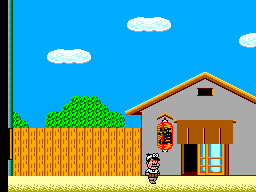
Tensai Bakabon (Japan)
0 2 0
Tensai Bakabon (Japan) is a classic Master System game that mixes action and adventure in a quirky pixel-art style. It’s perfect for players who enjoy straightforward gameplay with a nostalgic touch from the 8-bit era. Since it runs directly in your browser, you can enjoy this vintage title without downloads or setup, making it a quick option for fans of retro gaming.
Getting Into Tensai Bakabon
The gameplay centers on exploring environments and completing simple tasks or challenges in an action-adventure format. You control a character moving through various scenes, focusing on movement, interaction, and timing. The mechanics are straightforward, so it’s easy for newcomers and casual players to pick up. Levels or screens change frequently, each with its own layout or challenge.
Along the way, you’ll face different scenarios that test your reflexes or problem-solving skills, depending on the level. The game is designed for short sessions, often lasting just a few minutes, but mastering the timing and patterns of your actions adds a layer of challenge. Its simple design helps you jump in quickly and enjoy the playful style or try to improve your performance over multiple attempts.
Standout Features
Visually, Tensai Bakabon reflects the charm of early Master System titles with colorful pixel art and clear sprite design. The graphics evoke nostalgia while remaining easy to interpret during fast-paced moments. The animation is smooth enough to keep gameplay fluid, even on a browser emulator, maintaining that vintage feel without sacrificing performance.
Progression depends on completing scenes or levels, each with its own layout and objectives. You might replay to beat your scores or finish levels more efficiently. Its simple design makes it accessible, but the challenge stays engaging enough to encourage trying again. Many players revisit it to improve their times or try different approaches to challenges.
Strategy and Tips
Getting the most out of Tensai Bakabon involves timing your actions well and recognizing patterns in the game. Here are some tips:
- Start slow to learn the controls and scene layouts before rushing through levels.
- Watch for visual cues that indicate when to act, like character animations or environmental signals.
- Practice timing to avoid mistakes, especially in sections that need quick reactions.
- Focus on completing levels efficiently to improve your score.
- If stuck, try different approaches to overcome challenges.
- Use retries to learn enemy and obstacle patterns, which helps you plan your moves better.
Quick Questions
Is Tensai Bakabon easy for beginners?
Yes, its simple controls and clear objectives make it accessible for new players.
How long does a typical session last?
Most play sessions are just a few minutes, but you might spend extra time trying to improve your route or score.
Can I play Tensai Bakabon on a mobile device?
Since it runs in your browser, it works well on smartphones and tablets without extra setup.
What’s a common mistake for beginners?
Trying to rush through levels without learning the patterns often leads to mistakes and frustration.
Closing
Overall, Tensai Bakabon offers a compact and fun experience rooted in the legacy of the Master System. Its simple mechanics and nostalgic visuals make it a good choice for fans of classic action-adventure games. Playing it gives a glimpse into early console design, with enough challenge to keep you coming back. It shows how a straightforward idea can still deliver engaging gameplay with a bit of charm and clarity.
Related games: you can also try Enduro Racer (USA, Europe) and Alex Kidd no Miracle World (Japan), or browse all other games in the Master System category.
How to Play Tensai Bakabon (Japan)?
Move your character through scenes, complete tasks, and avoid mistakes by timing your actions well. Aim to finish levels efficiently and improve your score with each attempt.
Game Controls
Arrow keys control movement; other keys handle actions and interactions.
You may be interested in:
-
 Master System
♥ 6
Zool – Ninja of the ‘Nth’ Dimension (Europe)
Master System
♥ 6
Zool – Ninja of the ‘Nth’ Dimension (Europe) -
 Master System
♥ 2
Zillion II – The Tri Formation (World)
Master System
♥ 2
Zillion II – The Tri Formation (World) -
 Master System
♥ 3
Zillion (USA) (v1.1)
Master System
♥ 3
Zillion (USA) (v1.1) -
 Master System
♥ 1
Zillion (Japan, Europe) (En,Ja)
Master System
♥ 1
Zillion (Japan, Europe) (En,Ja) -
 Master System
♥ 1
Zillion (Europe) (v1.2)
Master System
♥ 1
Zillion (Europe) (v1.2) -
 Master System
♥ 1
Zaxxon 3-D (World) (Beta)
Master System
♥ 1
Zaxxon 3-D (World) (Beta) -
 Master System
♥ 1
Zaxxon 3-D (World)
Master System
♥ 1
Zaxxon 3-D (World) -
 Master System
♥ 1
Xenon 2 – Megablast (Europe) (Virgin)
Master System
♥ 1
Xenon 2 – Megablast (Europe) (Virgin)
Comments (0)
No comments yet. Be the first to comment!