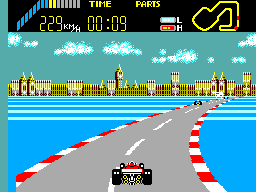
World Grand Prix (Europe)
0 1 0
World Grand Prix (Europe) is a classic Master System racing game that captures the thrill of high-speed competition on a simple, pixelated track. This vintage title from the 8-bit era offers a no-frills racing experience focused on speed, control, and arcade-style gameplay. Running directly in your browser on this site, it gives a nostalgic look back at the early days of racing games, when simplicity was key and every moment counted.
Step Into the World of World Grand Prix
From the moment the game loads, players see a bright, colorful screen that hints at the adrenaline ahead. The visuals lean on the characteristic pixel art of the Master System, with bold colors that make each track stand out and easy to follow. The sound design is minimal but punchy, with simple engine noises and electronic beeps that bring back that classic arcade feeling. The atmosphere is all about competition—fast-paced, focused, and driven by a desire to beat your best time or opponents.
The interface is straightforward: a top-down view of the track, with your car represented by a sprite you control with tight, responsive handling. While the graphics are simple compared to modern standards, they give a clear glimpse into early 80s racing. The focus is on quick sessions and immediate satisfaction, making it perfect for short bursts of play that still feel challenging and fun.
How the Gameplay Hooks You
World Grand Prix keeps players engaged with its brisk pace and simple progression. Races are short, usually just a few laps, requiring quick reflexes and precise steering. The game rewards mastering the controls and memorizing the track layout, encouraging repeated attempts to improve your best times. Its simplicity makes each race accessible but still challenging, especially when facing more aggressive AI opponents or racing against the clock.
The core loop revolves around improving your lap times and positioning, with each race feeling like a fresh challenge. As you go further, the difficulty gradually ramps up, pushing you to hone your skills. Without complex mechanics or gimmicks, every moment is dedicated to pure racing, keeping the tension high and the gameplay focused. It’s a game that asks for quick thinking and steady nerves—great for short sessions or when you want a pure adrenaline rush.
Pro Tips for World Grand Prix
To boost your chances of winning, focus on timing your acceleration and braking just right. Keeping your car stable through corners helps maintain speed.
- Learn each track’s layout so you can anticipate sharp turns and tricky sections.
- Practice smooth control rather than aggressive steering; sharp turns can slow you down.
- Take inside lines on corners to cut down lap times.
- Use quick acceleration after turns to regain speed faster.
- Watch the AI patterns—some opponents tend to brake or accelerate in predictable ways.
Frequently Asked Questions
Is World Grand Prix good for quick gaming sessions?
Absolutely. Its short races make it perfect for quick bursts, with each session lasting just a few minutes.
Does the game get repetitive over time?
While the gameplay is simple, beating your best times and mastering the tracks keeps it interesting and replayable.
Can I play this game offline or on mobile devices?
Since it runs directly in your browser here, it’s ready to play on any device with internet access, no downloads needed. It’s great for casual, quick play sessions.
World Grand Prix offers a straightforward racing experience rooted in the classic Master System style. Its simple gameplay and nostalgic visuals make it a compact but engaging challenge for racing fans and retro game enthusiasts alike.
Related games: you can also try Klax (Europe) and Wonder Boy III – The Dragon's Trap (USA, Europe), or browse all other games in the Master System category.
How to Play World Grand Prix (Europe)?
Race around the track as fast as possible, controlling your car with precise steering and timing your acceleration and braking to beat your best lap times or opponents.
Game Controls
Arrow keys act as the D-pad; Enter is Start; on-screen mapped keys handle the action buttons
You may be interested in:
-
 Master System
♥ 6
Zool – Ninja of the ‘Nth’ Dimension (Europe)
Master System
♥ 6
Zool – Ninja of the ‘Nth’ Dimension (Europe) -
 Master System
♥ 2
Zillion II – The Tri Formation (World)
Master System
♥ 2
Zillion II – The Tri Formation (World) -
 Master System
♥ 3
Zillion (USA) (v1.1)
Master System
♥ 3
Zillion (USA) (v1.1) -
 Master System
♥ 1
Zillion (Japan, Europe) (En,Ja)
Master System
♥ 1
Zillion (Japan, Europe) (En,Ja) -
 Master System
♥ 1
Zillion (Europe) (v1.2)
Master System
♥ 1
Zillion (Europe) (v1.2) -
 Master System
♥ 1
Zaxxon 3-D (World) (Beta)
Master System
♥ 1
Zaxxon 3-D (World) (Beta) -
 Master System
♥ 1
Zaxxon 3-D (World)
Master System
♥ 1
Zaxxon 3-D (World) -
 Master System
♥ 1
Xenon 2 – Megablast (Europe) (Virgin)
Master System
♥ 1
Xenon 2 – Megablast (Europe) (Virgin)
Comments (0)
No comments yet. Be the first to comment!