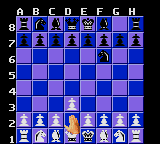
Chessmaster, The (USA, Europe)
0 3 0
Chessmaster, The (USA, Europe) is a classic Game Gear game that combines traditional chess strategy with straightforward digital presentation. As a digital version of the classic board game, it gives players the chance to practice and enjoy chess on a portable console from the early 1990s. Its focus on strategy and trivia elements makes it appealing to both casual players and chess enthusiasts looking for a simple, accessible experience.
Chessmaster, The: Gameplay Overview
The main gameplay involves standard chess moves, with players shifting pieces across an 8×8 board using the Game Gear’s controls. The game faithfully follows the rules of chess, including piece movement, castling, pawn promotion, and en passant. It features an AI opponent that changes its difficulty based on the selected level, offering a challenge for beginners and more seasoned players alike.
This version of Chessmaster, The emphasizes strategic thinking over flashy visuals, with a clean, minimalist interface. Players can analyze positions, undo moves, and review game history, supporting both learning and competitive play. The game runs in real-time, with the computer calculating its moves instantly, making for a smooth experience when played in your browser.
Modes, Levels and Progression
The game includes a single-player mode where players face off against the computer at different difficulty levels, usually from beginner to expert. The difficulty ramps up based on the AI’s analysis and strategic approach, encouraging players to improve gradually. While there aren’t multiple game modes beyond standard matches, the variation in difficulty offers enough depth to keep trying new strategies.
Though multiplayer isn’t part of the package, progressing through the difficulty levels motivates players to hone their skills and explore different tactics. The simplicity and focus on core chess mechanics mean players can spend time studying openings, practicing endgames, or just enjoying quick matches—all within a straightforward framework that supports learning and mastery.
Winning Strategies
Playing well in Chessmaster, The involves grasping key chess principles and adjusting to the AI’s style. Here are some helpful tips:
- Control the center early to gain space and influence.
- Develop your knights and bishops before moving the queen or rooks.
- Castle early to protect your king and connect your rooks.
- Keep an eye out for tactical threats like forks and pins, especially when the AI plays aggressively.
- Think ahead, considering how your opponent might respond before making a move.
- Use the undo feature to explore different move options and learn from mistakes.
Common Questions About Chessmaster, The
Does the difficulty level increase as I play?
Yes, the AI adjusts its strategic depth depending on the chosen difficulty, making the game more challenging as you improve.
Are there multiple game modes or just single matches?
This version mainly offers a single-player experience against the computer, with no additional modes like multiplayer or puzzles. Still, the variety in difficulty keeps things interesting.
How long does a typical game last?
Most games take anywhere from a few minutes up to about twenty, depending on your skill level and the difficulty setting. It’s suitable for quick sessions or longer practice runs.
Playing Chessmaster, The on this site provides a straightforward, authentic chess experience rooted in the classic Game Gear era. It’s a handy tool for practice and casual play, accessible directly in your browser without downloads or setup. This version keeps chessmaster, the, accessible and engaging for anyone looking for a simple but challenging digital chess environment.
Related games: you can also try Casino Funpak (USA) and Battletoads (Europe), or browse all other games in the Game Gear category.
How to Play Chessmaster, The (USA, Europe)?
Move pieces using the keyboard to play chess against an AI that adjusts difficulty. Aim to checkmate your opponent by controlling the board and planning your moves carefully.
Game Controls
Arrow keys move the cursor; Enter confirms selections and moves.
You may be interested in:
-
 Game Gear
♥ 2
Puzzle and Action Tanto-R (Japan)
Game Gear
♥ 2
Puzzle and Action Tanto-R (Japan) -
 Game Gear
♥ 2
Puyo Puyo 2 (Japan)
Game Gear
♥ 2
Puyo Puyo 2 (Japan) -
 Game Gear
♥ 3
Putt & Putter (USA, Europe)
Game Gear
♥ 3
Putt & Putter (USA, Europe) -
 Game Gear
♥ 1
Putt & Putter (Japan)
Game Gear
♥ 1
Putt & Putter (Japan) -
 Game Gear
♥ 1
Psychic World (USA, Europe) (v1.1)
Game Gear
♥ 1
Psychic World (USA, Europe) (v1.1) -
 Game Gear
♥ 1
Psychic World (USA, Europe)
Game Gear
♥ 1
Psychic World (USA, Europe) -
 Game Gear
♥ 1
Pro Yakyuu GG League (Japan)
Game Gear
♥ 1
Pro Yakyuu GG League (Japan) -
 Game Gear
♥ 1
Pro Yakyuu GG League ’94 (Japan)
Game Gear
♥ 1
Pro Yakyuu GG League ’94 (Japan)
Comments (0)
No comments yet. Be the first to comment!