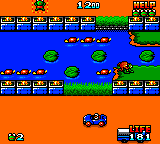
Frogger (USA) (Proto)
0 5 1
Frogger (USA) (Proto) is a vintage arcade challenge that now runs directly in your browser on this site. As a classic from the Game Gear era, it captures the feel of early 80s arcade gaming with its simple yet addictive mechanics. The game takes you into a pixelated world where timing and precision matter, giving you a taste of nostalgic gameplay that’s familiar but still fresh.
Step Into the World of Frogger
The visuals here reflect the modest but charming graphics of the original Game Gear version. Bright, blocky sprites show frogs, cars, logs, and obstacles, set against a plain background that keeps the focus on gameplay. The sound effects are basic chirps and beeps that evoke the arcade atmosphere, creating a rhythm that keeps you engaged without overwhelming your senses.
Playing this browser-based emulator gives you the chance to experience the classic arcade feel firsthand, with controls that respond quickly to your commands. The setting is simple: a busy highway, a rushing river, and a safe zone at the top. The goal remains to time your frog’s jumps across dangerous roads and streams, making every successful crossing feel like a small win in a quick-moving environment.
How the Gameplay Hooks You
The main gameplay loop is simple but compelling. As you guide your frog across moving vehicles and floating logs, the difficulty ramps up with each level, demanding better timing and focus. The pace is quick, encouraging short bursts of play that test your reflexes and decision-making. Success depends on your ability to recognize patterns and react fast, turning each crossing into a small puzzle that gets trickier as you go.
Progression feels natural; as you move forward, traffic and river hazards become more unpredictable. Getting immediate feedback—whether you make it or not—keeps the tension high. The mechanics are easy to pick up, but mastering the timing to rack up high scores and quick runs takes skill and patience, especially in longer sessions.
Pro Tips for Frogger
To get the most out of this classic, consider these tips:
- Observe traffic patterns carefully before moving; patience often beats rushing.
- Use logs and turtles as temporary platforms, but pay attention to how they move.
- Plan your route to avoid congested areas, especially as you head toward the safe zone.
- Stay calm after a mistake; quick recovery can help boost your score.
- Focus on consistency early on to develop better timing skills.
- Practice regularly—repetition helps you learn hazard patterns for smoother crossings.
Frequently Asked Questions
Does Frogger get repetitive after a while?
While the gameplay is simple, the increasing difficulty and pattern variations keep it engaging, especially for quick, skill-based sessions.
Can I pause or restart easily during a game?
Yes, you can restart quickly, making it easy to practice specific crossings or have short gaming sessions without hassle.
Is the game suitable for all ages?
Its straightforward mechanics and non-violent setting make it accessible to players of all ages, great for casual gaming.
Frogger continues to stand as a reminder of timeless arcade design, offering a crisp, responsive experience right in your browser. Its challenge lies in mastering simple mechanics that require quick reflexes, making it good for brief, focused play. Whether you’re revisiting an old favorite or trying it for the first time, this version of Frogger delivers a straightforward taste of vintage gaming.
Related games: you can also try Ax Battler – A Legend of Golden Axe (USA, Europe) (v2.4) and Chicago Syndicate (USA, Europe), or browse all other games in the Game Gear category.
How to Play Frogger (USA) (Proto)?
Guide your frog across roads and rivers by timing jumps carefully to reach the safe zone, avoiding vehicles and water hazards. Each level gets faster and more challenging, testing your reflexes and planning.
Game Controls
Arrow keys control movement; space or Enter to start or jump.
You may be interested in:
-
 Game Gear
♥ 2
Puzzle and Action Tanto-R (Japan)
Game Gear
♥ 2
Puzzle and Action Tanto-R (Japan) -
 Game Gear
♥ 2
Puyo Puyo 2 (Japan)
Game Gear
♥ 2
Puyo Puyo 2 (Japan) -
 Game Gear
♥ 3
Putt & Putter (USA, Europe)
Game Gear
♥ 3
Putt & Putter (USA, Europe) -
 Game Gear
♥ 1
Putt & Putter (Japan)
Game Gear
♥ 1
Putt & Putter (Japan) -
 Game Gear
♥ 1
Psychic World (USA, Europe) (v1.1)
Game Gear
♥ 1
Psychic World (USA, Europe) (v1.1) -
 Game Gear
♥ 1
Psychic World (USA, Europe)
Game Gear
♥ 1
Psychic World (USA, Europe) -
 Game Gear
♥ 1
Pro Yakyuu GG League (Japan)
Game Gear
♥ 1
Pro Yakyuu GG League (Japan) -
 Game Gear
♥ 1
Pro Yakyuu GG League ’94 (Japan)
Game Gear
♥ 1
Pro Yakyuu GG League ’94 (Japan)
Comments (0)
No comments yet. Be the first to comment!