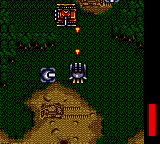
Griffin (Japan)
0 1 1
Griffin (Japan) is a classic Game Gear game emulated in the browser on this site, offering a piece of handheld gaming history right on your screen. As a game from the early 90s, it’s easy to pick up but still provides enough challenge to keep you interested. Playing it here requires no downloads or setup—just click and start enjoying some vintage gaming instantly.
What Is Griffin?
This game is a simple action platformer where players control a character moving through different levels. The main goal is to get past obstacles, enemies, and hazards to finish each stage. The gameplay emphasizes timing, accuracy, and quick reactions, typical of early handheld titles that focus on challenge rather than complexity. The controls are straightforward, making it accessible for players of all skill levels.
Griffin features a linear series of levels that test your agility and problem-solving abilities. It doesn’t have complex storylines or RPG elements; instead, it offers fast-paced gameplay with immediate feedback. Its design reflects the arcade-style approach of the time, where the goal is to complete levels efficiently while avoiding damage or failure. The simplicity and clear objectives make it easy for newcomers to pick up, yet it rewards those trying to beat their best times or high scores.
What Keeps You Coming Back
The game’s replay value comes from its straightforward yet tough mechanics. Each level has a different layout and enemy placement, encouraging players to memorize patterns or improve their reflexes. The scoring system motivates players to finish levels faster and with fewer mistakes, aiming for higher scores and quicker times. As you progress, the difficulty ramps up with more complex obstacles and enemy behaviors, keeping things interesting.
Griffin’s design supports short, focused gaming sessions. Since it’s easy to start a new game quickly, players often return to beat their previous runs or try different strategies. The nostalgic charm combined with tight controls makes it appealing for casual players and those looking for a quick challenge. Its simple gameplay loop means every attempt feels meaningful, giving you a chance to improve with each try.
Handy Tips
Getting the most out of Griffin is pretty straightforward—just a few pointers can help you last longer and rack up higher scores:
- Pay attention to timing your jumps to avoid traps and enemy patterns.
- Watch enemy movements and plan your route to avoid taking damage.
- Finish levels quickly to boost your score, but don’t rush—accuracy is more important than speed.
- Make small, controlled movements instead of panicking, especially in tight spots.
- Take breaks if you’re stuck; sometimes a fresh look can help you spot better routes or timing.
- Practice helps—repeating levels will improve your memory of enemy patterns and layouts.
Player FAQ
Is Griffin easy for beginners to pick up?
Yes, with simple controls and straightforward gameplay, it’s accessible to new players of all ages.
Can I play Griffin offline or on mobile devices?
This version runs right in your browser, so no internet connection is needed. It works well on both desktop and mobile browsers without extra downloads.
Is Griffin suitable for younger players?
Its simple mechanics and forgiving difficulty make it a good choice for kids, although some levels might require patience and quick reactions.
Playing Griffin offers a quick trip back to the early days of handheld gaming, where challenge and simplicity were key. Its easy-to-learn gameplay makes it a fun, nostalgic experience, and its replay value encourages you to improve your skills each time. The straightforward design means anyone can give it a try and enjoy a bit of vintage gaming right in their browser.
Related games: you can also try Chicago Syndicate (USA, Europe) and Bubble Bobble (USA, Europe), or browse all other games in the Game Gear category.
How to Play Griffin (Japan)?
Control the character to jump over obstacles and enemies, completing each level as quickly and accurately as possible while avoiding damage and hazards.
Game Controls
Arrow keys for movement and jumping; other keys for actions.
You may be interested in:
-
 Game Gear
♥ 2
Puzzle and Action Tanto-R (Japan)
Game Gear
♥ 2
Puzzle and Action Tanto-R (Japan) -
 Game Gear
♥ 2
Puyo Puyo 2 (Japan)
Game Gear
♥ 2
Puyo Puyo 2 (Japan) -
 Game Gear
♥ 3
Putt & Putter (USA, Europe)
Game Gear
♥ 3
Putt & Putter (USA, Europe) -
 Game Gear
♥ 1
Putt & Putter (Japan)
Game Gear
♥ 1
Putt & Putter (Japan) -
 Game Gear
♥ 1
Psychic World (USA, Europe) (v1.1)
Game Gear
♥ 1
Psychic World (USA, Europe) (v1.1) -
 Game Gear
♥ 1
Psychic World (USA, Europe)
Game Gear
♥ 1
Psychic World (USA, Europe) -
 Game Gear
♥ 1
Pro Yakyuu GG League (Japan)
Game Gear
♥ 1
Pro Yakyuu GG League (Japan) -
 Game Gear
♥ 1
Pro Yakyuu GG League ’94 (Japan)
Game Gear
♥ 1
Pro Yakyuu GG League ’94 (Japan)
Comments (0)
No comments yet. Be the first to comment!