King of Fighters ’98, The (Unl)
0 2 1
King of Fighters ’98, The (Unl) is a classic Genesis fighting game that captures the spirit of the late 90s arcade scene. If you enjoy fast-paced, side-by-side battles with a roster of distinct characters, this game provides a straightforward yet challenging experience. As a Genesis title, it has nostalgic appeal for fans of the console’s fighting game library and those wanting to test their skills against AI or friends.
Getting Into King of Fighters ’98, The
The game focuses on one-on-one fights, where players pick a team of fighters and battle through matches against AI or friends in multiplayer. The gameplay involves executing combos, special moves, and timing strategies to outlast your opponent. Matches usually start with a countdown, then players exchange blows until one’s health is gone. Quick reflexes and pattern recognition are key, making each fight tense and satisfying.
You can choose from a roster of characters, each with unique moves and abilities, which allows for different play styles. There’s a tournament mode where your team faces multiple opponents in a row, and a practice mode to sharpen your skills. Matches tend to be short but intense, making it easy to jump in for quick sessions or a few rounds of competitive play.
Standout Features
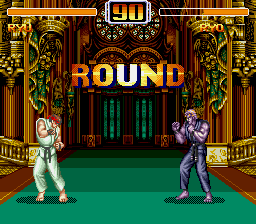
Graphically, King of Fighters ’98, The shows pixel art typical of the Genesis era, with clear and expressive character sprites, even if they aren’t as polished as modern games. The backgrounds are static but detailed enough to set the scene, while character animations are smooth and responsive. Sound is straightforward, with punchy effects and simple music that add to the arcade feel.
Replaying the game reveals its depth through character variety and strategic options. With a large roster and multiple team combinations, players can experiment with different fighters and tactics, giving it good replay value. The difficulty increases as you progress, encouraging mastery of timing and move execution. Plus, the multiplayer mode makes for competitive matches, perfect for local gaming or solo practice.
Strategy and Tips
Focus on timing and learning your character’s move set to win fights. Practice combos and special moves in training mode before jumping into matches. Keep an eye on your opponent’s patterns — patience often wins over rushing in recklessly.
- Prioritize blocking and dodging to avoid unnecessary damage, especially during counterattack windows.
- Mix up your attacks to break your opponent’s rhythm—use throws, high, and low attacks thoughtfully.
- Identify characters with strong zoning or long-range attacks to keep opponents at bay.
- Use super moves at key moments when openings appear or to finish off an opponent.
- Watch your health bar and save your special meter for critical moments.
Quick Questions
How do I get started if I’m new to fighting games?
Start with beginner-friendly characters and practice basic moves and combos in training mode before jumping into matches.
What’s a common mistake new players make?
Many rush in without blocking or timing their attacks, leaving themselves open to counters. Focus on defense and patience.
Can I play King of Fighters ’98, The on mobile or touch devices?
This version runs directly in your browser, so it works on any device with a modern web browser, including phones and tablets. It plays smoothly without extra setup or controls.
King of Fighters ’98, The remains a solid pick for fans of retro fighters, offering straightforward gameplay with enough depth to keep players coming back. Its classic design and accessible mechanics make it a good starting point into fighting games, whether for casual fun or serious practice.
Related games: you can also try Back to the Future Part III (USA) and Batman (Europe), or browse all other games in the Genesis category.
How to Play King of Fighters ’98, The (Unl)?
Choose a team of fighters, execute combos and special moves to deplete your opponent's health, and win matches either against AI or friends through quick, intense fights.
Game Controls
Arrow keys control movement; action buttons are mapped to keyboard keys for attacking and jumping.
Comments (0)
No comments yet. Be the first to comment!