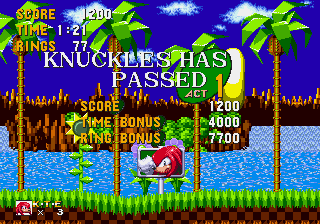
Knuckles in Sonic 1 – Super Knuckles Mode (2023 Update)
0 2 1
INTRO
Knuckles in Sonic 1 – Super Knuckles Mode (2023 Update) is a browser-based version of a classic Genesis game, giving a new spin to familiar platforming. It mixes the charm of the early ’90s with a character that introduces more challenge and strategy. If you grew up with Sonic the Hedgehog, this version offers a nostalgic feel with enough freshness to keep things interesting.
As someone who appreciates classic platformers, you’ll notice how it keeps the tight controls and vibrant visuals of the original, now playable directly on your device. The core gameplay is simple: move through levels, dodge hazards, and outsmart Dr. Robotnik’s minions. But with the Super Knuckles Mode, the game offers a different perspective—more power, more speed, and new ways to approach each stage.
Why Knuckles in Sonic 1 – Super Knuckles Mode Is Worth Playing
This version stands out because it centers on Knuckles—usually a secondary character—in a slightly altered experience. The pixel-perfect graphics stay true to the original style, but the new mode introduces subtle gameplay changes that keep things fresh. Knuckles’ glide and climb abilities feel more impactful, making movement smooth and satisfying.
The game’s bright color palette and crisp sprite work bring back a nostalgic vibe while feeling lively in a browser. The soundtrack, echoing the original, fits well with the fast-paced levels and adds to the excitement. It’s a game that rewards quick reflexes and familiarity with the genre, but it’s also easy for new players to pick up and enjoy.
What makes it interesting is the mix of classic design with the added Super Knuckles Mode, which slightly shifts the gameplay in a meaningful way. It’s perfect for quick sessions or longer playthroughs, especially since it’s free and easy to jump into whenever nostalgia hits.
Tips to Get Ahead
Before jumping in, here are some handy tips to help you along:
- Master Knuckles’ glide to reach hidden or tricky spots for extra rings and power-ups.
- Watch your speed; rushing can cause mistakes, especially in tight sections or when jumping.
- Use your surroundings—climb walls and jump strategically to avoid enemies and hazards.
- Gather as many rings as you can; they protect you from losing progress when you get hit.
- Familiarize yourself with each level’s layout to anticipate obstacles and plan your route.
- Be patient with the level design; it’s challenging but fair, echoing the original era.
Things to Know Before You Start
Question?
Is Knuckles in Sonic 1 – Super Knuckles Mode suitable for casual players?
Answer.
The game is accessible, but its difficulty lines up with the original Genesis platformers, making it better suited for players who enjoy a steady, skill-based experience rather than quick, casual gaming.
Question?
How long does a typical session last?
Answer.
Most playthroughs take about 15-30 minutes, depending on your familiarity and skill, making it good for quick gaming sessions or practicing specific levels.
Question?
Are there any modes besides Super Knuckles Mode?
Answer.
This browser version mainly focuses on the classic gameplay with the Super Knuckles Mode turned on. It offers a different experience from the standard Sonic play, but there aren’t additional modes or features.
CLOSING
If you’re after a real taste of Genesis-era platforming, Knuckles in Sonic 1 – Super Knuckles Mode is worth a try. Its familiar visuals and gameplay, combined with the added challenge of the Super Knuckles Mode, make it enjoyable for fans and newcomers alike. Jump in and see how far your skills can take you in this classic browser adventure.
Related games: you can also try Eternal Champions (USA) and Daze Before Christmas (Australia) (Beta), or browse all other games in the Genesis category.
How to Play Knuckles in Sonic 1 – Super Knuckles Mode (2023 Update)?
Move Knuckles through levels, using his glide and climb to avoid hazards and collect rings. Jump, run, and reach the end while staying safe from enemies and obstacles.
Game Controls
Arrow keys control movement; jump and action buttons are mapped to keyboard keys.
You may be interested in:
-
 Genesis
♥ 3
Zou! Zou! Zou! Rescue Daisakusen (Japan)
Genesis
♥ 3
Zou! Zou! Zou! Rescue Daisakusen (Japan) -
 Genesis
♥ 6
Zoom! (World)
Genesis
♥ 6
Zoom! (World) -
 Genesis
♥ 9
Zool – Ninja of the ‘Nth’ Dimension (USA)
Genesis
♥ 9
Zool – Ninja of the ‘Nth’ Dimension (USA) -
 Genesis
♥ 11
Zombies Ate My Neighbors (USA)
Genesis
♥ 11
Zombies Ate My Neighbors (USA) -
 Genesis
♥ 9
Zombies (Europe)
Genesis
♥ 9
Zombies (Europe) -
 Genesis
♥ 1
Zombie High (USA) (Proto)
Genesis
♥ 1
Zombie High (USA) (Proto) -
 Genesis
♥ 1
Zhuagui Dashi – Ghost Hunter (China) (Unl)
Genesis
♥ 1
Zhuagui Dashi – Ghost Hunter (China) (Unl) -
 Genesis
♥ 1
Zero Wing (Japan)
Genesis
♥ 1
Zero Wing (Japan)
Comments (0)
No comments yet. Be the first to comment!