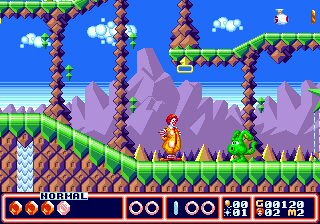
McDonald’s Treasure Land Adventure (Japan)
0 3 0
McDonald’s Treasure Land Adventure (Japan) is a classic Genesis action-platformer that combines straightforward gameplay with a colorful, cartoonish look. Originally released during the 16-bit era, it offers a lighthearted adventure where players guide a character through various levels filled with enemies and obstacles. Its arcade origins are clear in its simple yet challenging design, making it a nostalgic choice for fans of retro platformers. Now playable directly in your browser, you can enjoy a piece of Genesis history without needing downloads or emulators.
Why McDonald’s Treasure Land Adventure Is Worth Playing
This Genesis game stands out with its bright, pixel-rich visuals that capture the cheerful cartoon style of its time. The environments are lively and varied, with each level offering unique backgrounds and themes that keep things interesting. The soundtrack and sound effects are cheerful and uncomplicated, matching its family-friendly vibe. The gameplay itself is a straightforward action-platformer focused on precise jumps, avoiding enemies, and collecting items. It’s designed to be engaging without being overly complex, making it suitable for both casual players looking for a quick run and fans wanting to get better at its stages.
What keeps players coming back is its tight controls and predictable level design, which reward skill and memorization. The pacing encourages exploration and replay, especially if you’re aiming for higher scores or perfect runs. Despite its simplicity, the game introduces enough enemy variety and level layouts to keep things from feeling dull. Jumping, dodging, and collecting items are all well-executed, making it a solid choice for anyone craving a nostalgic, uncomplicated platformer experience on Genesis hardware or its browser version.
Tips to Get Ahead
Start by learning where enemies appear to avoid taking unnecessary hits. Collect all power-ups and items to boost your character’s abilities. Pay attention to how levels are laid out to find safe spots for regrouping. Practice your timing for jumps to clear tricky sections smoothly. Use the environment—some platforms can help you bypass enemies or hazards. Finally, aim to complete levels quickly to improve your score, but don’t rush if it causes mistakes.
Things to Know Before You Start
Question?
How difficult is McDonald’s Treasure Land Adventure compared to other Genesis platformers?
Answer.
It has a moderate level of difficulty typical of 16-bit platformers, with some sections demanding precise timing, but it’s accessible enough for casual players to enjoy without frustration.
Question?
How long does a typical session last?
Answer.
Most levels take just a few minutes each, so finishing the game might take around 20-30 minutes. It’s a good choice for quick gaming sessions or casual play.
Question?
Is it suitable for all ages?
Answer.
Yes, its cartoonish visuals and simple gameplay make it appropriate for children and family-friendly gaming. Some sections might need patience and practice, especially for younger players.
Jump in and give it a try
Playing McDonald’s Treasure Land Adventure gives a taste of the 16-bit era’s charm, and now you can enjoy this Genesis action-platformer right in your browser. Its simple yet engaging design makes it perfect for quick play or reliving childhood memories. Explore its colorful levels and see how far you can go—this game welcomes both casual players and collectors to experience a piece of gaming history right now.
Related games: you can also try Adventures of Batman & Robin, The (Europe) and Bahamut Senki (Japan), or browse all other games in the Genesis category.
How to Play McDonald’s Treasure Land Adventure (Japan)?
Guide your character through levels by jumping, avoiding enemies, and collecting items to reach the end. Learn enemy patterns and use the environment to navigate tricky sections efficiently.
Game Controls
Arrow keys move the character; action buttons are mapped to on-screen keys or keyboard equivalents.
You may be interested in:
-
 Genesis
♥ 3
Mega SWIV (Europe)
Genesis
♥ 3
Mega SWIV (Europe) -
 Genesis
♥ 5
Mega Q*bert
Genesis
♥ 5
Mega Q*bert -
 Genesis
♥ 44
Mega Man: The Sequel Wars Episode Red v1.1
Genesis
♥ 44
Mega Man: The Sequel Wars Episode Red v1.1 -
 Genesis
♥ 1
Mega Man: The Sequel Wars Episode Red Demo P1 (v1.01)
Genesis
♥ 1
Mega Man: The Sequel Wars Episode Red Demo P1 (v1.01) -
 Genesis
♥ 26
Mega Man: The Sequel Wars Demo EX UPDATE
Genesis
♥ 26
Mega Man: The Sequel Wars Demo EX UPDATE -
 Genesis
♥ 10
Mega Man: The Sequel Wars Demo EX
Genesis
♥ 10
Mega Man: The Sequel Wars Demo EX -
 Genesis
♥ 14
Mega Man Wily Wars SRAM+ Proto Man Size Fix
Genesis
♥ 14
Mega Man Wily Wars SRAM+ Proto Man Size Fix -
 Genesis
♥ 1
Mega Games I (Europe)
Genesis
♥ 1
Mega Games I (Europe)
Comments (0)
No comments yet. Be the first to comment!