Pantufa the cat : Extended Edition
0 32 9
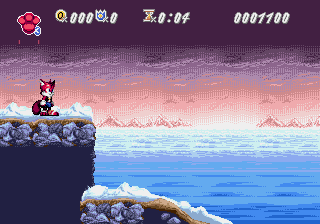
Pantufa the cat : Extended Edition is a colorful and quirky platformer that brings back the feel of classic Genesis games. The pixel art style hints at the era’s simple visuals but adds a lively personality that invites players into its whimsical world. Bright colors, expressive sprites, and a straightforward interface make the game easy to pick up and enjoy, all running directly in your browser without any downloads or installations. The soundtrack matches the pixel visuals with catchy tunes that create a cheerful mood, making each play session feel like stepping into an old arcade with a fresh twist.
Step Into the World of Pantufa the cat : Extended Edition
This Genesis-style game takes you to a lively, cartoonish universe where Pantufa the cat sets out on a fun adventure. The setting features colorful landscapes, simple backgrounds, and animated elements that bring the game’s world to life. The cheerful sound design includes upbeat chiptune melodies and satisfying effects that enhance every jump and collection. The atmosphere feels playful with a hint of mischief, with visuals and audio working together to create a lighthearted vibe. Playing it through your browser makes it easy to get started, with the emulator running smoothly and ready to spark nostalgic feelings or introduce new players to its retro charm.
How the Gameplay Hooks You
The game has a simple loop: move through levels, dodge obstacles, and gather items. Its pace is steady, with each stage rewarding careful timing and quick reflexes. Different challenges and layouts keep things fresh, encouraging players to adapt without feeling overwhelmed. Progression feels natural, with a gentle increase in difficulty that keeps the game interesting whether you have a few minutes or more time to play. The controls are straightforward, but mastering jump timing and movements brings a satisfying sense of skill. Visual and sound feedback make each successful move rewarding, encouraging you to keep going.
Pro Tips for Pantufa the cat : Extended Edition
To enjoy this charming platformer, keep a few tips in mind:
- Pay attention to timing your jumps to avoid falling or hitting obstacles.
- Pick up items as they often give points or bonuses that help progress.
- Watch level patterns to anticipate hazards and plan your moves.
- Take breaks if you get stuck; sometimes stepping back helps see things differently.
- Focus on clearing levels efficiently to unlock new stages faster.
- Use the in-browser controls comfortably—no need for extra devices or software.
Frequently Asked Questions
Can I play Pantufa the cat : Extended Edition in short sessions?
Yes, the level structure makes it great for quick plays, with each stage standing alone as a challenge.
Does the game become repetitive after a while?
While the gameplay stays simple, increasing difficulty and varied levels help keep it interesting over multiple tries.
Is Pantufa the cat : Extended Edition suitable for all ages?
Definitely. Its cheerful visuals and easy mechanics make it accessible for players of all ages, especially those who enjoy retro platformers.
Playing Pantufa the cat : Extended Edition on this site offers a smooth, browser-based experience that captures the charm of classic Genesis titles. Its bright visuals, cheerful sound, and straightforward gameplay make it a fun way to enjoy retro gaming without any hassle or downloads. Whether you’re looking for a quick challenge or want to explore the whole game, it’s a simple way to enjoy some 16-bit platforming fun right in your browser.
Related games: you can also try Bulls Versus Blazers and the NBA Playoffs (USA, Europe) and Kidou Keisatsu Patlabor – 98-Shiki Kidou Seyo! (Japan), or browse all other games in the Genesis category.
How to Play Pantufa the cat : Extended Edition?
Move Pantufa through colorful levels, avoid obstacles, and collect items to score points and unlock new stages. Use timing and quick reflexes to progress smoothly.
Game Controls
Arrow keys control movement; spacebar or designated keys handle jumps and actions.
You may be interested in:
-
 Genesis
♥ 2
Phantasy Star II (USA, Europe) (v1.1)
Genesis
♥ 2
Phantasy Star II (USA, Europe) (v1.1) -
![Phantasy Star II (USA, Europe) (Rev A) [En by Naflign v1.0]](https://www.playf2p.com/wp-content/uploads/phantasy-star-ii-usa-europe-rev-a-en-by-naflign-v1-0-200x120.png) Genesis
♥ 1
Phantasy Star II (USA, Europe) (Rev A) [En by Naflign v1.0]
Genesis
♥ 1
Phantasy Star II (USA, Europe) (Rev A) [En by Naflign v1.0] -
 Genesis
♥ 7
Phantasy Star II (Brazil)
Genesis
♥ 7
Phantasy Star II (Brazil) -
![Phantasy Star II – Shilka’s Adventure (Japan) (SegaNet) [En by MIJET v20080628]](https://www.playf2p.com/wp-content/uploads/phantasy-star-ii-shilkas-adventure-japan-seganet-en-by-mijet-v20080628-200x120.jpg) Genesis
♥ 1
Phantasy Star II – Shilka’s Adventure (Japan) (SegaNet) [En by MIJET v20080628]
Genesis
♥ 1
Phantasy Star II – Shilka’s Adventure (Japan) (SegaNet) [En by MIJET v20080628] -
![Phantasy Star II – Kinds’s Adventure (Japan) (SegaNet) [En by MIJET v20081213]](https://www.playf2p.com/wp-content/uploads/phantasy-star-ii-kindss-adventure-japan-seganet-en-by-mijet-v20081213-200x120.jpg) Genesis
♥ 1
Phantasy Star II – Kinds’s Adventure (Japan) (SegaNet) [En by MIJET v20081213]
Genesis
♥ 1
Phantasy Star II – Kinds’s Adventure (Japan) (SegaNet) [En by MIJET v20081213] -
 Genesis
♥ 1
Phantasy Star II – Kaerazaru Toki no Owari ni (Japan)
Genesis
♥ 1
Phantasy Star II – Kaerazaru Toki no Owari ni (Japan) -
![Phantasy Star II – Huey’s Adventure (Japan) (SegaNet) [En by MIJET v20081106]](https://www.playf2p.com/wp-content/uploads/phantasy-star-ii-hueys-adventure-japan-seganet-en-by-mijet-v20081106-200x120.jpg) Genesis
♥ 1
Phantasy Star II – Huey’s Adventure (Japan) (SegaNet) [En by MIJET v20081106]
Genesis
♥ 1
Phantasy Star II – Huey’s Adventure (Japan) (SegaNet) [En by MIJET v20081106] -
![Phantasy Star II – Anne’s Adventure (Japan) (SegaNet) [En by MIJET v20071024]](https://www.playf2p.com/wp-content/uploads/phantasy-star-ii-annes-adventure-japan-seganet-en-by-mijet-v20071024-200x120.png) Genesis
♥ 2
Phantasy Star II – Anne’s Adventure (Japan) (SegaNet) [En by MIJET v20071024]
Genesis
♥ 2
Phantasy Star II – Anne’s Adventure (Japan) (SegaNet) [En by MIJET v20071024]
Comments (0)
No comments yet. Be the first to comment!