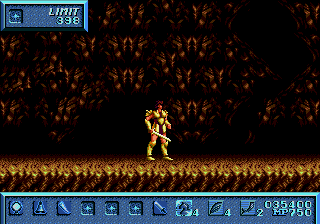
Saint Sword (USA)
0 3 0
Saint Sword (USA) is a classic Genesis action-adventure game that combines side-scrolling combat with exploration. Its simple design and focus on fighting mechanics set it apart from many other titles of the time. As a product of the Genesis era, it delivers a nostalgic experience that emphasizes challenging gameplay and a sense of progress through combat and exploration.
Saint Sword: Gameplay Overview
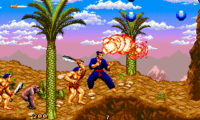
In Saint Sword, players control a hero moving through various levels filled with enemies, obstacles, and platforms. The main focus is on real-time combat, where timing and positioning matter. The game offers different attack moves, and players need to learn enemy patterns to succeed. Exploration plays a role too, with searching for hidden items or secret paths that help advance. The design encourages precision and strategic use of moves, making each encounter a test of skill.
The action mechanics are complemented by platforming sections requiring jumping, avoiding hazards, and sometimes solving simple puzzles to move forward. Balancing combat and exploration keeps the gameplay interesting, with players needing to adapt to different enemy types and level layouts. As a typical Genesis title, it features straightforward controls and fast-paced action that rewards quick reflexes and pattern recognition.
Modes, Levels and Progression
Saint Sword progresses linearly through a series of levels, each more difficult and complex than the last. The game has a straightforward adventure structure, with each stage presenting new challenges and enemy arrangements. Although it doesn’t include multiple modes or branching paths, the variety within levels—such as different enemy types and environmental hazards—keeps things fresh. The difficulty gradually ramps up as players move forward, requiring mastery of combat and timing.
Progress mainly involves completing levels and defeating bosses, with each victory unlocking the next stage. It doesn’t focus heavily on item collection or upgrades but relies on players learning enemy patterns and timing well. Replay value comes from mastering levels, improving scores, and finding hidden secrets or alternate routes.
Winning Strategies
Getting through Saint Sword often depends on understanding enemy attack patterns and timing your moves. Patience and careful observation help avoid damage and create openings for counterattacks.
- Learn enemy patterns to anticipate attacks and react accordingly.
- Use jump attacks to hit enemies from a safe distance or to dodge ground attacks.
- Take out weaker enemies quickly to focus on tougher bosses.
- Explore levels carefully to find hidden items that might help.
- Keep an eye on your health and avoid unnecessary risks early on to stay alive later.
- Watch out for environmental hazards and use platforming skills to stay safe.
Common Questions About Saint Sword
How does the difficulty change as I go?
Enemies get more aggressive and levels introduce more hazards as you progress. Boss fights tend to get tougher, requiring pattern recognition and good timing.
Are there different difficulty modes?
Saint Sword follows a straight path without multiple difficulty settings. The challenge aligns with other Genesis action titles from that time.
How long does it usually take to finish?
For an experienced player, finishing the game might take around 30 to 60 minutes, depending on how much you explore or aim for high scores.
The browser-based emulation of Saint Sword makes it easy to jump into this classic action game without downloads or setup. Its straightforward gameplay and nostalgic feel make it a good pick for fans of retro Genesis titles looking for a challenge rooted in classic mechanics.
Related games: you can also try G-LOC Air Battle (World) and J. League Pro Striker Final Stage (Japan), or browse all other games in the Genesis category.
How to Play Saint Sword (USA)?
Move through levels, fight enemies using timing and different attack moves, explore for secrets, and defeat bosses to progress. Master enemy patterns and platforming to advance.
Game Controls
Arrow keys control movement; action buttons are mapped to keyboard keys for attacking and jumping.

Comments (0)
No comments yet. Be the first to comment!