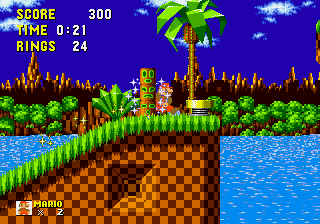
SMB1 Mario in Sonic The Hedgehog
0 12 1
SMB1 Mario in Sonic The Hedgehog combines two well-loved franchises into a classic Genesis-style game you can play right in your browser. It features familiar gameplay that fans of both Mario and Sonic will recognize, with pixel art graphics and simple mechanics that stay true to the 16-bit era. Because it’s emulated, you don’t need to download anything—just jump in and start playing.
SMB1 Mario in Sonic The Hedgehog: Gameplay Overview
This game is a side-scrolling platformer where you pick either Mario or Sonic, each with their own way of moving and jumping. The goal is to reach the end of each level, dodging obstacles and enemies, while collecting coins and power-ups. The controls are straightforward, requiring precise timing for jumps and careful navigation to avoid hazards. It’s a game that rewards quick reactions and remembering patterns, reminiscent of classic Genesis titles.
The levels are simple but varied enough to keep things interesting. Mario tends to jump steadily, while Sonic’s speed encourages a faster, momentum-based style. Some sections are linear, while others let you explore different routes, adding a bit of replay value. As you progress, the difficulty gradually ramps up, challenging your timing and memory skills across different stages.
Modes, Levels and Progression
This is a straightforward game with a single-player mode, where you move through levels in order. Each stage is designed to be completed in a few minutes, with the difficulty increasing as you go. There’s no story or multiple endings—success comes from mastering controls and remembering level layouts. The game introduces new enemies and obstacles gradually, keeping you engaged without overwhelming you.
While there aren’t multiplayer options or special challenge levels, the variety of stages encourages replaying to improve your times or find secrets. Progress is simple: finish each level to move forward, and the level design keeps the challenge steady. It’s a compact experience that emphasizes skill and quick decision-making, much like the classic Genesis platformers.
Winning Strategies
Getting through SMB1 Mario in Sonic The Hedgehog smoothly means learning each character’s mechanics and how the levels work. Here are some tips:
- Pay attention to enemy patterns to avoid unnecessary hits.
- Use power-ups wisely—save them for tough spots or boss fights.
- Practice your timing for jumps to clear gaps and dodge hazards.
- Explore different routes in levels for shortcuts or hidden items.
- Keep a steady pace, especially when controlling Sonic, to stay fast without losing control.
- Be patient with tricky sections—repetition and memorization help you get through them.
Common Questions About SMB1 Mario in Sonic The Hedgehog
How does the difficulty change as I go?
The game gets tougher as you progress, with more enemies and tighter timing. The early levels are fairly accessible, but the later ones will challenge your reflexes and jumping skills.
Are there different modes or level types?
This game mainly offers a single mode with a series of levels that follow one after the other. While there aren’t extra modes, the stages are varied enough to keep things fresh.
How long does it take to finish?
You might beat the game in about 15 to 30 minutes, depending on your skill and familiarity. Replayability comes from trying to improve your times or finding hidden secrets.
Playing SMB1 Mario in Sonic The Hedgehog in your browser gives you a quick taste of retro gaming. Its simple design and challenge make it a fun choice for quick sessions or trying to beat your best times.
Related games: you can also try I made you a Salad and Lethal Enforcers II – Gun Fighters (USA), or browse all other games in the Genesis category.
How to Play SMB1 Mario in Sonic The Hedgehog?
Choose Mario or Sonic and run through levels, avoiding enemies and obstacles while collecting coins and power-ups to reach the end. Master jumping and movement to beat your best times.
Game Controls
Arrow keys control movement; jump and action keys for character actions.
You may be interested in:
-
 Genesis
♥ 2
Sonic – The Return of Painful World Spikes Kaizo
Genesis
♥ 2
Sonic – The Return of Painful World Spikes Kaizo -
 Genesis
♥ 8
Sonic – The Boss Challenge
Genesis
♥ 8
Sonic – The Boss Challenge -
 Genesis
♥ 4
Sonic – South Island’s Encore (SHC Release)
Genesis
♥ 4
Sonic – South Island’s Encore (SHC Release) -
 Genesis
♥ 13
Sonic – Project Revenge (SHC ’24 Demo)
Genesis
♥ 13
Sonic – Project Revenge (SHC ’24 Demo) -
 Genesis
♥ 2
Sonic – Mysterious Visionary (Demo)
Genesis
♥ 2
Sonic – Mysterious Visionary (Demo) -
 Genesis
♥ 9
Sonic – Fast The Hedgehog
Genesis
♥ 9
Sonic – Fast The Hedgehog -
 Genesis
♥ 2
Sonic – Christmas Trouble Demo 2
Genesis
♥ 2
Sonic – Christmas Trouble Demo 2 -
 Genesis
♥ 4
Sonic – Angel Island Adventure – The First Half (AIZ Demo)
Genesis
♥ 4
Sonic – Angel Island Adventure – The First Half (AIZ Demo)
Comments (0)
No comments yet. Be the first to comment!