Sonic Debut
0 34 6
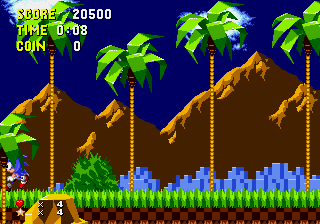
Sonic Debut is a classic Genesis game that introduces players to the fast-paced world of Sonic the Hedgehog. This early entry in the Sonic franchise is easy to pick up, thanks to its simple controls and clear goals. It captures the feel of the Genesis era with bright graphics, catchy music, and quick, engaging gameplay that appeals to both newcomers and longtime fans.
What Is Sonic Debut?
This Genesis classic is a side-scrolling platformer where the main goal is to move through levels filled with obstacles, enemies, and collectibles. The game emphasizes speed and agility, encouraging players to keep moving forward without getting caught or falling into hazards. While the gameplay itself is straightforward, the challenge comes from mastering timing and route choices to stay fast and avoid setbacks.
Players control Sonic as he runs through different environments, each with its own layout and challenges. The game rewards quick reflexes and exploration, with rings and power-ups scattered throughout levels. Its design is suited for quick sessions, making it accessible for short play or longer gaming marathons. Sonic Debut’s focus on momentum and timing keeps each run lively and satisfying, especially for those who enjoy tight controls and fast-paced action.
What Keeps You Coming Back
The core appeal lies in the emphasis on speed and precision, creating a satisfying loop of trying to beat your best times and find shortcuts. The levels have multiple routes, giving replay value for players eager to improve or discover hidden secrets. The gameplay loop is simple but addictive, making it easy to jump in briefly or spend hours trying to master every level.
Plus, Sonic Debut’s tight controls and responsive feel foster a sense of mastery. The cheerful soundtrack and colorful visuals make each session lively and engaging. Its straightforward mechanics and short levels encourage repeated attempts, appealing to players who enjoy incremental progress and high-score chasing in a casual way.
Handy Tips
Getting the most out of Sonic Debut is simple with a few basic tips. Here are some suggestions to help you improve:
- Keep your speed up; stopping often can slow you down and make avoiding obstacles harder.
- Learn each level’s layout to find the fastest routes and hidden shortcuts.
- Pick up rings whenever you can—losing all rings means losing extra lives or risking a game over.
- Use momentum to jump over enemies and gaps; timing your jumps correctly is key for smooth progress.
- Watch enemy patterns to avoid unnecessary damage and keep your speed going.
- If you get stuck, retrace your steps to find alternative paths or hidden areas.
Player FAQ
Is Sonic Debut suitable for young children or first-time players?
Yes, Sonic Debut is accessible for younger players thanks to its simple controls and straightforward gameplay, though mastering speed and timing might take some practice.
Can I play Sonic Debut offline or on any device?
This version runs directly in your browser, so no downloads or internet connection are needed after loading the page. It’s perfect for quick sessions on any device with a browser.
Is Sonic Debut good for quick plays or longer gaming sessions?
The game’s short levels and arcade style make it great for quick sessions, but it also offers enough challenge and replay value for longer play if you want to beat high scores or perfect your runs.
Sonic Debut remains a fun way to experience Sonic’s fast-paced world. Its simple mechanics and bright visuals make it a great choice whether you’re new to the series or just looking for a quick, enjoyable challenge on your browser.
Related games: you can also try Mortal Kombat Arcade Edition Enhanced v1.5 and Sonic 3 & Knuckles Super Peel Out by snkenjoi (SK Hack), or browse all other games in the Genesis category.
How to Play Sonic Debut?
Control Sonic to run through levels, avoiding obstacles and enemies while collecting rings. Use speed and jumps to reach the end quickly and find shortcuts for better scores.
Game Controls
Arrow keys act as the D-pad; Enter is Start; on-screen mapped keys handle the action buttons
You may be interested in:
-
 Genesis
♥ 15
Sonic ERaZor 7
Genesis
♥ 15
Sonic ERaZor 7 -
 Genesis
♥ 2
Sonic ERaZor 4th Public Release (S1 Hack)
Genesis
♥ 2
Sonic ERaZor 4th Public Release (S1 Hack) -
 Genesis
♥ 7
Sonic ERazor 2nd Public Release (S1 Hack)
Genesis
♥ 7
Sonic ERazor 2nd Public Release (S1 Hack) -
 Genesis
♥ 5
Sonic ERaZor 1st Public Release (S1 Hack)
Genesis
♥ 5
Sonic ERaZor 1st Public Release (S1 Hack) -
 Genesis
♥ 45
Sonic ERaZor
Genesis
♥ 45
Sonic ERaZor -
![Sonic Eraser (Japan) (SegaNet) [En by D v1.0]](https://www.playf2p.com/wp-content/uploads/sonic-eraser-japan-seganet-en-by-d-v1-0-200x120.png) Genesis
♥ 11
Sonic Eraser (Japan) (SegaNet) [En by D v1.0]
Genesis
♥ 11
Sonic Eraser (Japan) (SegaNet) [En by D v1.0] -
 Genesis
♥ 13
Sonic Encore 28-01-2024
Genesis
♥ 13
Sonic Encore 28-01-2024 -
 Genesis
♥ 4
Sonic Encore (SHC 2024)
Genesis
♥ 4
Sonic Encore (SHC 2024)
Comments (0)
No comments yet. Be the first to comment!