Sonic Forever
0 18 3
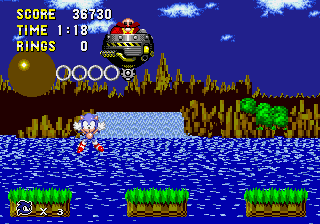
Sonic Forever is a classic Genesis game that brings the beloved hedgehog’s adventures directly to your browser. If you grew up with the Sega Genesis or just enjoy fast-paced platformers, this game provides a familiar experience without the need for downloads or installations. Playing Sonic Forever is a nice way to relive the gameplay of the Genesis era in a simple, accessible format—great for both nostalgic fans and newcomers alike.
Getting Into Sonic Forever
The main idea behind Sonic Forever is fast, side-scrolling platforming. As Sonic, your task is to move through levels filled with obstacles, enemies, and secrets. The game focuses on speed and accuracy, encouraging players to keep up their momentum while collecting rings and avoiding hazards. Levels are designed with multiple paths, which rewards exploration and good timing.
A typical play session involves choosing a level and racing through it, dodging enemies and environmental dangers. The game is straightforward: finish each stage to unlock the next. There aren’t complicated mechanics or modes—just pure platforming fun that works well in short or longer sessions. Controls are simple, so you can focus on movement and timing rather than tricky inputs.
Standout Features
Sonic Forever keeps the visual style and level design of the original Genesis games, with bright, colorful sprites that capture the pixel art charm of the era. Its visuals are crisp and true to the original, making it easy to recognize familiar zones and characters. The game runs smoothly in your browser, maintaining the responsive feel Sonic players expect, even on lower-end devices.
Progression feels natural, with each level presenting new challenges and chances to replay. The game encourages trying to beat your best times or find hidden pathways, which can make you want to play again. Since it’s emulated directly in your browser, you can jump into a quick session whenever you like—perfect for short breaks or longer gaming marathons. Its simple design means there are no unlockables or complicated mechanics, but mastering speed and route choices keeps things interesting.
Strategy and Tips
When starting out, try to keep Sonic moving; rushing through levels can lead to mistakes. Use rings to absorb damage—if hit, you’ll lose rings instead of lives. Practice jumping over enemies and hazards to avoid losing rings or lives. Experiment with different routes to find shortcuts and boost your speed. Watch out for hidden areas—they often contain rings or extra lives. Patience and accuracy can help you beat your best times.
- Always aim to keep Sonic moving; stopping makes it harder to avoid obstacles.
- Gather rings whenever you can; they protect you if you get hit.
- Learn each level’s layout to find shortcuts and secrets.
- Practice your jumping timing to clear tricky sections and enemies efficiently.
- Take your time in tight spaces to prevent unnecessary damage.
Quick Questions
How do I get started with Sonic Forever?
Just click to launch the game in your browser and start running through the levels right away.
What’s a common mistake beginners make?
Trying to go too fast without paying attention to obstacles often results in losing rings or lives early on.
Can I play Sonic Forever on mobile or touch devices?
Yes, since the game runs in your browser, you can play it on mobile devices with touch controls, though a keyboard might give better precision.
Sonic Forever provides a simple way to enjoy classic Sonic gameplay without any fuss. Its faithful recreation of the Genesis experience makes it a handy choice for anyone who wants a quick, fun platformer session directly in their browser.
Related games: you can also try Beauty and the Beast – Belle's Quest (USA) and Bubba'n'Stix (Europe) (Beta), or browse all other games in the Genesis category.
How to Play Sonic Forever?
Run through levels as Sonic, avoiding enemies and hazards while collecting rings. Complete each stage to unlock the next, aiming for the best time and discovering hidden paths.
Game Controls
Arrow keys for movement; jump and action buttons mapped to keyboard keys.
You may be interested in:
-
 Genesis
♥ 41
Sonic Megamix 3.5
Genesis
♥ 41
Sonic Megamix 3.5 -
 Genesis
♥ 6
Sonic Megamix 2.0
Genesis
♥ 6
Sonic Megamix 2.0 -
 Genesis
♥ 3
Sonic Megamix 1.0
Genesis
♥ 3
Sonic Megamix 1.0 -
 Genesis
♥ 3
Sonic Mega Mix v3debug by Team Megamix (S1 Hack)
Genesis
♥ 3
Sonic Mega Mix v3debug by Team Megamix (S1 Hack) -
 Genesis
♥ 7
Sonic Mega Mix (S1 Hack)
Genesis
♥ 7
Sonic Mega Mix (S1 Hack) -
 Genesis
♥ 12
Sonic Mega Fusion
Genesis
♥ 12
Sonic Mega Fusion -
 Genesis
♥ 4
Sonic Maxidrive (SHC 2022 Demo)
Genesis
♥ 4
Sonic Maxidrive (SHC 2022 Demo) -
 Genesis
♥ 6
Sonic Maxidrive (2023 Demo)
Genesis
♥ 6
Sonic Maxidrive (2023 Demo)
Comments (0)
No comments yet. Be the first to comment!