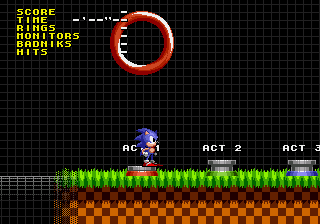
Sonic the Hedgehog 1 @ SAGE 2010
0 14 6
Sonic the Hedgehog 1 @ SAGE 2010 is a browser-based version of the classic Genesis platformer that many remember fondly. It’s a simple, fast-paced side-scrolling game where Sonic races through levels to stop Dr. Robotnik and free his animal friends from mechanical traps. The gameplay is straightforward, with a nostalgic feel that still resonates with players new and old.
Sonic the Hedgehog 1 @ SAGE 2010: Gameplay Overview
This game challenges players to guide Sonic through various levels filled with obstacles, enemies, and secrets. Sonic’s main moves are running at high speed, jumping, and rolling into a ball to defeat foes or break barriers. The game relies on momentum, so players need to understand each stage’s layout to keep moving fast and avoid dangers. Different paths in levels encourage exploration and replayability.
The controls reward quick reflexes and precise timing. Collecting rings keeps Sonic safe from enemies and adds to the score. Power-ups and hidden items are sprinkled throughout levels, often behind breakable walls or in secret spots. The goal is to move through levels efficiently, defeat enemies, gather rings, and reach the end as quickly as possible, with the difficulty increasing in later stages.
Modes, Levels and Progression
The game takes you through a series of zones, each with several themed levels—ranging from green hills to industrial areas. Each zone ends with a boss fight against Dr. Robotnik, testing how well you’ve learned the mechanics. Secret routes and hidden items reward exploration, giving extra lives and score boosts. Replaying stages to find shortcuts or beat your best times adds to the fun.
The levels are relatively short but quite different from each other, keeping things interesting. As you progress, enemies become faster, layouts more complex, and timing more demanding. The structure aims to keep players engaged by steadily increasing the challenge while staying accessible and easy to pick up, just like the original game on the Genesis.
Winning Strategies
Keeping Sonic moving at speed is a good start—try to maintain momentum to get through levels quickly. Use jumps wisely to avoid enemies and reach hidden areas.
- Gather rings whenever possible; they keep Sonic safe and boost your score.
- Learn each level’s layout to discover shortcuts and secret zones that save time.
- If available, use the spin dash to speed up sections fast.
- Time your jumps well to avoid spikes and moving obstacles.
- Study boss patterns to find openings and defeat Dr. Robotnik more easily.
Common Questions About Sonic the Hedgehog 1 @ SAGE 2010
How does the difficulty change as I go along?
The game begins with simpler levels but gradually introduces faster enemies, trickier layouts, and tighter timing, making things more challenging as you progress.
Are there different modes, or just the main game?
This version sticks to the original’s core gameplay. There aren’t alternate modes, but replaying levels to improve your times and scores is part of the experience.
How much does it encourage replaying?
With multiple routes, hidden areas, and the goal of beating your best times, you’ll find yourself coming back often. The levels are short enough for quick attempts or longer sessions focused on high scores.
Sonic the Hedgehog 1 @ SAGE 2010 offers a faithful browser version of the classic Genesis game. Its simple design and timeless gameplay still capture the spirit of the original, making it worth trying whether you’re a fan or new to retro platformers.
Related games: you can also try Sonic the Hedgehog (USA, Europe) [Hack by Mariofan0 v1.0] (Spindash+Spike Bug Fix) and Alien Storm (World), or browse all other games in the Genesis category.
How to Play Sonic the Hedgehog 1 @ SAGE 2010?
Guide Sonic through levels by running, jumping, and rolling to defeat enemies, collect rings, and reach the end quickly while avoiding obstacles and discovering secrets.
Game Controls
Arrow keys control movement; other keys handle jumping and actions.
You may be interested in:
-
 Genesis
♥ 3
Zou! Zou! Zou! Rescue Daisakusen (Japan)
Genesis
♥ 3
Zou! Zou! Zou! Rescue Daisakusen (Japan) -
 Genesis
♥ 6
Zoom! (World)
Genesis
♥ 6
Zoom! (World) -
 Genesis
♥ 9
Zool – Ninja of the ‘Nth’ Dimension (USA)
Genesis
♥ 9
Zool – Ninja of the ‘Nth’ Dimension (USA) -
 Genesis
♥ 11
Zombies Ate My Neighbors (USA)
Genesis
♥ 11
Zombies Ate My Neighbors (USA) -
 Genesis
♥ 9
Zombies (Europe)
Genesis
♥ 9
Zombies (Europe) -
 Genesis
♥ 1
Zombie High (USA) (Proto)
Genesis
♥ 1
Zombie High (USA) (Proto) -
 Genesis
♥ 1
Zhuagui Dashi – Ghost Hunter (China) (Unl)
Genesis
♥ 1
Zhuagui Dashi – Ghost Hunter (China) (Unl) -
 Genesis
♥ 1
Zero Wing (Japan)
Genesis
♥ 1
Zero Wing (Japan)
Comments (0)
No comments yet. Be the first to comment!