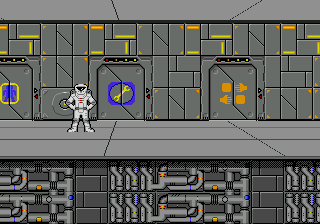
Starflight (USA, Europe) (v1.1)
0 1 0
Step Into the World of Starflight
Starflight (USA, Europe) (v1.1) is a classic Genesis game that takes players on a journey through a distant galaxy filled with mystery and adventure. Its pixelated visuals and synthesized sound effects evoke the arcade spirit of the era, creating a nostalgic yet immersive atmosphere. The interface is simple, but the universe feels vast, encouraging exploration and strategic choices. As you move across star maps and alien worlds, the thrill of venturing into the unknown is clear, even with the limited graphics of the Genesis era.
The soundtrack, made up of synthesized melodies, fits the spacey setting, shifting subtly as you travel between star systems and planets. The visual style relies on colorful sprites and text-based interfaces, putting gameplay depth ahead of graphical detail. This combination of sound and visuals fosters a feeling of solitary exploration—an experience that balances tension with curiosity, perfect for those looking for a classic space adventure on their browser-based emulator.
How the Gameplay Hooks You
Starflight combines adventure, role-playing, and simulation, centered around exploration and resource management. You begin with a small spaceship and a modest crew, tasked with navigating a galaxy full of planets, star systems, and alien civilizations. Progress depends on discovering new locations, collecting information, and making strategic choices about where to go next. The pacing encourages careful planning; rushing might lead to running out of resources or encountering enemies.
The game’s loop involves balancing exploration with survival: scanning planets, gathering data, trading or fighting, and upgrading your ship. Each decision impacts your crew’s well-being and your ability to uncover the galaxy’s secrets. Progress feels natural, as you piece together the galaxy’s story through collected data and encounters. The structure promotes long-term planning, with each session revealing new layers of the universe, though quick play sessions might feel disjointed because of the depth of its mechanics.
Pro Tips for Starflight
Getting started can seem a bit daunting, but these tips should help make things smoother:
- Focus on mapping and data collection — knowing more opens new routes and alliances.
- Manage resources carefully, like fuel and supplies; running out can end your game.
- Save often; you might need to backtrack to avoid dead ends.
- Talk to alien species carefully; some can help, others might be threats.
- Upgrade your ship thoughtfully, especially sensors and weapons to handle tougher enemies.
- Keep notes on planets and star charts; the game’s complexity rewards good record-keeping.
Frequently Asked Questions
Is the game good for short play sessions?
You can break exploration and data gathering into smaller chunks, but it’s best played over longer stretches to enjoy its full depth and unfolding story.
Does the game get repetitive?
While some activities like scanning planets and trading repeat, the variety of alien encounters and the growing galaxy help keep things fresh across multiple sessions.
Can I play this offline or on mobile devices?
Since it runs directly in your browser through an emulator, you can play Starflight on any device with internet access—no downloads needed, so you can jump in whenever it suits you.
This Genesis classic offers a rewarding journey through a pixelated cosmos, where every choice shapes your story. Its mix of adventure, strategy, and role-playing creates a universe worth exploring, especially when played right in your browser.
Related games: you can also try Sonic 2 Delta v0.30 and Shadow of the Beast – Mashou no Okite (Japan), or browse all other games in the Genesis category.
How to Play Starflight (USA, Europe) (v1.1)?
Explore the galaxy by navigating star maps and planets, gathering data, trading, and upgrading your ship while managing resources and making strategic decisions to uncover the universe's secrets.
Game Controls
Arrow keys move your ship; other keys handle actions like scanning, trading, and upgrading.
You may be interested in:
-
 Genesis
♥ 1
Unnecessary Roughness 95 (USA)
Genesis
♥ 1
Unnecessary Roughness 95 (USA) -
![Undead Line (Japan) [En by MIJET v20070903]](https://www.playf2p.com/wp-content/uploads/undead-line-japan-en-by-mijet-v20070903-200x120.jpg) Genesis
♥ 1
Undead Line (Japan) [En by MIJET v20070903]
Genesis
♥ 1
Undead Line (Japan) [En by MIJET v20070903] -
 Genesis
♥ 1
Undead Line (Japan)
Genesis
♥ 1
Undead Line (Japan) -
 Genesis
♥ 4
Ultra Instinct Sonic The Hedgehog
Genesis
♥ 4
Ultra Instinct Sonic The Hedgehog -
 Genesis
♥ 2
Ultimate Soccer (Europe)
Genesis
♥ 2
Ultimate Soccer (Europe) -
 Genesis
♥ 5
Ultimate Qix (USA)
Genesis
♥ 5
Ultimate Qix (USA) -
 Genesis
♥ 25
Ultimate Mortal Kombat Trilogy
Genesis
♥ 25
Ultimate Mortal Kombat Trilogy -
 Genesis
♥ 7
Ultimate Mortal Kombat 3 God Mode
Genesis
♥ 7
Ultimate Mortal Kombat 3 God Mode
Comments (0)
No comments yet. Be the first to comment!