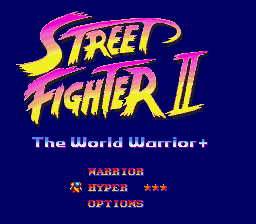
Street Fighter II: The World Warrior+
0 11 0
Street Fighter II: The World Warrior+ is a classic Genesis fighting game that runs right in your browser. It brings that arcade-style combat into a familiar console-era look, offering a fighting experience that’s simple to pick up but still has depth. If you’re nostalgic for the 90s or enjoy competitive battles, this game offers a fun challenge that still feels fresh. It’s great for a quick match or longer tournaments, rewarding timing, memorization, and strategic thinking.
Getting Into Street Fighter II: The World Warrior+
The game focuses on one-on-one battles, with players choosing from a lineup of characters, each with their own moves and fighting styles. The goal is to master attacks, combos, and special moves to wear down your opponent’s health bar before they do the same to you. Matches usually last a few minutes, making it easy to jump in for a quick round or spend more time sharpening your skills. You can play solo against AI or challenge friends or other players online here. Controls are simple, with punches, kicks, and special move buttons, encouraging you to experiment and find what works best. Success comes from understanding your character’s strengths and weaknesses and anticipating what your opponent will do next. Many players enjoy practicing combos, timing their special moves, and reading their opponent’s tendencies during each fight.
Standout Features
The pixel art keeps things colorful and sharp, staying true to the original arcade look. Animations flow smoothly enough to show off each character’s moves clearly, and the backgrounds, while simple, evoke the classic fighting tournament setting. Progressing through the game is straightforward: win matches to unlock new fighters or improve your skills against the AI. The variety of characters, each with their own fighting styles, keeps things interesting and adds replay value. Even after many fights, players often find new ways to outsmart opponents, especially when perfecting combos or trying out different strategies. The mechanics are easy to understand, making it accessible for newcomers, but there’s enough depth for experienced players to keep refining their skills.
Strategy and Tips
Getting started means learning your character’s move set and paying attention to your opponent’s habits. Blocking and punishing mistakes early can give you an advantage. Practice performing special moves smoothly—they often turn the tide of a match. Watching your opponent’s behavior helps you anticipate their attacks and counter effectively. Throw moves can be useful when opponents are blocking or distracted, opening up new opportunities. Patience and good timing are key; rushing in without thinking can leave you vulnerable.
- Practice against the AI to learn your character’s moves and timing.
- Pay attention to your opponent’s attack patterns and take advantage of their mistakes.
- Use blocking smartly and punish missed attacks.
- Try different characters to find a fighting style that feels right for you.
- Focus on mastering a few effective combos rather than trying every move.
Quick Questions
How do I get started if I’ve never played Street Fighter before?
Start with the AI mode to get comfortable with the controls and move timing before jumping into multiplayer matches.
What’s a common mistake beginners make?
Spamming special moves or attacking recklessly often leaves you open to counters—patience and defense usually serve you better.
Can I play Street Fighter II: The World Warrior+ on mobile or touch devices?
Since it runs in your browser, it works best on desktops, but if your device’s browser supports the game controls, you can play on mobile too.
Related games: you can also try Sonic 1 Open World Experiment and Gynoug (Europe), or browse all other games in the Genesis category.
How to Play Street Fighter II: The World Warrior+?
Choose a character and fight one-on-one matches by using punches, kicks, and special moves to deplete your opponent's health bar before they do the same to you. Win matches to unlock characters and improve skills.
Game Controls
Arrow keys control movement; action buttons are mapped to keyboard keys for punches, kicks, and special moves.
You may be interested in:
-
 Genesis
♥ 3
Zou! Zou! Zou! Rescue Daisakusen (Japan)
Genesis
♥ 3
Zou! Zou! Zou! Rescue Daisakusen (Japan) -
 Genesis
♥ 6
Zoom! (World)
Genesis
♥ 6
Zoom! (World) -
 Genesis
♥ 9
Zool – Ninja of the ‘Nth’ Dimension (USA)
Genesis
♥ 9
Zool – Ninja of the ‘Nth’ Dimension (USA) -
 Genesis
♥ 11
Zombies Ate My Neighbors (USA)
Genesis
♥ 11
Zombies Ate My Neighbors (USA) -
 Genesis
♥ 9
Zombies (Europe)
Genesis
♥ 9
Zombies (Europe) -
 Genesis
♥ 1
Zombie High (USA) (Proto)
Genesis
♥ 1
Zombie High (USA) (Proto) -
 Genesis
♥ 1
Zhuagui Dashi – Ghost Hunter (China) (Unl)
Genesis
♥ 1
Zhuagui Dashi – Ghost Hunter (China) (Unl) -
 Genesis
♥ 1
Zero Wing (Japan)
Genesis
♥ 1
Zero Wing (Japan)
Comments (0)
No comments yet. Be the first to comment!