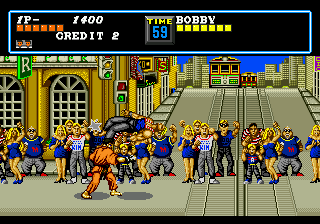
Street Smart (Japan, USA)
0 4 0
Street Smart (Japan, USA) is a classic Genesis game that combines action and fighting elements into a straightforward, easy-to-learn experience. Its simple controls and accessible gameplay make it a good choice for players looking for a no-fuss brawler that’s free in your browser. This Genesis title offers a nostalgic trip for fans of old-school arcade-style fighting games, with gameplay that’s easy to get into but hard to master.
What Is Street Smart?
Street Smart is a fighting game from the Genesis era where players face off against opponents in one-on-one battles. The gameplay focuses on timing punches, kicks, and blocks to defeat enemies while avoiding damage. It’s designed to be approachable, emphasizing quick reflexes and good timing over complex combos or story modes. Players can jump right into matches without needing to learn complicated mechanics, making it suitable for casual players or those new to fighting games.
The game features straightforward combat mechanics within a street fighting theme. The goal is to beat all opponents through a series of battles, often relying on quick, decisive moves. As a title from the Genesis era, the experience is built around fast-paced action, with a limited but satisfying set of moves that keep gameplay lively and engaging. Its pixel art characters and urban backgrounds evoke the arcade atmosphere of the early 90s.
What Keeps You Coming Back
One reason players keep returning to Street Smart is how easy it is to pick up and play. The controls are simple enough for newcomers, but the challenge grows as you face tougher opponents, encouraging you to improve your skills. The game offers replay value through trying to beat your high scores, improve your performance, or experiment with different strategies against each enemy.
The short, punchy matches make it perfect for quick gaming sessions. Its competitive nature pushes players to sharpen their timing and learn enemy patterns, which can be quite addictive. The minimalistic design and straightforward mechanics mean you can jump straight into action without a steep learning curve, making it accessible for players of all ages and skill levels. These qualities help keep Street Smart appealing, especially for fans of retro fighting games who enjoy testing their reflexes in a no-frills environment.
Handy Tips
Getting the most out of Street Smart is simple with a few useful tips:
- Practice your timing for punches and kicks to land combos and avoid getting hit.
- Use blocking effectively to defend against opponents’ attacks; timing is crucial.
- Watch enemy patterns to anticipate their moves and counterattack more effectively.
- Keep your movements unpredictable to prevent opponents from reading your strategy.
- Focus on quick, decisive strikes rather than prolonged exchanges for better chances of winning.
- Try different characters if available; each may have slightly different attack styles or speeds.
Player FAQ
Is Street Smart easy for beginners to learn?
Yes, its simple controls and clear mechanics make Street Smart accessible for newcomers to fighting games.
Can younger players enjoy Street Smart?
Definitely, since its basic gameplay and pixel art style suit a younger audience, though some fighting actions imply mild violence.
Do I need an internet connection to play Street Smart here?
No, the game runs directly in your browser, so you can enjoy Street Smart offline without any extra downloads.
Street Smart offers a street-smart challenge that’s easy to pick up but hard to put down. Its simplicity makes it a solid choice for quick, competitive fun, and its timeless gameplay keeps it relevant for fans of retro fighting games and casual players alike.
Related games: you can also try Hyper Sonic in Sonic 2 and Sonic The Hedgehog AGX (S1 Hack), or browse all other games in the Genesis category.
How to Play Street Smart (Japan, USA)?
Fight through one-on-one matches by timing punches, kicks, and blocks to defeat opponents. Focus on quick reflexes and avoiding damage to win each battle.
Game Controls
Arrow keys act as the D-pad; Enter is Start; on-screen mapped keys handle the action buttons.


Comments (0)
No comments yet. Be the first to comment!