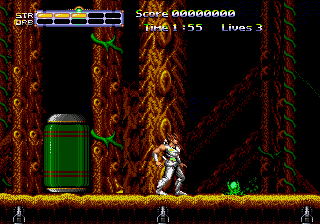
Strider Returns – Journey from Darkness (USA)
0 1 2
Strider Returns – Journey from Darkness (USA) is a classic Genesis game you can play right in your browser. It offers a side-scrolling action experience from the console era that fans of retro platformers and action titles might enjoy. The gameplay focuses on quick reflexes, precise jumps, and combat, making it a good choice for those who like old-school gameplay on modern devices.
Getting Into Strider Returns – Journey from Darkness
The game is centered around moving through linear levels filled with enemies, obstacles, and platforming sections. Your character moves from left to right, battling foes and avoiding hazards. It’s simple to get started—just launch the game and start moving. Most of the time, you’ll go through stages, manage your health, and face bosses at the end of each level. Since it’s rooted in arcade-style design, the difficulty gradually increases, asking you to remember enemy patterns and time your actions carefully.
This game offers a single-player experience that rewards improving your skills with each attempt. Its quick pace encourages fast decision-making and accurate movements. Being browser-based means you can jump in whenever you want, with no setup needed, whether for a quick session or a longer challenge as you get familiar with the levels.
Standout Features
The visuals reflect the Genesis era, with pixel art that clearly shows characters, enemies, and backgrounds. While not pushing hardware limits, the art style keeps things clear and focused on action. The progression is simple: defeat enemies, clear levels, and face bosses, with each stage getting a bit tougher. Since the game is linear, replaying often comes from mastering levels, improving your speed, or aiming for high scores.
Its challenge and the desire to get better at it give replay value. The short levels mean you can try again quickly, and mastering enemy patterns provides a sense of achievement. It doesn’t have branching paths or multiple endings, but the increasing difficulty encourages repeated tries, especially if you’re aiming for high scores or faster completion times. Playing in your browser makes it easy to pick up whenever you’re in the mood for some classic action.
Strategy and Tips
Getting started is easy: learn enemy attack patterns and time your jumps well. Take your time moving through levels; patience helps conserve health and avoid unnecessary hits.
- Focus on avoiding damage rather than rushing to defeat enemies, so you can stay alive longer.
- Use the environment—look for safe spots to plan your next move.
- If possible, practice boss patterns separately to learn their attack cycles and openings.
- Keep an eye on your health; don’t take unnecessary hits, especially in later stages.
- Memorize level layouts when you can to reduce hesitation and improve your times.
Quick Questions
How do I get started playing?
The game loads instantly in your browser—just click to start and get going, no downloads needed.
What’s the most common mistake beginners make?
Many rush in without watching enemy attack patterns, which often leads to taking damage early on.
Can I play this on mobile or touch devices?
Yes, since it runs in your browser, it works on touchscreens, though you might need to get used to the controls for precise jumps and attacks.
Strider Returns – Journey from Darkness offers a straightforward and action-packed trip back to the Genesis days. Its accessibility and challenge make it a good pick for quick play or practicing your skills in classic side-scrolling combat.
Related games: you can also try Daffy Duck in Hollywood (Europe) (Beta) and Mick & Mack as the Global Gladiators (USA) (Beta), or browse all other games in the Genesis category.
How to Play Strider Returns – Journey from Darkness (USA)?
Move through levels, defeat enemies, and avoid hazards using quick reflexes. Clear each stage and face bosses to progress, aiming for high scores and faster times.
Game Controls
Arrow keys control movement; action buttons are mapped to keyboard keys.
You may be interested in:
-
 Genesis
♥ 11
Super Donkey Kong 99 (Unl)
Genesis
♥ 11
Super Donkey Kong 99 (Unl) -
 Genesis
♥ 1
Super Daisenryaku (Japan)
Genesis
♥ 1
Super Daisenryaku (Japan) -
 Genesis
♥ 8
Super Bubble Bobble (China) (Unl)
Genesis
♥ 8
Super Bubble Bobble (China) (Unl) -
 Genesis
♥ 3
Super Baseball 2020 (USA, Europe)
Genesis
♥ 3
Super Baseball 2020 (USA, Europe) -
 Genesis
♥ 2
Super Ashura in Ashura the Glitchhog
Genesis
♥ 2
Super Ashura in Ashura the Glitchhog -
 Genesis
♥ 2
Super Airwolf (Japan)
Genesis
♥ 2
Super Airwolf (Japan) -
 Genesis
♥ 2
Summer Challenge (USA, Europe)
Genesis
♥ 2
Summer Challenge (USA, Europe) -
 Genesis
♥ 1
SubTerrania (USA) (Beta) (Earlier)
Genesis
♥ 1
SubTerrania (USA) (Beta) (Earlier)
Comments (0)
No comments yet. Be the first to comment!