Trouble Shooter (USA)
0 3 0
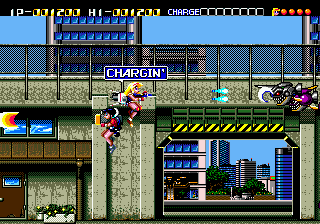
Trouble Shooter (USA) is a classic Genesis game that puts players into the role of a spaceship pilot in a shoot ’em up environment. This Genesis title offers fast-paced action with simple gameplay, making it a good pick for fans of arcade-style shooters. Playing it here in your browser gives you quick access to its nostalgic feel without any downloads or installations.
Getting Into Trouble Shooter
The main gameplay involves flying a spaceship through vertically scrolling levels filled with enemy ships and obstacles. Your main goal is to clear waves of enemies before they reach you, all while avoiding their fire. The game keeps a steady pace, with each level increasing in difficulty, so quick reflexes and precise movements are needed. Players will spend their time dodging attacks and shooting enemies across different stages.
The options are straightforward, mostly focusing on a single-player experience that emphasizes survival and high scores. As you progress, enemies attack faster and patterns get more complex. Success depends on managing your ship’s firepower and movement, turning each run into a test of reflexes and pattern recognition. The game encourages trying again to beat your best score or to master the more challenging levels.
Standout Features
Visually, Trouble Shooter has that pixelated look typical of early 90s arcade shooters, with colorful sprites and simple backgrounds that keep the focus on the action. Its clean design prevents clutter, highlighting gameplay over flashy effects. The difficulty gradually ramps up, making each attempt more intense. This setup encourages players to improve their skills and learn enemy attack patterns, giving you a reason to keep playing.
Even with its simplicity, the game provides enough challenge to stay interesting. High scores are the main competitive element, and getting good at levels takes time as you learn enemy behavior and refine your dodging. The short stages make it easy to pick up and put down, whether you’re looking for quick fun or a longer session to improve your score.
Strategy and Tips
If you’re new to Trouble Shooter, focusing on positioning and avoiding enemy fire is key. Practice recognizing enemy patterns to move and shoot more smoothly. Collecting power-ups, if they appear, can boost your chances, so go for those when you can. Staying calm and avoiding panicked moves will help you last longer and rack up higher scores. Patience and pattern recognition tend to work better than frantic shooting.
- Keep moving to avoid getting trapped by enemies or bullets.
- Target larger ships first to clear the screen faster.
- Use the edges of the screen for better maneuvering space.
- Save your firepower for tough enemies or bosses, if there are any.
- Learn enemy attack patterns to improve your reaction time.
Quick Questions
How do I get started playing Trouble Shooter?
You can jump right in through your browser—no downloads needed, just load the page and start playing.
What’s a common mistake for beginners?
Many new players try to shoot everything without moving enough, which can lead to getting overwhelmed. Focus on dodging first, then firing.
Can I play Trouble Shooter on a mobile device or touchscreen?
Yes, since it runs in your browser, it usually supports touchscreen controls, so you can enjoy it on smartphones and tablets.
Playing Trouble Shooter gives a quick taste of Genesis shoot ’em up action, ideal for short sessions or trying to beat your high score. Its simple gameplay and classic style make it a reliable choice for fans of vintage arcade shooters, all available for free right in your browser.
Related games: you can also try Battletoads & Double Dragon (USA) and Mega Games 10 (Brazil), or browse all other games in the Genesis category.
How to Play Trouble Shooter (USA)?
Fly your spaceship through scrolling levels, shooting enemies and dodging their attacks. Clear waves to survive longer and beat your high score, learning enemy patterns to improve your reflexes.
Game Controls
Arrow keys control movement; other keys handle shooting and game functions.
You may be interested in:
-
 Genesis
♥ 1
Unnecessary Roughness 95 (USA)
Genesis
♥ 1
Unnecessary Roughness 95 (USA) -
![Undead Line (Japan) [En by MIJET v20070903]](https://www.playf2p.com/wp-content/uploads/undead-line-japan-en-by-mijet-v20070903-200x120.jpg) Genesis
♥ 1
Undead Line (Japan) [En by MIJET v20070903]
Genesis
♥ 1
Undead Line (Japan) [En by MIJET v20070903] -
 Genesis
♥ 1
Undead Line (Japan)
Genesis
♥ 1
Undead Line (Japan) -
 Genesis
♥ 4
Ultra Instinct Sonic The Hedgehog
Genesis
♥ 4
Ultra Instinct Sonic The Hedgehog -
 Genesis
♥ 2
Ultimate Soccer (Europe)
Genesis
♥ 2
Ultimate Soccer (Europe) -
 Genesis
♥ 5
Ultimate Qix (USA)
Genesis
♥ 5
Ultimate Qix (USA) -
 Genesis
♥ 25
Ultimate Mortal Kombat Trilogy
Genesis
♥ 25
Ultimate Mortal Kombat Trilogy -
 Genesis
♥ 7
Ultimate Mortal Kombat 3 God Mode
Genesis
♥ 7
Ultimate Mortal Kombat 3 God Mode
Comments (0)
No comments yet. Be the first to comment!