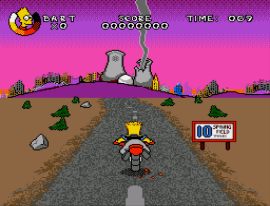
Virtual Bart (World)
0 6 1
Getting Into Virtual Bart
Virtual Bart is a classic Genesis action game that puts you in the shoes of the Springfield character. It’s all about quick reflexes and timing, with players completing various tasks and mini-games that test their agility. Since it’s emulated directly in your browser, there’s no need to download anything—just click and start playing. It’s perfect for a quick gaming session whenever you feel like some retro action.
Most of the gameplay involves simple challenges like catching objects, dodging obstacles, or performing timed actions. The game doesn’t have complex storylines or modes; instead, it offers short, standalone levels that keep things moving at a lively pace. As you get further, the challenges get tougher, requiring sharper reactions and better timing. The gameplay is easy to pick up: watch for cues, react quickly, and see how high you can score or how fast you can finish. It’s a good choice for quick bursts of fun, especially if you’re playing in a browser.
Virtual Bart is a typical action game from the Genesis era, with fast-paced gameplay and simple mechanics. Its bright, pixelated sprites have a nostalgic feel, and the cartoonish animations keep things light. The stages are designed to be quick, encouraging players to improve their reflexes and beat their previous scores. Playing again and again to improve your score or finish levels faster adds replay value, even if the game itself is straightforward. The controls are simple, making it easy to learn but challenging enough to keep you coming back.
The design focuses on instant enjoyment—short levels, immediate feedback, and easy controls. It’s encouraging to keep trying and do better each time. The variety of mini-games and challenges helps keep things fresh, so no two sessions are exactly the same. Bright visuals and lively sounds add to the nostalgic charm, making it appealing for players of all ages who want a quick, fun action game. If you’re looking for a quick arcade hit in your browser, this one fits the bill—enough variety to keep you entertained without requiring a big time commitment.
Strategy and Tips
Getting the most out of Virtual Bart comes down to quick reactions and picking up on the rhythm of each mini-game. Pay attention to visual cues like flashing objects or sound effects, which signal when to act. Building a good sense of timing can make a real difference. With practice, your reactions will improve and you’ll see your scores go up.
- Watch for visual cues that tell you when to move, such as flashing objects or sounds.
- Maintain a steady rhythm—some challenges need consistent timing rather than frantic button presses.
- If you’re unsure, don’t rush; waiting for the right moment often leads to better results.
- Memorize common patterns in repetitive mini-games to speed up your responses.
- Prioritize accuracy at first, then work on speeding up once you’re comfortable.
- If mistakes happen often, take a break—coming back fresh can make a difference.
Quick Questions
How do I start playing Virtual Bart?
Answer: Just load it in your browser. No downloads or setup needed—click and go.
What’s a common mistake beginners make?
Answer: Trying to react too quickly without paying attention to cues, which can lead to missed actions.
Can I play Virtual Bart on mobile or touch devices?
Answer: Yes, it works on mobile devices with touch screens, though quick reactions may be trickier on smaller screens.
This Genesis classic is quick and easy to access, making it perfect for short gaming sessions. You can jump right in and enjoy some retro arcade fun whenever you feel like it.
Related games: you can also try Dinosaurs for Hire (USA) and Addams Family, The (USA) (Beta), or browse all other games in the Genesis category.
How to Play Virtual Bart (World)?
Complete quick mini-games by reacting fast to catch objects, dodge obstacles, or perform timed actions. Improve your score by finishing levels faster and reacting more accurately each time.
Game Controls
Arrow keys control movement; action buttons are mapped to other keys for gameplay.
You may be interested in:
-
 Genesis
♥ 3
Zou! Zou! Zou! Rescue Daisakusen (Japan)
Genesis
♥ 3
Zou! Zou! Zou! Rescue Daisakusen (Japan) -
 Genesis
♥ 6
Zoom! (World)
Genesis
♥ 6
Zoom! (World) -
 Genesis
♥ 9
Zool – Ninja of the ‘Nth’ Dimension (USA)
Genesis
♥ 9
Zool – Ninja of the ‘Nth’ Dimension (USA) -
 Genesis
♥ 11
Zombies Ate My Neighbors (USA)
Genesis
♥ 11
Zombies Ate My Neighbors (USA) -
 Genesis
♥ 9
Zombies (Europe)
Genesis
♥ 9
Zombies (Europe) -
 Genesis
♥ 1
Zombie High (USA) (Proto)
Genesis
♥ 1
Zombie High (USA) (Proto) -
 Genesis
♥ 1
Zhuagui Dashi – Ghost Hunter (China) (Unl)
Genesis
♥ 1
Zhuagui Dashi – Ghost Hunter (China) (Unl) -
 Genesis
♥ 1
Zero Wing (Japan)
Genesis
♥ 1
Zero Wing (Japan)
Comments (0)
No comments yet. Be the first to comment!