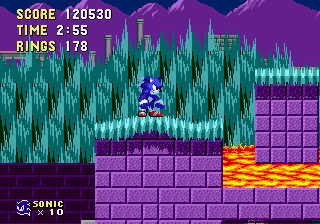
Werehog sonic in sonic 1 v2 By Axel
0 19 5
Werehog Sonic in Sonic 1 v2 by Axel is a fan-made mod that gives Sonic the Hedgehog’s classic platformer a fresh feel. Inspired by the look of the Sega Genesis, the game is perfect for those who like nostalgic gameplay with some creative twists on familiar mechanics. If you enjoy retro-style platformers and want to see familiar games from a different angle, you can try it out right in your browser—no downloads needed.
Getting into Werehog Sonic in Sonic 1 v2 by Axel
This version keeps the core gameplay of Sonic 1 but adds a unique “Werehog” feature that changes how you play levels. The game involves running through side-scrolling stages, dodging obstacles, and collecting rings while exploring different environments. The controls are simple—mainly focused on jumping accurately and moving quickly. Usually, you pick a level, race against the clock or aim for high scores, then try again to improve your run or discover secrets.
The game calls for quick reflexes and memorizing level layouts. Since it’s based on a classic Genesis platformer, it’s best enjoyed in short, focused play sessions. You’ll see familiar stage designs with some tweaks, and there are variations that challenge your timing and agility. It’s all about quick, arcade-style play where finishing levels efficiently matters more than long storylines.
Standout Features
The visuals stick close to the retro Genesis style, with pixel art that captures the era’s charm and adds some creative touches to make the levels look nice. The difficulty increases gradually, pushing you to improve your timing and platforming skills. Replayability comes from trying to beat your previous scores, clock times, or explore different paths through the stages.
There are multiple stages that keep things interesting. Since it runs in a browser, there’s no need to install anything or worry about hardware compatibility. You can jump straight into the game and start playing. Whether you want quick bursts of gameplay or longer sessions to beat your high scores, it’s easy to get into the action and enjoy trying new routes or uncover hidden areas.
Strategy and Tips
Getting started is easy—just pick a level and start playing. Focus on timing your jumps well, especially over tricky areas with moving platforms or enemies.
- Collect rings whenever you can—they act as a buffer if you get hit.
- Use checkpoints wisely, especially in longer stages with tough sections.
- Pay close attention to enemy movement patterns to avoid losing lives.
- Practice difficult parts to improve your speed and flow through the stage more smoothly.
- Try different routes through levels to find faster or safer ways around obstacles.
- If you’re having trouble, slowing down a little can help you time your jumps better and stay safe.
Quick Questions
How do I get started playing Werehog Sonic in Sonic 1 v2 by Axel?
Just load the game in your browser and pick a level. The controls are simple, similar to classic side-scrollers.
What’s a common mistake beginners make?
Many rush through levels without paying attention to enemy patterns or neglecting to collect rings, which can lead to losing lives early on.
Can I play this on my mobile device?
Yes, since it runs in the browser, it works on most smartphones and tablets. Just keep in mind that touchscreen controls might take a little getting used to.
Playing Werehog Sonic in Sonic 1 v2 by Axel offers a nostalgic experience with a twist. Its straightforward gameplay and the challenge of improving your runs make it a good pick for fans of retro platformers who want quick, engaging sessions right in the browser.
Related games: you can also try Monster World IV (Japan) and Sonic & Ashuro (REV01 4.05), or browse all other games in the Genesis category.
How to Play Werehog sonic in sonic 1 v2 By Axel?
Run through levels, jump over obstacles, dodge enemies, and collect rings to complete stages quickly and earn high scores. Use quick reflexes to navigate tricky sections and find secret paths.
Game Controls
Arrow keys control movement; jump and action keys are used for platforming and attacking.
You may be interested in:
-
 Genesis
♥ 18
White Sonic in Sonic 1 (First Release)
Genesis
♥ 18
White Sonic in Sonic 1 (First Release) -
 Genesis
♥ 137
White Sonic in Sonic & Knuckles
Genesis
♥ 137
White Sonic in Sonic & Knuckles -
 Genesis
♥ 132
White Sonic 1
Genesis
♥ 132
White Sonic 1 -
 Genesis
♥ 3
Whip Rush (USA)
Genesis
♥ 3
Whip Rush (USA) -
 Genesis
♥ 1
Whip Rush – Wakusei Voltegas no Nazo (Japan)
Genesis
♥ 1
Whip Rush – Wakusei Voltegas no Nazo (Japan) -
 Genesis
♥ 1
Where in Time Is Carmen Sandiego (USA, Europe) (En,Fr,De,Es,It)
Genesis
♥ 1
Where in Time Is Carmen Sandiego (USA, Europe) (En,Fr,De,Es,It) -
 Genesis
♥ 1
Where in Time Is Carmen Sandiego (Brazil) (Es,Pt)
Genesis
♥ 1
Where in Time Is Carmen Sandiego (Brazil) (Es,Pt) -
 Genesis
♥ 3
Where in the World Is Carmen Sandiego (USA, Europe) (En,Fr,De,Es,It)
Genesis
♥ 3
Where in the World Is Carmen Sandiego (USA, Europe) (En,Fr,De,Es,It)
Comments (0)
No comments yet. Be the first to comment!