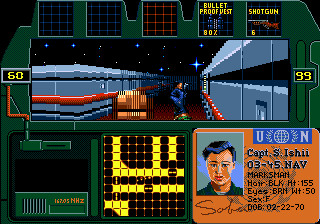
Zero Tolerance (USA, Europe)
0 12 0
Zero Tolerance (USA, Europe) is a classic Genesis game that offers straightforward shooting and first-person action. As a piece of gaming history from the Genesis era, it’s easy to pick up and doesn’t require complicated controls or prior experience. Playing it in your browser makes it accessible for anyone wanting to experience a bit of retro gaming without any fuss.
What Is Zero Tolerance?
Zero Tolerance is a fast-paced first-person shooter where players move through corridors and open areas to take out enemies. The gameplay focuses on quick combat, often with waves of foes in tight spaces. Success depends on shooting accuracy, quick reactions, and managing limited ammo, which keeps each encounter tense and immediate.
Made for the Genesis console, the game is simple but challenging. You control a character armed with a gun, tasked with clearing levels of hostile enemies. The goal is clear: defeat enemies and avoid or survive their attacks. Its difficulty ramps up in a way that rewards skill and punishes mistakes, making short, intense gaming sessions engaging and satisfying.
What Keeps You Coming Back
What makes Zero Tolerance appealing is its quick and direct gameplay. The controls are tight, and the shooting mechanics are straightforward, making it easy to get started but hard to master. It encourages fast reactions and smart movement, especially during chaotic firefights where timing and positioning are key to survival.
Repeated play comes from wanting to improve your skills and complete levels more efficiently. The game has multiple levels filled with enemies, and each run can feel different depending on how you approach it. Its simplicity lets you focus purely on combat, making it perfect for short gaming bursts that reward accuracy and quick thinking. The arcade-style difficulty also encourages players to keep trying to beat their high scores or sharpen their reflexes each time they play.
Handy Tips
Here are a few tips to help you get the most out of Zero Tolerance:
- Keep moving so you don’t become an easy target. Standing still makes you vulnerable.
- Save your ammo for tougher enemies or bosses, rather than wasting shots on weaker foes.
- Pay attention to enemy spawn points and attack patterns to anticipate their moves.
- Use cover wisely—peek out to shoot and then duck back behind walls or objects.
- Take out the most dangerous enemies first, especially those with ranged attacks.
- Practice your aiming to deal more damage and avoid wasting shots in tight spots.
Player FAQ
Is Zero Tolerance suitable for new players?
Absolutely. The controls are simple, and the action is immediate, making it accessible for players of all skill levels. Newcomers can jump right in and enjoy the challenge without much hassle.
Is Zero Tolerance okay for older kids or teenagers?
Since it involves shooting enemies but has pixelated graphics and no graphic violence, it’s generally suitable for older children and teens. Still, parents should decide if it fits their comfort levels.
Do I need an internet connection to play?
No. This game runs directly in your browser on this site, so once it loads, you can play offline. That makes it easy to enjoy a quick gaming session whenever you want.
Playing Zero Tolerance gives a taste of early 90s arcade-style shooting. It’s all about quick reflexes and smart movement, reflecting the no-nonsense style of games from that time. Its simple design and challenging gameplay help keep the spirit of classic gaming alive, showing that sometimes, playing with precision and focus makes for the best action.
Related games: you can also try Sonic 1 Valentines Day Edition and Mortal Kombat II (World) [Hack by Smoke v0.70] (~Mortal Kombat II Unlimited), or browse all other games in the Genesis category.
How to Play Zero Tolerance (USA, Europe)?
Move through levels, shoot enemies quickly, and avoid getting hit. Clear all foes to complete each stage and survive as long as possible.
Game Controls
Arrow keys move; spacebar or designated keys shoot; other keys handle actions.
You may be interested in:
-
 Genesis
♥ 3
Zou! Zou! Zou! Rescue Daisakusen (Japan)
Genesis
♥ 3
Zou! Zou! Zou! Rescue Daisakusen (Japan) -
 Genesis
♥ 6
Zoom! (World)
Genesis
♥ 6
Zoom! (World) -
 Genesis
♥ 9
Zool – Ninja of the ‘Nth’ Dimension (USA)
Genesis
♥ 9
Zool – Ninja of the ‘Nth’ Dimension (USA) -
 Genesis
♥ 11
Zombies Ate My Neighbors (USA)
Genesis
♥ 11
Zombies Ate My Neighbors (USA) -
 Genesis
♥ 9
Zombies (Europe)
Genesis
♥ 9
Zombies (Europe) -
 Genesis
♥ 1
Zombie High (USA) (Proto)
Genesis
♥ 1
Zombie High (USA) (Proto) -
 Genesis
♥ 1
Zhuagui Dashi – Ghost Hunter (China) (Unl)
Genesis
♥ 1
Zhuagui Dashi – Ghost Hunter (China) (Unl) -
 Genesis
♥ 1
Zero Wing (Japan)
Genesis
♥ 1
Zero Wing (Japan)
Comments (0)
No comments yet. Be the first to comment!