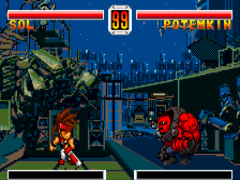
Guilty Gear Petit (J)
0 2 1
Guilty Gear Petit (J) is a classic WonderSwan game that captures the essence of fighting games in a compact, portable form. As a WonderSwan classic, it offers straightforward controls and fast-paced action, making it easy to pick up for new players while still providing enough depth for seasoned fighters. Its simple yet engaging gameplay means you can jump right in without a steep learning curve, perfect for quick sessions or longer battles on the go.
What Is Guilty Gear Petit?
This game belongs to the action fighting genre, focusing on one-on-one battles where timing and strategy are key. The objective is to deplete your opponent’s health bar through a series of punches, kicks, and special moves. The game emphasizes quick reflexes and precise timing, with each match lasting just a few minutes, making it ideal for short play sessions or casual competitions.
Guilty Gear Petit distills the core mechanics of traditional fighting games into a more accessible format. Its controls are simplified, yet it retains enough complexity to challenge players who want to master timing and move combos. The game’s straightforward approach makes it a good entry point for players new to fighting games, while still providing enough challenge for those familiar with the genre.
What Keeps You Coming Back
The game offers a limited roster of characters, but each has distinct moves and playstyles, encouraging experimentation. Its fast-paced matches and easy-to-understand mechanics make it perfect for quick retries, fostering a pick-up-and-play mentality that keeps players returning. The simplicity of Guilty Gear Petit means you can jump into a match instantly, with minimal fuss, making it easy to squeeze in a quick fight anytime.
Despite its straightforward design, the game features competitive replayability. Players often challenge themselves to improve their skills, beat their high scores, or outsmart friends in local battles. Its quick match length and accessible mechanics make it suitable for casual players and fighting game fans alike, ensuring plenty of chances for repeated fun without long setup times.
Handy Tips
If you’re just starting out, focus on mastering basic attacks before trying more complex moves. Timing your punches and kicks is more effective than button mashing.
- Practice blocking and dodging to avoid taking damage during fights.
- Experiment with different characters to find the one that suits your style best.
- Learn the timing for special moves to surprise your opponent.
- Use quick matches to familiarize yourself with each character’s strengths and weaknesses.
- Keep an eye on your health bar and manage your offense and defense accordingly.
Player FAQ
Is Guilty Gear Petit easy enough for beginners?
Yes, the game is designed with simple controls and mechanics, making it accessible for newcomers to fighting games.
Can I play Guilty Gear Petit offline and on any device?
This WonderSwan classic runs directly in your browser, so you can enjoy it without needing an internet connection or specific hardware, making it ideal for casual, offline play.
Is Guilty Gear Petit suitable for younger players?
While it features cartoon-style graphics and straightforward gameplay, it’s primarily aimed at older players. Parents should consider the game’s content and difficulty for younger children.
Guilty Gear Petit remains a neat port of a fighting game classic, simplified for quick, fun battles. Its easy learning curve makes it a friendly choice for casual players or anyone interested in trying out a classic fighting game on the WonderSwan platform, all playable freely in your browser.
Related games: you can also try Dragonball (J) and Chocobo no Fushigi na Dungeon (J) [M], or browse all other games in the WonderSwan category.
How to Play Guilty Gear Petit (J)?
Fight against an opponent by using punches, kicks, and special moves to deplete their health bar. Focus on timing and quick reactions in fast-paced one-on-one battles.
Game Controls
Arrow keys act as the D-pad; action buttons are mapped to keyboard keys.
You may be interested in:
-
 WonderSwan
♥ 1
Yakusoku no Chi Riviera (J)
WonderSwan
♥ 1
Yakusoku no Chi Riviera (J) -
 WonderSwan
♥ 2
XI (Sai) Little (J)
WonderSwan
♥ 2
XI (Sai) Little (J) -
![X Card of Fate (TV Animation X) (J) [!]](https://www.playf2p.com/wp-content/uploads/x-card-of-fate-tv-animation-x-j-200x120.png) WonderSwan
♥ 1
X Card of Fate (TV Animation X) (J) [!]
WonderSwan
♥ 1
X Card of Fate (TV Animation X) (J) [!] -
![WonderSwan Handy Sonar (J) [M]](https://www.playf2p.com/wp-content/uploads/wonderswan-handy-sonar-j-m-200x120.png) WonderSwan
♥ 1
WonderSwan Handy Sonar (J) [M]
WonderSwan
♥ 1
WonderSwan Handy Sonar (J) [M] -
![Wonder Stadium (J) [M]](https://www.playf2p.com/wp-content/uploads/wonder-stadium-j-m-200x120.png) WonderSwan
♥ 1
Wonder Stadium (J) [M]
WonderSwan
♥ 1
Wonder Stadium (J) [M] -
![Wonder Stadium ’99 (J) [M]](https://www.playf2p.com/wp-content/uploads/wonder-stadium-99-j-m-200x120.jpg) WonderSwan
♥ 1
Wonder Stadium ’99 (J) [M]
WonderSwan
♥ 1
Wonder Stadium ’99 (J) [M] -
![Wonder Classic (J) [M][!]](https://www.playf2p.com/wp-content/uploads/wonder-classic-j-m-200x120.png) WonderSwan
♥ 1
Wonder Classic (J) [M][!]
WonderSwan
♥ 1
Wonder Classic (J) [M][!] -
![Wizardry – Scenario 1 – Kyounou no Shiren Jou (J) [M][!]](https://www.playf2p.com/wp-content/uploads/wizardry-scenario-1-kyounou-no-shiren-jou-j-m-200x120.jpg) WonderSwan
♥ 1
Wizardry – Scenario 1 – Kyounou no Shiren Jou (J) [M][!]
WonderSwan
♥ 1
Wizardry – Scenario 1 – Kyounou no Shiren Jou (J) [M][!]
Comments (0)
No comments yet. Be the first to comment!