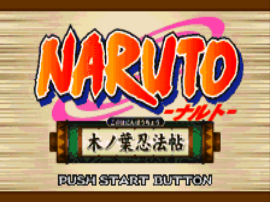
Naruto (J)
0 24 3
Naruto (J) is a classic WonderSwan role-playing game that provides a straightforward turn-based experience rooted in the handheld’s era of simple yet engaging RPGs. This WonderSwan classic is great for fans of the franchise or anyone looking for a nostalgic JRPG to play in their browser. Its focus on character development and story-driven gameplay makes it accessible for players interested in a traditional role-playing experience on a retro platform.
Getting Into Naruto
The game involves exploring various maps, engaging in battles, and managing your team of characters through a turn-based combat system. During a typical session, players select their party members, move through different environments, and encounter enemies that trigger combat sequences. The game encourages strategic decision-making, as choosing the right attacks and managing resources are important for progressing. You’ll also see story segments that deepen your understanding of the narrative, often woven with battles or exploration.
Progression involves leveling up characters, unlocking new skills, and upgrading equipment, which are standard for the genre. Battles start when you move into enemy zones or encounter foes randomly, and success depends on understanding enemy weaknesses and timing your actions well. The pacing is steady, with each session usually lasting until a boss fight or story milestone, making it suitable for quick plays or longer sessions.
Standout Features
The graphics stick to the minimalistic charm of WonderSwan visuals, with simple sprite animations and clear, colorful environments that reflect the handheld’s style. While it doesn’t have high-resolution graphics, the art captures the essence of the franchise with recognizable character designs and familiar settings. The progression system encourages replay, as players can try different character builds and strategies to defeat tougher enemies or explore alternative story paths.
Replay value is increased by the game’s straightforward mechanics and various character customization options. Each playthrough can be different depending on choices made in character development and combat tactics. Its design makes it easy to revisit, whether to try new approaches or simply enjoy the nostalgic feel of a WonderSwan RPG. The simplicity and focus on core gameplay make it approachable for players of all experience levels.
Strategy and Tips
If you’re starting out with Naruto, try to balance your team’s skills and keep an eye on your resources during battles. Here are some tips to help you succeed:
- Upgrade characters that suit your playstyle early to make battles smoother.
- Pay attention to enemy weaknesses and use them to your advantage for quicker wins.
- Save your special moves for boss fights or tough enemies to get the most impact.
- Explore thoroughly to find hidden items or better equipment that boost your team’s stats.
- Manage your resources carefully — avoid using all your items at once, especially before boss encounters.
- Adjust your party based on the enemies you face to improve your chances of victory.
Quick Questions
How do I get started with Naruto?
Just select the game from the browser emulator and follow the in-game prompts to begin your adventure. It’s designed to be easy for newcomers, with simple menus and gameplay.
What’s a common mistake new players make?
Many overlook the importance of upgrading characters and equipment early on, which can make battles harder later. Focus on improving your team regularly.
Can I play Naruto on mobile or touchscreen devices?
Since it runs directly in your browser, you can play on any device with a modern browser, including phones and tablets. Touch controls might work depending on your device’s browser, but the game is optimized for standard input methods.
Playing Naruto offers a nostalgic look at WonderSwan’s RPG lineup, with enough strategic depth to keep players interested. Its simple mechanics, combined with familiar JRPG elements, make it a solid choice for fans of the franchise or anyone interested in a classic handheld RPG experience in their browser.
Related games: you can also try Buffers Evolution (J) [M] and Dark Eyes – Battle Gate (J) [!], or browse all other games in the WonderSwan category.
How to Play Naruto (J)?
Explore maps, engage in turn-based battles, and develop your characters through leveling up, skills, and equipment to progress through story events and defeat enemies.
Game Controls
Arrow keys for movement; other keys for actions and menu navigation.
You may be interested in:
-
 WonderSwan
♥ 1
Yakusoku no Chi Riviera (J)
WonderSwan
♥ 1
Yakusoku no Chi Riviera (J) -
 WonderSwan
♥ 2
XI (Sai) Little (J)
WonderSwan
♥ 2
XI (Sai) Little (J) -
![X Card of Fate (TV Animation X) (J) [!]](https://www.playf2p.com/wp-content/uploads/x-card-of-fate-tv-animation-x-j-200x120.png) WonderSwan
♥ 1
X Card of Fate (TV Animation X) (J) [!]
WonderSwan
♥ 1
X Card of Fate (TV Animation X) (J) [!] -
![WonderSwan Handy Sonar (J) [M]](https://www.playf2p.com/wp-content/uploads/wonderswan-handy-sonar-j-m-200x120.png) WonderSwan
♥ 1
WonderSwan Handy Sonar (J) [M]
WonderSwan
♥ 1
WonderSwan Handy Sonar (J) [M] -
![Wonder Stadium (J) [M]](https://www.playf2p.com/wp-content/uploads/wonder-stadium-j-m-200x120.png) WonderSwan
♥ 1
Wonder Stadium (J) [M]
WonderSwan
♥ 1
Wonder Stadium (J) [M] -
![Wonder Stadium ’99 (J) [M]](https://www.playf2p.com/wp-content/uploads/wonder-stadium-99-j-m-200x120.jpg) WonderSwan
♥ 1
Wonder Stadium ’99 (J) [M]
WonderSwan
♥ 1
Wonder Stadium ’99 (J) [M] -
![Wonder Classic (J) [M][!]](https://www.playf2p.com/wp-content/uploads/wonder-classic-j-m-200x120.png) WonderSwan
♥ 1
Wonder Classic (J) [M][!]
WonderSwan
♥ 1
Wonder Classic (J) [M][!] -
![Wizardry – Scenario 1 – Kyounou no Shiren Jou (J) [M][!]](https://www.playf2p.com/wp-content/uploads/wizardry-scenario-1-kyounou-no-shiren-jou-j-m-200x120.jpg) WonderSwan
♥ 1
Wizardry – Scenario 1 – Kyounou no Shiren Jou (J) [M][!]
WonderSwan
♥ 1
Wizardry – Scenario 1 – Kyounou no Shiren Jou (J) [M][!]
Comments (0)
No comments yet. Be the first to comment!