Play 3D Golf Simulation
0 1 0
Play 3D Golf Simulation offers a fresh take on the classic golf experience, combining vintage-style graphics with gameplay that appeals to fans of the sport. As a browser game, it takes you onto beautifully crafted courses where accuracy, strategy, and patience are your best tools. Whether you’re into golf or just looking for a relaxed way to spend some time, this game creates a fun yet challenging environment that keeps players coming back for more swings and putts.
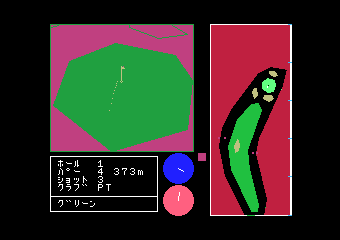
Designed with a nostalgic MSX 1 vibe, Play 3D Golf Simulation features pixel-perfect visuals and a simple interface that’s accessible for casual players and those looking for a bit more challenge. Its atmospheric courses, with rolling greens and scenic backgrounds, foster a calm, focused mood, making each shot feel like a small win. The game’s straightforward mechanics, combined with subtle depth, make it easy to pick up while offering enough nuance for seasoned golfers to test their skills. Playing online, you can quickly jump into a round or spend longer perfecting your swing—either way, it’s a golf experience that’s easy to start but hard to put down.
Why Play 3D Golf Simulation Is Worth Playing
One of the appealing aspects of Play 3D Golf Simulation is its nostalgic visual style. The pixel art recalls the MSX 1 era, giving it a charming, retro feel that appeals to fans of vintage gaming. Despite its simple look, the game creates an inviting atmosphere, with lively course designs and animated details that add a bit of life to each round. The visual style feels cozy and immersive, whether you’re playing just for fun or trying to beat your personal best.
Another reason players keep coming back is the gameplay. It’s straightforward but requires some thought—aiming, power, and timing are key. The controls are simple enough for newcomers, but understanding how wind, terrain, and shot angles affect the ball adds an extra layer of strategy. The physics feel natural, making each shot a little more satisfying when you get it right, and providing a sense of progress as you improve your skills.
What stands out about Play 3D Golf Simulation is its relaxed yet engaging tone. The game balances casual play with moments of concentration, turning each hole into a small puzzle. Its quick sessions are perfect for a quick break, but you can also spend more time on longer rounds if you want to practice. Different course conditions keep things interesting, so no two rounds are quite the same. It encourages players to experiment, improve their technique, and enjoy the calming rhythm of golf—all within a charming pixel art package.
Tips to Get Ahead
Here are some practical tips to help you improve in Play 3D Golf Simulation:
- Keep an eye on the wind indicators; adjusting your aim accordingly can help on tricky holes.
- Practice your timing with power swings; getting the balance right means your shots won’t fall short or overshoot.
- Use the terrain to your advantage—hills and slopes can help or hinder your shot, so plan your approach accordingly.
- Look over the course before swinging; spotting hazards and good landing spots can make a difference.
- Take your time lining up your shot; rushing often leads to misjudged swings and missed opportunities.
- Try different clubs if available, to see how distance and control change your shots.
- Play several rounds to get familiar with course patterns and build consistency.
Things to Know Before You Start
Question?
How tough is Play 3D Golf Simulation for newcomers?
Answer.
The game is quite accessible for beginners, but the physics and strategies can become more rewarding as you get better. It’s suitable for all skill levels, with a gentle learning curve.
Question?
How long does a typical game take?
Playing usually takes just a few minutes per hole, making it good for quick breaks or casual rounds. If you have more time, you can go for several rounds in one sitting.
Question?
Can I play on mobile or offline?
Playing directly through this site means you can enjoy the game on desktop or mobile browsers without downloading anything. It needs an internet connection, though, so offline play isn’t an option. Still, it’s easy to access whenever you want a quick game.
Question?
Is it suitable for kids or more casual players?
Yes, with simple mechanics and a relaxed pace, it works well for younger audiences or anyone looking for a low-pressure golf experience. The retro style adds a nostalgic touch that many enjoy across different ages.
Jump into the Game Today
If you’re ready to hit the virtual links, Play 3D Golf Simulation is just a click away on this site. It’s a fun, accessible way to practice your swing, challenge yourself, or just unwind with a quick round. Whether you’re experienced or new to golf, this browser game offers enough charm and challenge to keep you swinging. Grab your virtual clubs and see if you can master the course—nothing beats that feeling when you sink a perfect putt.
Related games: you can also try Play 10 Yard Fight, or browse all other games in the MSX 1 category.
How to Play Play 3D Golf Simulation?
Aim, adjust power, and time your shot to get the ball in the hole in as few strokes as possible. Use strategy to handle wind and terrain for better scores.
Game Controls
Use mouse to aim and set power, click to hit; keyboard controls are optional.








Comments (0)
No comments yet. Be the first to comment!