Dynastic Hero, The
0 1 0
Dynastic Hero, The is a classic TurboGrafx CD game that mixes action, platforming, and adventure into a side-scrolling adventure. Originally made for the TurboGrafx CD console, it offers a nostalgic look at 16-bit style gameplay with bright visuals and simple mechanics. Fans of old-school platformers with a fantasy theme will find this game enjoyable, especially since it runs right in your browser, no downloads needed.
Getting Into Dynastic Hero, The
The main idea in Dynastic Hero, The is guiding a brave character through levels filled with enemies, obstacles, and secrets. It’s a typical side-scroller where you move from left to right, attacking enemies with jumps and strikes. Each stage combines combat and platforming challenges, so timing your jumps and attacks matters. As you progress, you’ll clear levels, face bosses, and collect items that boost your skills or open new paths.
A typical game session starts at the beginning of a level, where you look for power-ups and hidden areas, then fight enemies until you reach the boss or the stage’s end. The game encourages learning enemy moves and refining your timing, making each run feel more strategic. Though it doesn’t have complex RPG elements, it rewards players who master its mechanics and explore every part of each level.
Standout Features
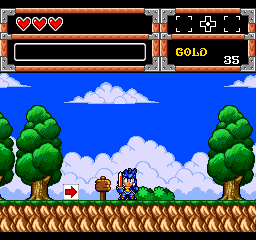
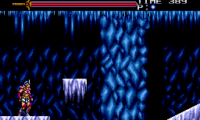
Visually, Dynastic Hero, The channels the charm of classic TurboGrafx titles with colorful, pixel-perfect sprites and lively backgrounds. Its art style fits a fantasy adventure theme, with characters and settings that evoke nostalgia. The animations flow smoothly, and the level design takes you through lush forests, dark dungeons, and more, keeping things fresh across stages.
Progress depends on completing levels and beating bosses, which unlock new areas and upgrades. There’s replay value in trying to beat your best times, finding hidden secrets, and mastering the controls for more efficient play. The straightforward design makes it easy for new players to pick up, but the layered challenges reward those aiming for higher scores and faster finishes.
Strategy and Tips
Playing Dynastic Hero, The is about balancing attack, movement, and exploration. Learn enemy attack patterns early so you can time your jumps and strikes well. Trying different routes within levels can help you find useful hidden items, especially in tougher parts.
- Collect power-ups that boost your attack or health—they can be key in boss fights.
- Take your time exploring each stage; secrets and upgrades are often tucked away in hard-to-reach spots.
- Practice enemy moves to avoid damage and save health for the tougher battles.
- Sometimes a well-timed jump can avoid enemy attacks better than fighting through them.
- Watch the timer if you’re aiming for high scores or speed runs—rushing can lead to mistakes.
Quick Questions
What’s a good way to start playing?
Try the first few levels to get familiar with enemy patterns and level layouts before focusing on speed or high scores.
What do new players often get wrong?
Many rush through levels without exploring, missing hidden upgrades and leaving themselves open to attacks.
Can I play Dynastic Hero, The on mobile or touch screens?
Yes, since it runs in your browser, you can play it on mobile devices. Just keep in mind that precise controls might take some getting used to.
Dynastic Hero, The offers a simple yet satisfying platforming experience. Its colorful visuals, accessible gameplay, and secrets make it a good pick for fans of retro games. Playing here, right in your browser, brings back the feel of classic gaming without any fuss.
Related games: you can also try Beyond Shadowgate and Dragon Slayer – The Legend of Heroes, or browse all other games in the TurboGrafx CD category.
How to Play Dynastic Hero, The?
Guide your character through levels by jumping, attacking enemies, and exploring for secrets to defeat bosses and advance. Collect upgrades and master timing to improve your score and complete stages faster.
Game Controls
Arrow keys move; attack and jump are mapped to keyboard keys; use them to navigate and fight.




Comments (0)
No comments yet. Be the first to comment!