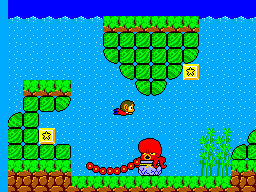
Alex Kidd in Miracle World (USA, Europe) (v1.1)
0 13 5
Alex Kidd in Miracle World (USA, Europe) (v1.1) is a classic Master System platformer that combines charming pixel art, tight controls, and a whimsical fantasy setting. Released during the heyday of 8-bit gaming, this game provides a straightforward yet addictive adventure that has remained enjoyable over time. Its mix of combat, exploration, and puzzle-solving makes it a title worth revisiting, especially through this browser-based emulation. If you’re feeling nostalgic for 8-bit consoles or curious about a timeless platformer, this game is easy to access and fun to play right in your browser.
Why Alex Kidd in Miracle World Is a Game to Try
This game catches the eye with its bright sprite-based visuals that still look good today, thanks to its lively color palette and unique character designs. The world feels energetic and varied, with towns, caves, and castles to explore, each filled with enemies and secrets. The gameplay combines combat using a punch mechanic and puzzle-solving, offering a variety of challenges that keep things interesting without becoming overwhelming. The soundtrack and sound effects give off a nostalgic 80s arcade vibe, fitting well with the whimsical story of Alex’s quest to save his homeland from an evil overlord.
What keeps players coming back is how the game balances simplicity with depth. The controls are responsive, making platforming smooth and satisfying, while the combat system introduces a strategic element with different enemies requiring different tactics. The boss fights and item collection encourage experimentation, and the quirky humor adds charm to each encounter. Its straightforward design makes it accessible for newcomers, yet its subtle difficulty provides enough of a challenge to keep dedicated players trying to improve their skills. Overall, it’s a well-crafted platformer that still feels fresh despite its age.
Tips to Get Started
Start by mastering the punch mechanic early, since it’s key for defeating enemies and bosses efficiently.
- Use power-ups wisely; some are especially helpful during boss fights or tricky sections.
- Explore each area thoroughly to discover hidden items and secrets that can help you move forward.
- Save your special items like the jet or power-ups for the hardest parts.
- Practice your timing for jumps and attacks to avoid damage and defeat enemies more quickly.
- Watch enemy patterns in boss fights to find their weak spots and plan your attacks.
What You Should Know Before Playing
How difficult is Alex Kidd in Miracle World?
It’s moderately challenging, with some tough sections, especially during boss battles. Still, it’s accessible enough for players willing to learn its patterns and mechanics. Expect to die a few times before mastering certain parts.
How long does a typical game session last?
Most players will spend around one to two hours completing a full playthrough, depending on how much they explore and how long they spend solving puzzles or fighting bosses. It’s suitable for quick gaming sessions or longer ones.
Is Alex Kidd in Miracle World suitable for all ages?
It’s generally family-friendly, with bright visuals and light humor, though its challenge level might be frustrating for very young children. Casual players and those feeling nostalgic should find it just right for a quick, enjoyable experience.
Now that you know what to expect, give this browser version of Alex Kidd in Miracle World a try and see how you handle its whimsical challenges and quirky enemies. It’s a straightforward game that still offers plenty of fun, whether you’re reminiscing about childhood or discovering a hidden gem from the Master System library.
Related games: you can also try After Burner (World) and Aerial Assault (USA), or browse all other games in the Master System category.
How to Play Alex Kidd in Miracle World (USA, Europe) (v1.1)?
Move Alex around, jump on enemies, collect items, and defeat bosses to save his homeland. Explore, solve puzzles, and use power-ups wisely to progress through the levels.
Game Controls
Arrow keys for movement; action buttons for jumping, punching, and using items.
You may be interested in:
-
 Master System
♥ 6
Zool – Ninja of the ‘Nth’ Dimension (Europe)
Master System
♥ 6
Zool – Ninja of the ‘Nth’ Dimension (Europe) -
 Master System
♥ 2
Zillion II – The Tri Formation (World)
Master System
♥ 2
Zillion II – The Tri Formation (World) -
 Master System
♥ 3
Zillion (USA) (v1.1)
Master System
♥ 3
Zillion (USA) (v1.1) -
 Master System
♥ 1
Zillion (Japan, Europe) (En,Ja)
Master System
♥ 1
Zillion (Japan, Europe) (En,Ja) -
 Master System
♥ 1
Zillion (Europe) (v1.2)
Master System
♥ 1
Zillion (Europe) (v1.2) -
 Master System
♥ 1
Zaxxon 3-D (World) (Beta)
Master System
♥ 1
Zaxxon 3-D (World) (Beta) -
 Master System
♥ 1
Zaxxon 3-D (World)
Master System
♥ 1
Zaxxon 3-D (World) -
 Master System
♥ 1
Xenon 2 – Megablast (Europe) (Virgin)
Master System
♥ 1
Xenon 2 – Megablast (Europe) (Virgin)
Comments (0)
No comments yet. Be the first to comment!