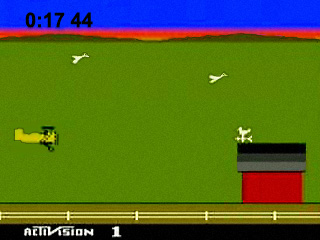
Activision Classics
0 14 2
Activision Classics is a curated collection of classic PlayStation titles that run directly in your browser, providing a nostalgic trip for fans of the console era. If you grew up playing these games on your original PlayStation, you’ll find this emulated experience familiar and straightforward. It’s an easy way to revisit well-loved titles without needing to set up any hardware or downloads. This collection is perfect for those seeking quick, accessible gaming sessions or for newcomers curious about vintage PlayStation gaming.
Getting Into Activision Classics
This game collection features a range of titles that typically follow simple, arcade-style gameplay. The core loop involves completing levels, achieving high scores, or progressing through stages with minimal fuss. Because it’s a PlayStation classic, gameplay tends to be straightforward, focusing on skill and timing rather than complex storylines or character customization. Sessions usually last from a few minutes to longer stretches if you’re aiming for high scores or mastery.
Most titles in the collection are designed for single-player experiences, though some might offer local multiplayer options. Playing here is as simple as selecting a game from the menu and starting immediately. The emulator runs the game directly in your browser, so there’s no need for configuration or setup. This setup makes it easy to jump into a game, try your hand at each title, and switch between them quickly. It’s a platform that caters to both casual players and those wanting to hone their skills across multiple classics.
Standout Features
Visuals on these titles are preserved in their original pixelated style, which adds to the retro charm. The emulation faithfully reproduces the look and feel of the PlayStation era, capturing the blocky sprites, simple backgrounds, and iconic UI elements. This authenticity enhances the nostalgic experience while running smoothly in your browser environment.
Progression varies by game but generally involves completing stages or achieving high scores. Since many of these titles are arcade-style, replay value depends on beating personal records or mastering difficult levels. The games tend to be short but challenging, encouraging players to replay and improve with each session. The collection offers a variety of gameplay mechanics, ensuring you won’t get bored quickly, especially if you’re aiming to beat your best scores or unlock hidden secrets.
Strategy and Tips
Start with familiar titles to get comfortable with the controls and gameplay style. Pay attention to level patterns and enemy behaviors to improve your reaction times.
- Master the controls early, as most titles rely on quick reflexes and timing.
- Practice each level or stage to memorize patterns, especially in arcade-style titles.
- Focus on high scores over just completing levels, since many games reward replay with better rankings.
- Use pause or restart options if available to analyze tough sections without penalty.
- Try different game modes or difficulty settings if they exist, to find a challenge that matches your skill level.
Quick Questions
How do I get started playing Activision Classics?
Just pick a game from the collection menu and click to start playing right in your browser.
What’s a common mistake for beginners?
Many new players try to rush through levels without paying attention to enemy patterns, which can lead to unnecessary mistakes.
Can I play Activision Classics on mobile or touch devices?
Yes, since it runs in your browser, it should work on mobile devices, though controls might be less precise without a physical controller.
This collection offers a straightforward way to enjoy classic PlayStation titles in a browser. Whether you’re revisiting old favorites or trying these games for the first time, it’s a simple platform to experience the challenge and fun of gaming from that era.
Related games: you can also try 100% Star and Ace Combat 2 (Europe), or browse all other games in the PlayStation category.
How to Play Activision Classics?
Select a game, use the keyboard to navigate and perform actions, complete levels or achieve high scores by timing your moves well. Replay to beat your best scores or unlock secrets.
Game Controls
Arrow keys control movement; action buttons are mapped to keyboard keys; Start is usually Enter.
You may be interested in:
-
 PlayStation
♥ 12
Alundra 2: A New Legend Begins
PlayStation
♥ 12
Alundra 2: A New Legend Begins -
 PlayStation
♥ 161
Alundra
PlayStation
♥ 161
Alundra -
 PlayStation
♥ 128
Alone in the Dark – One Eyed Jack’s Revenge
PlayStation
♥ 128
Alone in the Dark – One Eyed Jack’s Revenge -
 PlayStation
♥ 10
Allied General
PlayStation
♥ 10
Allied General -
 PlayStation
♥ 13
All-Star Slammin’ D-Ball
PlayStation
♥ 13
All-Star Slammin’ D-Ball -
 PlayStation
♥ 26
All Star Racing 2
PlayStation
♥ 26
All Star Racing 2 -
 PlayStation
♥ 24
All Star Racing
PlayStation
♥ 24
All Star Racing -
 PlayStation
♥ 139
Alien Trilogy
PlayStation
♥ 139
Alien Trilogy
Comments (0)
No comments yet. Be the first to comment!