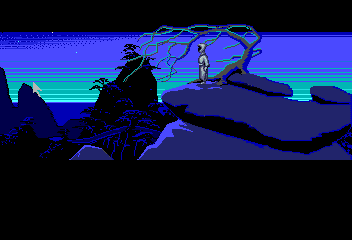
Loom
0 1 0
Loom is a classic TurboGrafx CD game that combines storytelling and puzzle-solving in a richly crafted fantasy setting. Originally released for the TurboGrafx CD platform, it has earned a loyal following among adventure fans. Its distinctive art style, atmospheric soundtrack, and creative gameplay mechanics make it memorable for those who enjoy narrative-driven puzzles. Playing Loom in your browser means you can explore its enchanting universe without downloads or installations, making it easy for retro gaming enthusiasts to enjoy a nostalgic yet fresh experience.
Getting Into Loom
The main gameplay involves using musical spells to solve puzzles and advance the story. As the protagonist, you move through different environments, collect items, and learn melodies that influence the world around you. The game uses a point-and-click interface, where you select musical notes and sequences to cast spells or manipulate objects. Often, you’ll start in a new scene, trying to understand the surroundings and figure out which spells to use to get past obstacles or access new areas.
Throughout the game, you encounter puzzles that require listening, pattern recognition, and experimentation. Instead of combat or timed challenges, Loom centers on exploration and puzzle interaction. The story moves forward in a linear fashion, but the visuals and ambient sounds invite careful observation and multiple playthroughs to discover all its secrets. It’s best enjoyed at a relaxed pace, taking time to appreciate the soundtrack and visual storytelling woven into each scene.
Standout Features
One of Loom’s most striking aspects is its hand-drawn art style, which gives each scene a warm, storybook feel. The visuals match its fantasy setting, creating a sense of wonder that pulls players into its world. The soundtrack plays a key role, with melodies that you learn and reuse to solve puzzles. The music isn’t just background—it’s part of the gameplay. The narrative arc is clear, but the clever use of musical spells encourages experimentation, giving the game replay value for those who want to try different melodies and solutions.
Replayability is also boosted by the multiple solutions some puzzles have—approaching problems in different ways can be rewarding. Loom’s minimalistic interface and focus on auditory cues make it accessible for players of various skill levels, especially those who enjoy a slower, more contemplative style. Its design invites multiple playthroughs, whether to find hidden details or simply enjoy the enchanting atmosphere again.
Strategy and Tips
If you’re new to Loom, pay close attention to the melodies you learn, as they’re essential for solving puzzles. Don’t hesitate to experiment with different note combinations—they can sometimes reveal new solutions.
- Listen carefully to the music cues and try to repeat melodies exactly before trying variations.
- Keep track of the spells you learn—they’re often reused and crucial for puzzle-solving.
- Explore every area thoroughly; items and clues can be subtle but necessary for progress.
- Don’t rush—trial and error is part of the process, and patience often leads to success.
- Use the environment to your advantage, as some puzzles involve manipulating objects alongside musical spells.
Quick Questions
Can I start playing Loom right away without experience?
Yes. The interface is simple, and the focus on exploration and listening makes it accessible for newcomers.
What mistakes do beginners often make?
Many try to rush through puzzles without paying enough attention to the music cues or environmental details, which are key to solving them correctly.
Is Loom playable on mobile or touch devices in the browser?
While it runs in your browser, it’s mainly designed for mouse input. Playing on a touchscreen can work with some adjustments but might be less comfortable.
Loom offers a gentle but captivating experience that highlights atmosphere and puzzle-solving through music. Its charm endures, and playing it in your browser keeps this classic accessible for anyone interested in a thoughtful, story-rich adventure.
Related games: you can also try Fantasy Star Soldier and It Came from the Desert, or browse all other games in the TurboGrafx CD category.
How to Play Loom?
Use musical melodies to solve puzzles and progress through the story by exploring environments, collecting items, and experimenting with different spells to unlock new areas.
Game Controls
Arrow keys or WASD move; other keys select notes and cast spells.




Comments (0)
No comments yet. Be the first to comment!