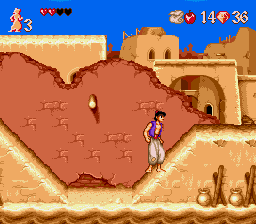
Aladdin II
0 11 1
Aladdin II is a classic Genesis game that runs directly in your browser, giving a glimpse into the platformer adventures of the 16-bit era. Its pixel art and soundtrack bring back the charm of the original console, inviting players into a colorful, storybook world filled with daring escapes and vibrant landscapes. The game captures the spirit of its time, combining simple yet engaging gameplay with the visual flair that made Genesis titles stand out.
Step Into the World of Aladdin II
The game takes players to a lively, animated universe inspired by Middle Eastern fairy tales. Bright, detailed sprites animate bustling marketplaces, desert dunes, and mysterious caves, creating a setting full of adventure. The soundtrack features energetic tunes that complement the lively visuals and boost the sense of movement and urgency. Despite its pixelated graphics, the atmosphere feels lively and immersive, pulling players into a whimsical world where each step leads to a new challenge or discovery.
Animated backgrounds and character sprites highlight the era’s technical charm, while sound effects—like footsteps, calls, and atmospheric melodies—help build a cohesive scene. The pacing encourages quick reflexes and sharp timing, making each level feel like a small adventure within a larger storybook. As you move through different environments, the nostalgic tone stays clear, echoing the simplicity and charm of early 16-bit platformers.
How the Gameplay Hooks You
The main gameplay loop focuses on navigating levels filled with enemies, obstacles, and secrets. Its straightforward design emphasizes timing and precision, rewarding players who pay attention to enemy patterns and platform layouts. Progression is steady but not overwhelming, encouraging exploration and mastery of each stage without feeling punishing or repetitive.
The difficulty gradually increases, but each level is short enough to finish in a few minutes. This makes it good for quick sessions, whether you’re replaying a level or trying to beat your best time. The mechanics are easy to pick up, centered around jumping, avoiding hazards, and collecting items—offering a satisfying experience for fans of classic platformers.
Pro Tips for Aladdin II
To get the most out of the game, pay attention to enemy movements and time your jumps carefully.
- Memorize enemy patterns to avoid unnecessary hits.
- Use precise timing to jump over obstacles instead of rushing through levels.
- Explore every corner for hidden items or shortcuts that can help your progress.
- Practice tricky sections to improve your reaction times for future attempts.
- Keep an eye on your lives—saving them can help you extend your playtime.
- Take occasional breaks to stay focused and avoid frustration.
Frequently Asked Questions
Can I play Aladdin II in short sessions without losing progress?
Yes, its short, manageable levels work well for quick play sessions on this browser version.
Does Aladdin II get repetitive after a while?
While the gameplay is straightforward, increasing difficulty and exploration help keep it interesting over multiple tries.
Is Aladdin II suitable for all ages and skill levels?
The simple mechanics and colorful visuals make it accessible for younger players, but the challenge can also appeal to experienced platformer fans.
This Genesis classic offers a nostalgic experience that’s easy to pick up and satisfying to master. It runs smoothly in your browser, giving a taste of the 16-bit era without any fuss. Whether you’re revisiting a childhood favorite or trying it for the first time, this version makes it simple to enjoy a well-crafted platformer whenever you want.
Related games: you can also try Addams Family Values (Europe) (En,Fr,De) and Aero the Acro-Bat (Europe), or browse all other games in the Genesis category.
How to Play Aladdin II?
Navigate through levels by jumping over obstacles, avoiding enemies, and collecting items. Use timing and pattern recognition to complete each stage quickly and efficiently.
Game Controls
Arrow keys control movement; action buttons are mapped to keyboard keys for jumping and attacking.
You may be interested in:
-
 Genesis
♥ 9
Alien Storm (World)
Genesis
♥ 9
Alien Storm (World) -
 Genesis
♥ 6
Alien Soldier (Japan)
Genesis
♥ 6
Alien Soldier (Japan) -
 Genesis
♥ 19
Alien Soldier (Europe)
Genesis
♥ 19
Alien Soldier (Europe) -
 Genesis
♥ 2
Alien 3 (USA, Europe) (v1.1)
Genesis
♥ 2
Alien 3 (USA, Europe) (v1.1) -
 Genesis
♥ 21
Alex Kidd in the Enchanted Castle (USA)
Genesis
♥ 21
Alex Kidd in the Enchanted Castle (USA) -
 Genesis
♥ 4
Alex Kidd in the Enchanted Castle (Europe) (Alt)
Genesis
♥ 4
Alex Kidd in the Enchanted Castle (Europe) (Alt) -
 Genesis
♥ 11
Alex Kidd in the Enchanted Castle (Europe)
Genesis
♥ 11
Alex Kidd in the Enchanted Castle (Europe) -
 Genesis
♥ 5
Alex Kidd – Tenkuu Majou (Japan)
Genesis
♥ 5
Alex Kidd – Tenkuu Majou (Japan)
Comments (0)
No comments yet. Be the first to comment!