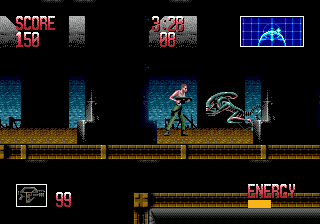
Alien 3 (USA, Europe) (v1.1)
0 2 0
Alien 3 (USA, Europe) (v1.1) is a classic Genesis game that throws players into a tense, action-packed fight for survival against dangerous alien creatures. Based on the film of the same name, it offers a straightforward challenge for fans of retro titles. If you enjoy fast-paced gameplay that mixes combat with resource management, this game delivers a satisfying dose of 16-bit nostalgia, playable right in your browser so you can jump in without any hassle.
Getting Into Alien 3
The gameplay centers on moving through levels filled with hostile aliens. Your main goal is to survive while fighting or avoiding these threats. The game follows a typical action loop: explore, confront enemies, and manage limited supplies like ammo and health. Each session moves quickly, demanding quick reactions and smart choices, especially since enemies can appear unexpectedly and get overwhelming fast.
There aren’t complex storylines or branching paths—just immediate action. You progress through different stages, each with new challenges and alien encounters. Success depends on balancing aggressive tactics with cautious movement, making sure to save resources for tougher enemies. Controls are simple, and the difficulty gradually increases, testing your coordination and planning as you move forward.
Standout Features
Visually, Alien 3 captures the pixel art style typical of the Genesis era, with detailed sprites and atmospheric backgrounds that evoke the tense mood from the film. The animations are smooth, and the aliens react convincingly when attacked, adding to the feeling of danger. Despite its age, the game keeps a gritty, dark aesthetic that pulls players into its hostile environment.
Progression feels straightforward but rewarding—each level is an opportunity to sharpen your tactics, learn enemy patterns, and manage your supplies better. The challenge of mastering each stage adds replay value, especially since enemies can behave unpredictably. Quick sessions make it easy to play casually, and the increasing difficulty encourages refining your approach over multiple tries.
Strategy and Tips
Start out cautiously, especially at the beginning. Save your ammo for tougher enemies and avoid unnecessary fights when you can.
- Clear areas carefully to avoid being caught off guard by surprise attacks.
- Watch your health closely and use cover to stay safe from damage.
- Learn where enemies appear and their attack patterns to time your movements and shots better.
- Save resources for the more dangerous aliens; don’t waste ammo on weaker foes.
- Stay quick on your feet; reacting fast to enemies can mean the difference between survival and defeat.
Quick Questions
How do I start playing Alien 3?
The game loads instantly in your browser. Just open the page and start playing with the controls on-screen or your keyboard—no downloads needed.
What’s a common mistake for newbies?
Many rush into fights without thinking, which quickly drains health. Taking your time and learning enemy patterns helps avoid early deaths.
Can I play Alien 3 on mobile or touch devices?
Yes, since it runs in your browser, you can play on mobile devices with touchscreen controls, though responsiveness might vary depending on your device and browser.
Alien 3 remains a tough action game rooted in its era’s style, offering straightforward but tense gameplay. Its pixel art and quick sessions make it a memorable part of the Genesis lineup, perfect for quick bursts of retro fun. Playing it gives you the chance to face off against aliens much like in the film, all in a format that’s easy to pick up and enjoy whenever you want in your browser.
Related games: you can also try Air Diver (USA) and Aero the Acro-Bat (Europe), or browse all other games in the Genesis category.
How to Play Alien 3 (USA, Europe) (v1.1)?
Navigate through levels, fight or avoid aliens, and manage limited resources like ammo and health to survive as long as possible.
Game Controls
Arrow keys control movement; action buttons are mapped to keyboard keys for shooting and interacting.
You may be interested in:
-
 Genesis
♥ 9
Alien Storm (World)
Genesis
♥ 9
Alien Storm (World) -
 Genesis
♥ 6
Alien Soldier (Japan)
Genesis
♥ 6
Alien Soldier (Japan) -
 Genesis
♥ 19
Alien Soldier (Europe)
Genesis
♥ 19
Alien Soldier (Europe) -
 Genesis
♥ 21
Alex Kidd in the Enchanted Castle (USA)
Genesis
♥ 21
Alex Kidd in the Enchanted Castle (USA) -
 Genesis
♥ 4
Alex Kidd in the Enchanted Castle (Europe) (Alt)
Genesis
♥ 4
Alex Kidd in the Enchanted Castle (Europe) (Alt) -
 Genesis
♥ 11
Alex Kidd in the Enchanted Castle (Europe)
Genesis
♥ 11
Alex Kidd in the Enchanted Castle (Europe) -
 Genesis
♥ 5
Alex Kidd – Tenkuu Majou (Japan)
Genesis
♥ 5
Alex Kidd – Tenkuu Majou (Japan) -
 Genesis
♥ 2
Alex Kidd – Cheongong Maseong (Korea)
Genesis
♥ 2
Alex Kidd – Cheongong Maseong (Korea)
Comments (0)
No comments yet. Be the first to comment!