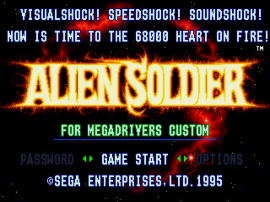
Alien Soldier (Japan)
0 6 0
Alien Soldier (Japan) is a classic Genesis action-shooter known for its fast-paced gameplay and tough design. As a product of the Genesis era, it offers a straightforward yet demanding experience that’s easy to start playing. This browser-based version lets players enjoy the intense action without any downloads or installations, running smoothly in your browser.
What Is Alien Soldier?
Alien Soldier is an action and shooter game where players control a powerful protagonist fighting against waves of enemies. The gameplay focuses on quick reflexes, precise shooting, and fast movement through levels filled with enemies, projectiles, and obstacles. It challenges your reaction time and strategic use of weapons, making each encounter a test of skill.
You’ll go through stages that require quick decisions and mastery of the controls. The game emphasizes smooth combat and agility, with a focus on defeating enemies efficiently while avoiding damage. Its simple mechanics make it accessible for new players, but its difficulty keeps experienced players engaged as they try to master each level.
What Keeps You Coming Back
Alien Soldier’s main draw is its relentless gameplay and tough difficulty. The game features different enemy types, each needing different strategies to defeat. Tight controls and responsive mechanics make every encounter satisfying, pushing players to improve their skills and beat their best times.
It’s highly replayable because of its challenging nature. Players often return to improve their scores or complete stages faster. Memorizing enemy patterns and reacting quickly are key to success, making each session a chance to get better. The variety of enemies and intense combat keep things feeling fresh, even after multiple plays.
Handy Tips
Start by practicing your character’s movement and attack timing before engaging large groups of enemies. Use your weapons wisely and save special attacks for tougher foes. Pay attention to enemy patterns so you can dodge more effectively. If things get overwhelming, retreat and reposition. Patience can turn difficult fights around. Practice makes perfect, especially in a game like this.
- Learn enemy attack patterns to boost your reaction time.
- Save your stronger weapons for boss fights or big groups of enemies.
- Use quick movement and dodging to avoid damage, rather than relying only on shields or health pickups.
- Take your time planning your attack instead of rushing through levels.
- Try different weapons and strategies to see what works best in each stage.
Player FAQ
Is Alien Soldier easy for new players to pick up?
While the controls are simple, the game’s high difficulty can be tough for newcomers. It’s better suited for players who have some experience with action-shooters or are willing to learn its patterns.
Can younger players enjoy Alien Soldier?
This game is quite challenging and might not be suitable for very young players. Its fast-paced combat and difficulty are better for teens and adults.
Do I need an internet connection to play Alien Soldier?
No, the game plays directly in your browser without needing an internet connection, so you can enjoy it anytime without downloads or updates.
Alien Soldier remains a solid example of Genesis-era action-shooters, combining quick reflex gameplay with high difficulty. Playing it in your browser keeps things simple and instant, perfect for players after a challenge and some retro fun.
Related games: you can also try Advanced Daisenryaku – Deutsch Dengeki Sakusen (Japan) (Rev A) [En by Nebelwurfer v0.95] (~Advanced Military Commander) (Incomplete) and Adventures of Mighty Max, The (USA), or browse all other games in the Genesis category.
How to Play Alien Soldier (Japan)?
Control your character to shoot enemies, dodge attacks, and clear levels. Learn enemy patterns, manage your weapons, and survive through fast-paced combat to progress and improve your score.
Game Controls
Arrow keys move; attack and special keys are mapped to on-screen buttons.
You may be interested in:
-
 Genesis
♥ 9
Alien Storm (World)
Genesis
♥ 9
Alien Storm (World) -
 Genesis
♥ 19
Alien Soldier (Europe)
Genesis
♥ 19
Alien Soldier (Europe) -
 Genesis
♥ 2
Alien 3 (USA, Europe) (v1.1)
Genesis
♥ 2
Alien 3 (USA, Europe) (v1.1) -
 Genesis
♥ 21
Alex Kidd in the Enchanted Castle (USA)
Genesis
♥ 21
Alex Kidd in the Enchanted Castle (USA) -
 Genesis
♥ 4
Alex Kidd in the Enchanted Castle (Europe) (Alt)
Genesis
♥ 4
Alex Kidd in the Enchanted Castle (Europe) (Alt) -
 Genesis
♥ 11
Alex Kidd in the Enchanted Castle (Europe)
Genesis
♥ 11
Alex Kidd in the Enchanted Castle (Europe) -
 Genesis
♥ 5
Alex Kidd – Tenkuu Majou (Japan)
Genesis
♥ 5
Alex Kidd – Tenkuu Majou (Japan) -
 Genesis
♥ 2
Alex Kidd – Cheongong Maseong (Korea)
Genesis
♥ 2
Alex Kidd – Cheongong Maseong (Korea)
Comments (0)
No comments yet. Be the first to comment!