Aladdin (Unl)
0 4 1
Getting Into Aladdin
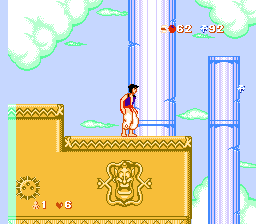
Aladdin (Unl) is a classic NES game where you control Disney’s beloved character through a series of platforming challenges. It’s a side-scroller that tests your timing, jumps, and ability to dodge enemies, which many fans of early 8-bit games will recognize. The game runs directly in your browser, no downloads needed, and captures the straightforward, sometimes tough gameplay of that era.
Most rounds involve moving through levels filled with jumping puzzles, enemy encounters, and obstacles. You usually go from left to right, defeating enemies and reaching the stage’s end. You’ll face different hazards that demand quick reflexes and recognizing enemy patterns. The mechanics are simple, focusing on mastering each level’s layout and timing to improve your score and finish faster.
Standout Features
The visuals stay true to the colorful style of NES games, with detailed sprites and backgrounds inspired by the Disney film. The levels are designed to feel like a natural progression, gradually introducing more complex challenges. Replaying the game helps you get better at timing and reading enemy movements, encouraging repeated tries to improve your speed and accuracy.
The game’s difficulty increases as you go, with each level building on what you’ve learned. Its design suits short play sessions, making it perfect for quick challenges or longer focused runs. Its simple mechanics combined with the rising difficulty keep players coming back to beat their previous bests or try different routes through each stage.
Strategy and Tips
Getting started is easy, but patience and timing really matter. Here are some tips to help you get better at Aladdin:
- Memorize enemy movement patterns to avoid taking hits unnecessarily.
- Time your jumps carefully—rushing can lead to falls or hits.
- Pause in safe spots when you need to plan your next move during tricky sections.
- Repeat difficult parts to sharpen your reflexes.
- Save your jumps for crucial moments, like crossing gaps or dodging projectiles.
- If you get stuck, try different routes—some may be safer or quicker than others.
Quick Questions
How do I start playing Aladdin in my browser?
Just load the game on this page, and it’ll start running in your browser — no downloads or setup needed.
What’s a common mistake beginners make?
Many rush ahead without paying attention to enemy patterns, which often leads to unnecessary hits and frustration.
Can I play Aladdin on mobile or touch devices?
Yes, since it runs in-browser, you can play on mobile browsers, though controlling it precisely might be trickier than with a keyboard or controller.
Aladdin offers a classic platforming experience that echoes the style of early NES titles. Its straightforward gameplay, colorful visuals, and nostalgic soundtrack make it a fun pick for fans of retro gaming. Playing directly in your browser gives instant access to a game that’s stood the test of time. Practicing its levels can sharpen your timing and reactions, making it a nice challenge for anyone interested in NES history or just looking for a fun way to test their skills.
Related games: you can also try Addams Family, The – Pugsley's Scavenger Hunt (Europe) (Beta) and [Aladdin] Micro Machines (USA) (Unl), or browse all other games in the NES category.
How to Play Aladdin (Unl)?
Control Aladdin through levels by jumping and dodging enemies, aiming to reach the end of each stage while improving your timing and avoiding hazards.
Game Controls
Arrow keys for movement, action buttons for jumping and attacking.
You may be interested in:
-
![Zombie Hunter (Japan) [En by KingMike v1.01]](https://www.playf2p.com/wp-content/uploads/zombie-hunter-japan-en-by-kingmike-v1-01-200x120.png) NES
♥ 2
Zombie Hunter (Japan) [En by KingMike v1.01]
NES
♥ 2
Zombie Hunter (Japan) [En by KingMike v1.01] -
 NES
♥ 1
Zombie Hunter (Japan)
NES
♥ 1
Zombie Hunter (Japan) -
 NES
♥ 1
Zoids Mokushiroku (Japan)
NES
♥ 1
Zoids Mokushiroku (Japan) -
 NES
♥ 2
Zoids 2 – Zenebas no Gyakushuu (Japan)
NES
♥ 2
Zoids 2 – Zenebas no Gyakushuu (Japan) -
 NES
♥ 1
Zoids – Chuuou Tairiku no Tatakai (Japan)
NES
♥ 1
Zoids – Chuuou Tairiku no Tatakai (Japan) -
 NES
♥ 11
Zippy Race (Japan)
NES
♥ 11
Zippy Race (Japan) -
 NES
♥ 1
Zhen Ben Xi You Ji (Asia) (Unl)
NES
♥ 1
Zhen Ben Xi You Ji (Asia) (Unl) -
 NES
♥ 1
Zenbei!! Pro Basket (Japan)
NES
♥ 1
Zenbei!! Pro Basket (Japan)
Comments (0)
No comments yet. Be the first to comment!