Batman – The Video Game (USA) (Beta)
0 7 8
Batman – The Video Game (USA) (Beta) is a classic NES action game that takes you through Gotham City’s dark, gritty streets. It captures the feel of the Caped Crusader’s vigilante work, offering a straightforward yet challenging experience set in pixelated 8-bit style. As part of NES history, it delivers gameplay that tests your reflexes and strategic thinking, wrapped in a nostalgic package you can play directly in your browser. If you enjoy old-school action games with a superhero vibe, this title offers solid retro entertainment without requiring downloads or complicated setups.
Step Into the World of Batman – The Video Game
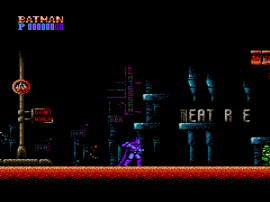
The visuals stick to a typical NES look—blocky, colorful sprites representing Batman and the city’s dark background. The atmosphere leans toward a noir feel, with dark tones and bright highlights hinting at Gotham’s crime-ridden streets. Sound effects are simple but effective, with punchy hits and sirens that evoke a patrol through Gotham. The music is minimal but creates a tense, no-nonsense mood, making each encounter feel like Batman’s relentless pursuit of justice. The environment is designed to keep you on your toes, with enemies appearing unexpectedly from the shadows and encouraging cautious exploration and quick reactions.
How the Gameplay Hooks You
This NES action game focuses on moving through levels filled with enemies and obstacles. The pace is quick, with a steady stream of foes that demand fast reflexes and smart use of your limited weapons. Progress involves moving through stages that get tougher, testing your timing and decision-making. The game’s loop centers on defeating enemies, avoiding hazards, and moving forward through Gotham’s underworld. Its simple design keeps players engaged, with each level offering new challenges that encourage mastering controls and memorizing enemy patterns. The challenge is balancing attacks with evasion, so each successful run feels rewarding without being overwhelming.
Pro Tips for Batman – The Video Game
Get familiar with enemy patterns early to save health and resources. Use quick, deliberate movements to dodge attacks and find openings for counterattacks. Keep an eye on your health and plan your route carefully to avoid unnecessary hits. When facing tougher enemies, focus on positioning yourself to hit without getting countered. Practice timing your attacks to deal maximum damage while avoiding danger. Knowing the layout of each level can help you find safer routes through Gotham’s streets and rooftops.
- Save your special attacks for the hardest enemies or bosses.
- Clear enemies efficiently to open paths and reduce damage taken.
- Use the environment—hide behind objects when possible.
- Patience pays off. Sometimes it’s better to retreat and reassess than rush headlong into danger.
- Practice each level to memorize enemy spawn points and attack timings.
Frequently Asked Questions
Is Batman – The Video Game good for short play sessions?
Yes, each level can usually be completed in a few minutes, making it easy to play during quick breaks or busy days.
Does the game get repetitive?
The core gameplay stays consistent, but increasing difficulty and varied enemy placements help keep it interesting, especially for fans of classic NES action.
Is there a story or multiple endings?
No, this game sticks mainly to straightforward action and level advancement, focusing on challenge and reflexes rather than complex stories.
Playing Batman – The Video Game offers a nostalgic trip through Gotham’s streets, blending simple, tense gameplay with a clear retro charm. It’s accessible and fun, especially when played directly in your browser, giving a pure taste of 8-bit superhero action.
Related games: you can also try Back to the Future Part II & III (USA) and Airball (Proto2), or browse all other games in the NES category.
How to Play Batman – The Video Game (USA) (Beta)?
Move through levels, defeat enemies, and avoid hazards to progress Gotham’s streets. Use quick reflexes and strategic attacks to clear stages and survive longer.
Game Controls
Arrow keys control movement; action buttons are mapped to keyboard keys for attacking and jumping.
You may be interested in:
-
![Zombie Hunter (Japan) [En by KingMike v1.01]](https://www.playf2p.com/wp-content/uploads/zombie-hunter-japan-en-by-kingmike-v1-01-200x120.png) NES
♥ 2
Zombie Hunter (Japan) [En by KingMike v1.01]
NES
♥ 2
Zombie Hunter (Japan) [En by KingMike v1.01] -
 NES
♥ 1
Zombie Hunter (Japan)
NES
♥ 1
Zombie Hunter (Japan) -
 NES
♥ 1
Zoids Mokushiroku (Japan)
NES
♥ 1
Zoids Mokushiroku (Japan) -
 NES
♥ 2
Zoids 2 – Zenebas no Gyakushuu (Japan)
NES
♥ 2
Zoids 2 – Zenebas no Gyakushuu (Japan) -
 NES
♥ 1
Zoids – Chuuou Tairiku no Tatakai (Japan)
NES
♥ 1
Zoids – Chuuou Tairiku no Tatakai (Japan) -
 NES
♥ 11
Zippy Race (Japan)
NES
♥ 11
Zippy Race (Japan) -
 NES
♥ 1
Zhen Ben Xi You Ji (Asia) (Unl)
NES
♥ 1
Zhen Ben Xi You Ji (Asia) (Unl) -
 NES
♥ 1
Zenbei!! Pro Basket (Japan)
NES
♥ 1
Zenbei!! Pro Basket (Japan)
Comments (0)
No comments yet. Be the first to comment!