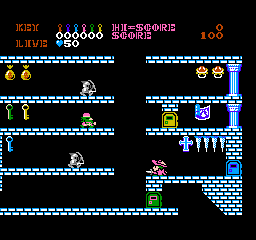
Castlequest (USA)
0 4 4
Castlequest (USA) is a classic NES puzzle-platformer that challenges players to rebuild a fallen castle by exploring its maze-like rooms and solving spatial puzzles. The game mixes exploration, logic, and precision, appealing to those who enjoy brain-teasing gameplay alongside traditional platforming action. Its simple mechanics and retro style make it a good choice for anyone looking for a nostalgic experience or a fresh challenge right in their browser.
Getting Into Castlequest
In Castlequest, each session involves exploring a multi-room castle filled with puzzles, traps, and hidden passages. Your task is to restore the structure by collecting and placing tiles correctly, which often means navigating through maze-like corridors and dodging hazards. The game runs on a fixed screen, with movement controlling your character as you solve puzzles and move through increasingly tricky levels.
The main loop involves exploring, solving puzzles, and moving carefully. You’ll need to remember room layouts, figure out how to position tiles properly, and avoid enemies or pitfalls. While the goal is straightforward, solving each room can require patience and careful planning. There are no complex modes—just a series of levels that test your spatial reasoning and timing, revealing more about the castle with each attempt.
Standout Features
The visuals are typical of the NES era, with pixel art clearly showing castle interiors and characters. Its simple color scheme and sprite work keep things clear, making interactable objects and hazards easy to spot. Progress depends on completing levels and restoring the castle, giving a sense of achievement as you see your work come together.
Replay value comes from trying to optimize your route through each room, solving puzzles faster, or challenging yourself to beat your best times. The design encourages experimentation, offering multiple ways to approach puzzles. This makes replaying rooms interesting, whether to improve your speed or find alternative solutions. The difficulty ramps up gradually, so you’re tested without feeling overwhelmed early on.
Strategy and Tips
Getting started is simple—take some time to understand each room’s layout before rushing into moving tiles or exploring, as rushing often leads to mistakes.
- Remember key features of each room to avoid retracing your steps unnecessarily.
- Plan your tile placements carefully; misplacing tiles can block progress or cause resets.
- Use the environment to your advantage—avoid enemies by timing your movements or using obstacles for cover.
- Stay patient in tricky rooms to prevent falls or tile misplacements.
- Practice certain puzzles to memorize solutions, which helps reduce trial-and-error on future attempts.
- If you get stuck, try backtracking through completed rooms to see if you missed a tile or an alternative route.
Quick Questions
How do I start playing Castlequest?
The game loads instantly in your browser—just hit start and begin exploring the castle’s rooms.
What’s a common mistake new players make?
Many try rushing puzzles without analyzing the room first, which often leads to misplaced tiles and resets.
Can I play Castlequest on a mobile device or touch screen?
Yes, since it runs directly in your browser, it works on smartphones and tablets, though precise movements may be trickier on touch screens.
Castlequest (USA) offers a nice mix of puzzle-solving and platforming wrapped in a nostalgic NES style. Its straightforward gameplay and focus on spatial reasoning make it a satisfying challenge for puzzle fans and platformer lovers alike. Playing here gives you instant access to a timeless game—no fuss, just castle-restoring fun in your browser.
Related games: you can also try After Burner (USA) (Unl) and Armadillo (Japan) [En by Vice v1.01], or browse all other games in the NES category.
How to Play Castlequest (USA)?
Explore the castle, solve puzzles by placing tiles correctly, and restore the structure. Move carefully through maze-like rooms, avoiding hazards and figuring out the best route to complete each level.
Game Controls
Arrow keys move your character; other keys handle actions like placing tiles and interacting with objects.
You may be interested in:
-
![Zombie Hunter (Japan) [En by KingMike v1.01]](https://www.playf2p.com/wp-content/uploads/zombie-hunter-japan-en-by-kingmike-v1-01-200x120.png) NES
♥ 2
Zombie Hunter (Japan) [En by KingMike v1.01]
NES
♥ 2
Zombie Hunter (Japan) [En by KingMike v1.01] -
 NES
♥ 1
Zombie Hunter (Japan)
NES
♥ 1
Zombie Hunter (Japan) -
 NES
♥ 1
Zoids Mokushiroku (Japan)
NES
♥ 1
Zoids Mokushiroku (Japan) -
 NES
♥ 2
Zoids 2 – Zenebas no Gyakushuu (Japan)
NES
♥ 2
Zoids 2 – Zenebas no Gyakushuu (Japan) -
 NES
♥ 1
Zoids – Chuuou Tairiku no Tatakai (Japan)
NES
♥ 1
Zoids – Chuuou Tairiku no Tatakai (Japan) -
 NES
♥ 11
Zippy Race (Japan)
NES
♥ 11
Zippy Race (Japan) -
 NES
♥ 1
Zhen Ben Xi You Ji (Asia) (Unl)
NES
♥ 1
Zhen Ben Xi You Ji (Asia) (Unl) -
 NES
♥ 1
Zenbei!! Pro Basket (Japan)
NES
♥ 1
Zenbei!! Pro Basket (Japan)
Comments (0)
No comments yet. Be the first to comment!