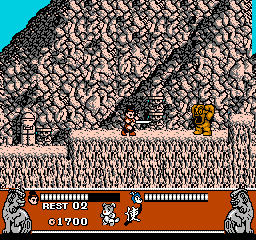
Conquest of the Crystal Palace (USA)
0 7 5
Conquest of the Crystal Palace (USA) is a classic NES action-platformer that challenges players to move through a series of screens filled with enemies and obstacles. Made for fans of retro gaming, this game offers simple gameplay focused on timing and precision. Its mechanics are easy to pick up and engaging enough to keep you playing, perfect for a nostalgic challenge right in your browser.
Getting Into Conquest of the Crystal Palace
The game involves moving through multiple levels by progressing from left to right across screens, each with its own layout of platforms, hazards, and enemies. The main idea is to jump, avoid or defeat enemies, and collect items to move forward. Since it’s an action platformer, you’ll spend most of your time timing jumps and attacks to get through the increasingly tough stages.
There are no complicated modes or branching paths—just a steady push forward. Each session tends to be quick, with levels taking a few minutes to finish, making it easy to pick up for a quick play or longer sessions if you want to complete the game. The real challenge is mastering enemy patterns and precise movements, which grow more demanding as you go. It’s designed for one player, with no multiplayer options, so success depends on your skill and patience.
Standout Features
The visuals stay true to the NES style, with pixel art that clearly shows characters and environments. This makes it easy to tell hazards from friendly elements. The colors and sprites give a nostalgic feel but still work well for gameplay clarity. The progression is simple: clear each level to move on, with difficulty increasing through faster enemies and more complex platform setups.
Replaying the game can be fun if you try to beat your previous times or improve your skills to go further without losing lives. Without complex stories or branching paths, replay motivation often comes from mastering levels or aiming for high scores. Its straightforward design pushes you to work on your timing and reactions, turning each attempt into a chance to get better.
Strategy and Tips
If you’re just starting out, spend time learning enemy patterns and timing your jumps carefully. Patience helps avoid unnecessary mistakes. Here are some tips:
- Practice enemy placements so you can anticipate their movements and attacks.
- Be cautious and deliberate to save lives instead of rushing through levels.
- Look for safe spots or moments when enemies are less likely to strike.
- Use the environment, like ledges or platforms, to stay safe from enemies.
- Watch your health or remaining lives and avoid risky moves.
- If you get stuck, taking a break can help you come back with better reflexes.
Quick Questions
How do I get started playing Conquest of the Crystal Palace?
You can start playing right here—no downloads or setup needed. Simply load the page and get going.
What’s a common mistake for beginners?
Many new players rush ahead without paying attention to enemy patterns, which can lead to losing lives early. Patience and watching enemy movements help a lot.
Does it work on mobile or touch devices?
Since it runs in your browser, you can play it on mobile devices with a touchscreen, but controls might not be as precise as using a keyboard or gamepad.
Conquest of the Crystal Palace offers a straightforward challenge that rewards practice and patience. Its classic NES style makes it a fun, accessible way to test your platforming skills right in your browser, turning each level into a satisfying achievement.
Related games: you can also try Aigiina no Yogen – From The Legend of Balubalouk (Japan) and Baseball Fighter (Japan), or browse all other games in the NES category.
How to Play Conquest of the Crystal Palace (USA)?
Move through levels by jumping, avoiding or defeating enemies, and collecting items to reach the next screen. Focus on timing and precision to complete each stage and improve your score.
Game Controls
Arrow keys control movement; action buttons are mapped to keyboard keys for jumping and attacking.
You may be interested in:
-
![Zombie Hunter (Japan) [En by KingMike v1.01]](https://www.playf2p.com/wp-content/uploads/zombie-hunter-japan-en-by-kingmike-v1-01-200x120.png) NES
♥ 2
Zombie Hunter (Japan) [En by KingMike v1.01]
NES
♥ 2
Zombie Hunter (Japan) [En by KingMike v1.01] -
 NES
♥ 1
Zombie Hunter (Japan)
NES
♥ 1
Zombie Hunter (Japan) -
 NES
♥ 1
Zoids Mokushiroku (Japan)
NES
♥ 1
Zoids Mokushiroku (Japan) -
 NES
♥ 2
Zoids 2 – Zenebas no Gyakushuu (Japan)
NES
♥ 2
Zoids 2 – Zenebas no Gyakushuu (Japan) -
 NES
♥ 1
Zoids – Chuuou Tairiku no Tatakai (Japan)
NES
♥ 1
Zoids – Chuuou Tairiku no Tatakai (Japan) -
 NES
♥ 11
Zippy Race (Japan)
NES
♥ 11
Zippy Race (Japan) -
 NES
♥ 1
Zhen Ben Xi You Ji (Asia) (Unl)
NES
♥ 1
Zhen Ben Xi You Ji (Asia) (Unl) -
 NES
♥ 1
Zenbei!! Pro Basket (Japan)
NES
♥ 1
Zenbei!! Pro Basket (Japan)
Comments (0)
No comments yet. Be the first to comment!