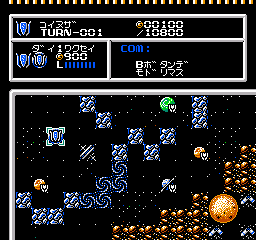
Cosmic Wars (Japan)
0 1 0
Cosmic Wars (Japan) is a strategy game for the NES that challenges players to manage fleets and resources across a galactic battlefield. Its focus on planning and tactical choices sets it apart, offering gameplay that rewards careful maneuvering rather than quick reflexes. As a product of its time, the game combines simple mechanics with enough depth to keep players thinking, making it a solid choice for fans of NES strategy games.
Cosmic Wars: Gameplay Overview
In Cosmic Wars, you control a fleet with the goal of expanding influence and defeating opponents through smart placement and resource management. The main gameplay involves selecting units, positioning them on a grid, and fighting enemy fleets. The game requires you to consider each move carefully, especially since enemies adapt to your tactics.
The game proceeds in turns, with you giving commands to your units before the enemy responds. Success depends on predicting enemy moves and deploying your units wisely across different sectors. The mechanics are straightforward—focused on unit placement and combat resolution—but the challenge comes from managing limited resources and deciding when to attack or defend. Each session becomes a puzzle of planning and execution.
Modes, Levels and Progression
Cosmic Wars features a single, ongoing campaign that gets more difficult as you advance. Each stage presents new enemy formations and strategic challenges, pushing you to adapt your tactics. Some stages require careful resource use, encouraging you to experiment with different approaches to beat tougher opponents.
The game’s design is simple but layered. Different maps and enemy setups mean you need to change your approach each time. While there are no additional modes, the increasing difficulty and variety in levels help keep the game interesting and encourage trying new strategies. Even after beating a level, there’s room to improve or try different tactics for future playthroughs.
Winning Strategies
Managing resources well and predicting enemy actions are key. Focus on capturing important areas early to gain an advantage. Keep your units balanced between attacking and defending, and use terrain to your benefit. Avoid spreading your forces too thin, and save stronger units for critical moments. Watching enemy patterns can help you anticipate their moves and plan effective counters.
- Capture strategic points to boost resources and positioning.
- Keep your formations flexible to handle surprises.
- Save resources for key battles instead of spreading them out everywhere.
- Watch enemy behavior and plan your counterattacks accordingly.
- Adjust your tactics as you move through levels; what works early on might need changing later.
Common Questions About Cosmic Wars
How does the difficulty change as I go through levels?
The game gets tougher, with enemies becoming more strategic and resource management more critical, so refining your tactics helps as you progress.
Are there other modes besides the main campaign?
Just the single campaign with different levels—there aren’t additional modes included.
How long does a typical game session last, and is there replay value?
Most levels take a few minutes, but replaying earlier stages with different strategies or trying higher difficulty settings can keep things interesting for longer.
Cosmic Wars remains a good example of NES strategy games, offering enough depth with simple mechanics. Its focus on planning and tactics makes it a game worth playing, and you can enjoy this vintage experience now through your browser, keeping it fresh and accessible.
Related games: you can also try Bonk's Adventure (USA) and Chip to Dale no Daisakusen (Japan), or browse all other games in the NES category.
How to Play Cosmic Wars (Japan)?
Move units on the grid to control territories, attack enemies, and manage resources. Plan your moves carefully each turn to expand influence and defeat opponents.
Game Controls
Arrow keys move the cursor; Enter confirms selections; other keys handle commands.
You may be interested in:
-
![Zombie Hunter (Japan) [En by KingMike v1.01]](https://www.playf2p.com/wp-content/uploads/zombie-hunter-japan-en-by-kingmike-v1-01-200x120.png) NES
♥ 2
Zombie Hunter (Japan) [En by KingMike v1.01]
NES
♥ 2
Zombie Hunter (Japan) [En by KingMike v1.01] -
 NES
♥ 1
Zombie Hunter (Japan)
NES
♥ 1
Zombie Hunter (Japan) -
 NES
♥ 1
Zoids Mokushiroku (Japan)
NES
♥ 1
Zoids Mokushiroku (Japan) -
 NES
♥ 2
Zoids 2 – Zenebas no Gyakushuu (Japan)
NES
♥ 2
Zoids 2 – Zenebas no Gyakushuu (Japan) -
 NES
♥ 1
Zoids – Chuuou Tairiku no Tatakai (Japan)
NES
♥ 1
Zoids – Chuuou Tairiku no Tatakai (Japan) -
 NES
♥ 11
Zippy Race (Japan)
NES
♥ 11
Zippy Race (Japan) -
 NES
♥ 1
Zhen Ben Xi You Ji (Asia) (Unl)
NES
♥ 1
Zhen Ben Xi You Ji (Asia) (Unl) -
 NES
♥ 1
Zenbei!! Pro Basket (Japan)
NES
♥ 1
Zenbei!! Pro Basket (Japan)
Comments (0)
No comments yet. Be the first to comment!