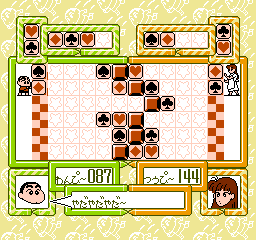
Crayon Shin-Chan – Ora to Poi Poi (Japan)
0 2 1
Crayon Shin-Chan – Ora to Poi Poi (Japan) is a classic NES game that combines action, platforming, and adventure elements into a colorful and engaging experience. As a title from the Nintendo Entertainment System, it features the 8-bit era’s distinctive sprite art and straightforward gameplay, appealing to fans of nostalgic gaming. While it doesn’t have complex mechanics, its charm lies in its simplicity and the chance to explore a familiar universe through a vintage lens, now accessible directly in your browser without any downloads or setups.
Crayon Shin-Chan – Ora to Poi Poi: Gameplay Overview
The game involves guiding the main character through levels filled with obstacles and enemies. It uses a side-scrolling perspective typical of NES platformers, requiring players to jump over hazards, avoid enemies, and collect items along the way. The main goal is to navigate each stage efficiently, managing limited lives and trying to reach the finish without losing all health.
Controlling Shin-chan is straightforward: move left or right, jump, and interact with objects. While it doesn’t feature complex combat or power-ups, it emphasizes timing and precision. Learning the layout of each level and enemy patterns helps players progress smoothly, making it accessible for newcomers but still offering enough challenge for seasoned players.
Modes, Levels and Progression
The game progresses through levels in a linear fashion, with each one increasing in difficulty and complexity. While there aren’t many levels, the design encourages completing each stage before moving on. Different themes and obstacles keep the gameplay interesting, with early levels acting as tutorials and later ones adding more enemies and platforming challenges. The level designs often feature playful, whimsical settings that match the character’s universe, creating a lively atmosphere.
Winning Strategies
Focusing on timing and understanding enemy movements can help improve your chances. Patience with jumps and hazard avoidance prevents unnecessary loss of lives. Gathering items along the way can offer points or temporary advantages, so try to collect what appears. Memorizing level layouts helps anticipate obstacles, especially in later stages where challenges get tougher.
- Watch enemy patterns before rushing ahead.
- Use jumps carefully to clear obstacles.
- Collect items for points or small benefits.
- Replaying levels helps improve reaction times and familiarity.
- Be cautious with risky moves when health is low.
Common Questions About Crayon Shin-Chan – Ora to Poi Poi
How does the difficulty change as you progress?
Levels start easier and become more challenging, with enemies and platforming sections growing more complex. The early stages serve as introductions, while later ones demand better timing and memorization.
Are there different modes or level types?
The game follows a set sequence of levels, each with its own theme and challenges, but it doesn’t include multiple modes. The variety comes from level design and increasing difficulty.
How replayable is the game?
Trying to beat your best times or scores, or completing levels without losing lives, adds replay value. Since the game relies on a fixed set of levels, practicing to improve can keep you engaged, especially if you enjoy NES platformers.
Playing Crayon Shin-Chan – Ora to Poi Poi on a browser offers a nostalgic trip into a familiar universe with simple mechanics and a modest challenge. Its charming look and accessible gameplay make it a nice addition to any collection of classic NES titles, especially for fans of the crayon shin-chan universe.
Related games: you can also try Conflict (Japan) and Championship Lode Runner (Japan), or browse all other games in the NES category.
How to Play Crayon Shin-Chan – Ora to Poi Poi (Japan)?
Guide Shin-chan through levels by moving, jumping, and avoiding enemies. Collect items and reach the end of each stage without losing all lives, using timing and pattern recognition.
Game Controls
Arrow keys act as the D-pad; Enter is Start; on-screen mapped keys handle the action buttons.
You may be interested in:
-
![Zombie Hunter (Japan) [En by KingMike v1.01]](https://www.playf2p.com/wp-content/uploads/zombie-hunter-japan-en-by-kingmike-v1-01-200x120.png) NES
♥ 2
Zombie Hunter (Japan) [En by KingMike v1.01]
NES
♥ 2
Zombie Hunter (Japan) [En by KingMike v1.01] -
 NES
♥ 1
Zombie Hunter (Japan)
NES
♥ 1
Zombie Hunter (Japan) -
 NES
♥ 1
Zoids Mokushiroku (Japan)
NES
♥ 1
Zoids Mokushiroku (Japan) -
 NES
♥ 2
Zoids 2 – Zenebas no Gyakushuu (Japan)
NES
♥ 2
Zoids 2 – Zenebas no Gyakushuu (Japan) -
 NES
♥ 1
Zoids – Chuuou Tairiku no Tatakai (Japan)
NES
♥ 1
Zoids – Chuuou Tairiku no Tatakai (Japan) -
 NES
♥ 11
Zippy Race (Japan)
NES
♥ 11
Zippy Race (Japan) -
 NES
♥ 1
Zhen Ben Xi You Ji (Asia) (Unl)
NES
♥ 1
Zhen Ben Xi You Ji (Asia) (Unl) -
 NES
♥ 1
Zenbei!! Pro Basket (Japan)
NES
♥ 1
Zenbei!! Pro Basket (Japan)
Comments (0)
No comments yet. Be the first to comment!