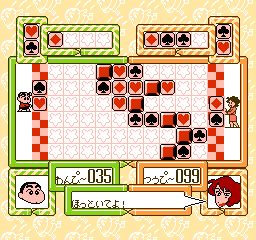
Datach – Crayon Shin Chan – Ora to Poi Poi (Japan)
0 1 1
Datach – Crayon Shin Chan – Ora to Poi Poi (Japan) is a lively, colorful NES game that celebrates the quirky spirit of the manga and anime series. It offers a taste of childhood memories, wrapped in simple 8-bit graphics and catchy sound effects. Being browser-based, you can play it without downloads or complicated setups. Whether you’re a longtime fan or just curious, this title invites you to enjoy a lighthearted adventure rooted in classic gaming traditions.
Step Into the World of Datach – Crayon Shin Chan – Ora to Poi Poi
The visuals of this NES game reflect the bright, exaggerated style of the original manga, with vivid colors and expressive sprites. Though pixelated, the animations are lively and humorous, capturing the goofy tone fans love. The soundtrack features cheerful tunes that match the playful feel, with sound effects adding a nostalgic touch to each action. The mood stays fun and easygoing, making it perfect for quick, casual play. Playing on this browser emulator gives you instant access to a game that feels like a trip back to the late 80s or early 90s, when NES titles focused on straightforward, accessible gameplay.
How the Gameplay Hooks You
The main gameplay revolves around short, repetitive levels that test your reflexes and timing. The pace is quick, encouraging you to stay alert and react fast, with each round lasting just a few minutes—great for brief gaming sessions. As you go on, the challenge increases gradually but remains simple enough to pick up easily. This creates a cycle that’s easy to learn but hard to master, rewarding players who develop better timing and observation skills over time. The game emphasizes immediate satisfaction, with each successful run offering a small sense of achievement before starting again.
Pro Tips for Datach – Crayon Shin Chan – Ora to Poi Poi
Getting comfortable with the game’s rhythm can help you improve more quickly. Practice your timing and watch enemy patterns to boost your score. Keep a steady pace—rushing can lead to mistakes, but going too slow might let enemies accumulate. Pay attention to visual hints, which often signal when to dodge or jump. Since the game is meant for quick sessions, pacing yourself helps you stay sharp. If you find yourself repeatedly making mistakes, restarting early can help you reset your focus.
- Focus on enemy patterns to improve reaction times.
- Maintain a steady pace to avoid unnecessary errors.
- Use visual cues to time your jumps and dodges better.
- Take short breaks to stay focused during longer sessions.
- Don’t get discouraged by early mistakes; consistent practice helps.
Frequently Asked Questions
Question?
Is Datach – Crayon Shin Chan – Ora to Poi Poi good for quick play sessions?
Absolutely. The short levels and simple mechanics make it perfect for testing your reflexes in a few minutes.
Question?
Does it get repetitive after a while?
The gameplay is straightforward, but the increasing difficulty and fun visuals keep it engaging enough for multiple tries, especially if you like arcade challenges.
Question?
Is the game in Japanese? Will I understand the menus and instructions?
Yes, since it’s a Japanese release, the text is in Japanese. If you don’t read the language, you might rely on visual cues and trial-and-error, but the gameplay remains clear enough to enjoy.
Datach – Crayon Shin Chan – Ora to Poi Poi delivers a compact, lively experience that echoes the early days of NES gaming. Its colorful characters and quick-paced play make it a charming choice for fans of retro titles, playable right in your browser whenever you want a quick nostalgic break.
Related games: you can also try Batman Bros. Co-Op 1.2 and Big Nose and the Witchdoctor (USA) (Unl) (Beta), or browse all other games in the NES category.
How to Play Datach – Crayon Shin Chan – Ora to Poi Poi (Japan)?
Move and jump to avoid enemies and obstacles through short levels, aiming for the highest score by reacting quickly and timing your actions well.
Game Controls
Arrow keys act as the D-pad; Enter is Start; other keys handle actions.
You may be interested in:
-
![Zombie Hunter (Japan) [En by KingMike v1.01]](https://www.playf2p.com/wp-content/uploads/zombie-hunter-japan-en-by-kingmike-v1-01-200x120.png) NES
♥ 2
Zombie Hunter (Japan) [En by KingMike v1.01]
NES
♥ 2
Zombie Hunter (Japan) [En by KingMike v1.01] -
 NES
♥ 1
Zombie Hunter (Japan)
NES
♥ 1
Zombie Hunter (Japan) -
 NES
♥ 1
Zoids Mokushiroku (Japan)
NES
♥ 1
Zoids Mokushiroku (Japan) -
 NES
♥ 2
Zoids 2 – Zenebas no Gyakushuu (Japan)
NES
♥ 2
Zoids 2 – Zenebas no Gyakushuu (Japan) -
 NES
♥ 1
Zoids – Chuuou Tairiku no Tatakai (Japan)
NES
♥ 1
Zoids – Chuuou Tairiku no Tatakai (Japan) -
 NES
♥ 11
Zippy Race (Japan)
NES
♥ 11
Zippy Race (Japan) -
 NES
♥ 1
Zhen Ben Xi You Ji (Asia) (Unl)
NES
♥ 1
Zhen Ben Xi You Ji (Asia) (Unl) -
 NES
♥ 1
Zenbei!! Pro Basket (Japan)
NES
♥ 1
Zenbei!! Pro Basket (Japan)
Comments (0)
No comments yet. Be the first to comment!