Fleet Commander (Japan)
0 1 0
Fleet Commander (Japan) is a classic NES strategy and simulation game that puts players in charge of a space fleet. As a turn-based tactic game, it asks you to manage resources, plan movements, and engage in fleet battles on a grid-based map. Fans of retro strategy titles looking for a thoughtful, command-focused experience will find plenty to enjoy here.
In Fleet Commander, your main task is to control a fleet of ships across a series of missions that combine strategic planning with tactical combat. The game unfolds in turns—you move your ships around the grid, positioning for attack or defense, then resolve battles based on your commands. The core gameplay involves surveying the map, deploying your fleet wisely, and responding to enemy movements. Missions usually have specific goals, like defeating enemy fleets or defending a certain area, making each session goal-oriented. Because it isn’t real-time, it emphasizes careful planning, where each decision can make a difference.
Getting Into Fleet Commander
This NES classic offers a straightforward but engaging experience centered on fleet management. Once you start, you’ll see a map and a limited fleet of ships, each with its own role. Your first goal is to position your ships to maximize attack potential while avoiding enemy fire. During your turn, you can move ships, attack enemy vessels, or reposition strategically. After your move, the enemy responds, creating a cycle that demands foresight and adaptability. The game continues until you complete the mission or suffer defeat.
It doesn’t feature complex storylines or many modes, but Fleet Commander focuses on tactical decision-making and resource management. Encounters are usually short but require careful planning. A typical session might include a few battles, with difficulty gradually increasing as enemies become more aggressive or numerous. Since it’s turn-based, you can take your time analyzing the map, planning your moves, and executing your strategy. It’s well-suited for quick, thoughtful play sessions that reward strategic thinking without the pressure of real-time action.
Standout Features
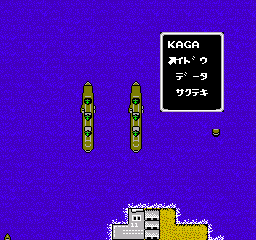
Graphically, Fleet Commander keeps things simple but effective, reminiscent of early NES strategy titles. Its grid maps are clear, with ships represented by distinct icons that make it easy to identify units and plan your maneuvers. The interface provides quick access to each ship’s status, position, and actions, helping you make decisions without clutter. The minimal visuals keep the focus on tactical placement rather than flashy effects.
Progression depends on completing missions successfully. Each victory unlocks new maps or slightly tougher enemy fleets. Replay value comes from trying different fleet setups and strategies, as well as tackling harder scenarios over time. Its straightforward mechanics mean you can learn and refine your tactics quickly, encouraging multiple playthroughs. The game rewards strategic planning and adaptation, giving you a reason to improve your fleet management skills with each attempt.
Strategy and Tips
Start with a clear plan and know your fleet’s strengths. Position ships to cover attacks while staying safe from enemy fire. Use terrain and map features to your advantage—channel enemies or protect vulnerable units.
- Target weaker or exposed enemy ships early to reduce threats faster.
- Spread out your fleet enough to avoid concentrated attacks, but stay close enough for coordinated moves.
- Reposition to lure enemies into unfavorable attacks or to cut off their retreat.
- If the game allows, save some action points for reactions to counter enemy moves.
- Complete objectives efficiently; rushing can lead to costly mistakes.
- Try different fleet combinations to find strategies that work well against various enemies.
Quick Questions
How do I get started with Fleet Commander?
Start by learning the map layout and your fleet’s capabilities. Take your time planning each move and focus on completing the mission step by step.
What’s a common mistake for beginners?
Trying to move all ships at once without paying attention to enemy positions often leads to being overwhelmed. Focus on positioning and targeting carefully.
Can I play Fleet Commander on mobile or touch devices?
This game runs through a browser emulator, so it’s accessible on mobile. However, because it’s turn-based, it’s best controlled with a mouse or keyboard. Touch input can work but may be less precise.
Fleet Commander offers a straightforward but demanding fleet management experience rooted in classic NES strategy gameplay. Its focus on tactical decisions keeps each session engaging, rewarding careful planning and flexibility. Command your fleet and enjoy this enduring strategy game.
Related games: you can also try Contra: Easy Mode and America Oudan Ultra Quiz – Shijou Saidai no Tatakai (Japan), or browse all other games in the NES category.
How to Play Fleet Commander (Japan)?
Move your ships around the grid to attack enemies or defend objectives. Take turns planning your actions, then watch the enemy respond, aiming to complete mission goals without losing your fleet.
Game Controls
Arrow keys control movement; other keys handle selection and actions.
You may be interested in:
-
![Zombie Hunter (Japan) [En by KingMike v1.01]](https://www.playf2p.com/wp-content/uploads/zombie-hunter-japan-en-by-kingmike-v1-01-200x120.png) NES
♥ 2
Zombie Hunter (Japan) [En by KingMike v1.01]
NES
♥ 2
Zombie Hunter (Japan) [En by KingMike v1.01] -
 NES
♥ 1
Zombie Hunter (Japan)
NES
♥ 1
Zombie Hunter (Japan) -
 NES
♥ 1
Zoids Mokushiroku (Japan)
NES
♥ 1
Zoids Mokushiroku (Japan) -
 NES
♥ 2
Zoids 2 – Zenebas no Gyakushuu (Japan)
NES
♥ 2
Zoids 2 – Zenebas no Gyakushuu (Japan) -
 NES
♥ 1
Zoids – Chuuou Tairiku no Tatakai (Japan)
NES
♥ 1
Zoids – Chuuou Tairiku no Tatakai (Japan) -
 NES
♥ 11
Zippy Race (Japan)
NES
♥ 11
Zippy Race (Japan) -
 NES
♥ 1
Zhen Ben Xi You Ji (Asia) (Unl)
NES
♥ 1
Zhen Ben Xi You Ji (Asia) (Unl) -
 NES
♥ 1
Zenbei!! Pro Basket (Japan)
NES
♥ 1
Zenbei!! Pro Basket (Japan)
Comments (0)
No comments yet. Be the first to comment!