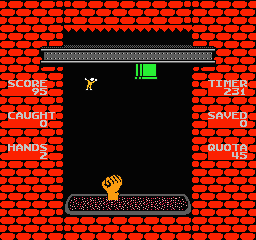
Free Fall (USA) (Proto)
0 1 0
Getting Into Free Fall
Free Fall (USA) (Proto) is a classic NES game that puts players in the role of a character navigating a series of obstacle-filled levels. Its straightforward gameplay focuses on timing and precision, making it accessible for newcomers while offering enough challenge for seasoned players. Since it runs directly in your browser, you can jump right in without any setup, experiencing the game as it was originally designed for the NES console.
The core loop involves controlling a character who must avoid falling objects, spikes, and other hazards while progressing through increasingly difficult stages. The gameplay emphasizes quick reflexes, as players need to dodge obstacles that move unpredictably or appear suddenly. Each session typically involves completing a level or set of levels, with the difficulty ramping up gradually to test your reaction speed and planning. There are no complex mechanics—just avoidance puzzles that demand focus and timing. The challenge lies in mastering the rhythm of each level and recognizing patterns in obstacle placement.
Standout Features
Visually, Free Fall sports pixel art typical of the NES era, with simple yet distinct character and obstacle designs. The animations are minimal but clear, ensuring players can quickly identify hazards and react accordingly. Its straightforward aesthetic complements the gameplay, keeping distractions low and focus on avoiding dangers. The progression system revolves around completing levels without losing lives, which encourages repeated attempts to improve your best times or scores.
Replay value comes from the increasing challenge and the desire to beat personal bests. Since there are no additional modes or story elements, the main motivation is mastering the timing and pattern recognition. Its short, intense bursts of gameplay suit quick sessions, but mastering the game’s rhythm can keep players returning. As a browser-based NES classic, it offers instant access for those looking to test their reflexes anytime, making it a reliable choice for quick gaming sessions or focused practice.
Strategy and Tips
Getting started is simple—just jump into a level and observe the obstacle patterns. Staying calm and focused during the initial moments helps you learn the rhythm needed to avoid hazards effectively.
- Focus on memorizing obstacle patterns rather than rushing through levels to reduce mistakes.
- Use small, controlled movements to navigate tight spots—panic moves often lead to mistakes.
- Pay attention to the timing of falling objects; many hazards follow predictable patterns once recognized.
- Practice levels repeatedly to improve reaction speed and get familiar with obstacle placements.
- If you find yourself stuck, take a short break to reset your focus before trying again.
Quick Questions
Is Free Fall easy for beginners?
It can be accessible at first, but the challenge increases as obstacles become faster or more unpredictable, requiring quick reflexes and pattern recognition.
How long does a typical game session last?
Levels are short, so a session might just last a few minutes, but mastering all levels or aiming for high scores can extend playtime quite a bit.
Can I play Free Fall on a mobile device or touch screen?
Since it runs in your browser, it works well with touch screens, making it easy to play on smartphones or tablets without extra apps.
The simplicity of Free Fall makes it a great quick-play game that tests your reflexes without complicated mechanics. Its roots in NES gaming and straightforward obstacle avoidance deliver a challenge that’s easy to pick up but hard to master, encouraging repeated tries and improvement. Playing in your browser, you can enjoy this classic whenever you want a quick burst of nostalgic action.
Related games: you can also try Bubble Bobble Part 2 (USA) [Hack by Dragon Eye Studios v0.15] (~Bubble Bobble Madness 2) and Felix the Cat (USA), or browse all other games in the NES category.
How to Play Free Fall (USA) (Proto)?
Control your character to avoid falling objects, spikes, and hazards through timed movements and pattern recognition to clear levels and improve your best score.
Game Controls
Arrow keys act as the D-pad; Enter is Start; on-screen mapped keys handle the action buttons.
You may be interested in:
-
![Zombie Hunter (Japan) [En by KingMike v1.01]](https://www.playf2p.com/wp-content/uploads/zombie-hunter-japan-en-by-kingmike-v1-01-200x120.png) NES
♥ 2
Zombie Hunter (Japan) [En by KingMike v1.01]
NES
♥ 2
Zombie Hunter (Japan) [En by KingMike v1.01] -
 NES
♥ 1
Zombie Hunter (Japan)
NES
♥ 1
Zombie Hunter (Japan) -
 NES
♥ 1
Zoids Mokushiroku (Japan)
NES
♥ 1
Zoids Mokushiroku (Japan) -
 NES
♥ 2
Zoids 2 – Zenebas no Gyakushuu (Japan)
NES
♥ 2
Zoids 2 – Zenebas no Gyakushuu (Japan) -
 NES
♥ 1
Zoids – Chuuou Tairiku no Tatakai (Japan)
NES
♥ 1
Zoids – Chuuou Tairiku no Tatakai (Japan) -
 NES
♥ 11
Zippy Race (Japan)
NES
♥ 11
Zippy Race (Japan) -
 NES
♥ 1
Zhen Ben Xi You Ji (Asia) (Unl)
NES
♥ 1
Zhen Ben Xi You Ji (Asia) (Unl) -
 NES
♥ 1
Zenbei!! Pro Basket (Japan)
NES
♥ 1
Zenbei!! Pro Basket (Japan)
Comments (0)
No comments yet. Be the first to comment!